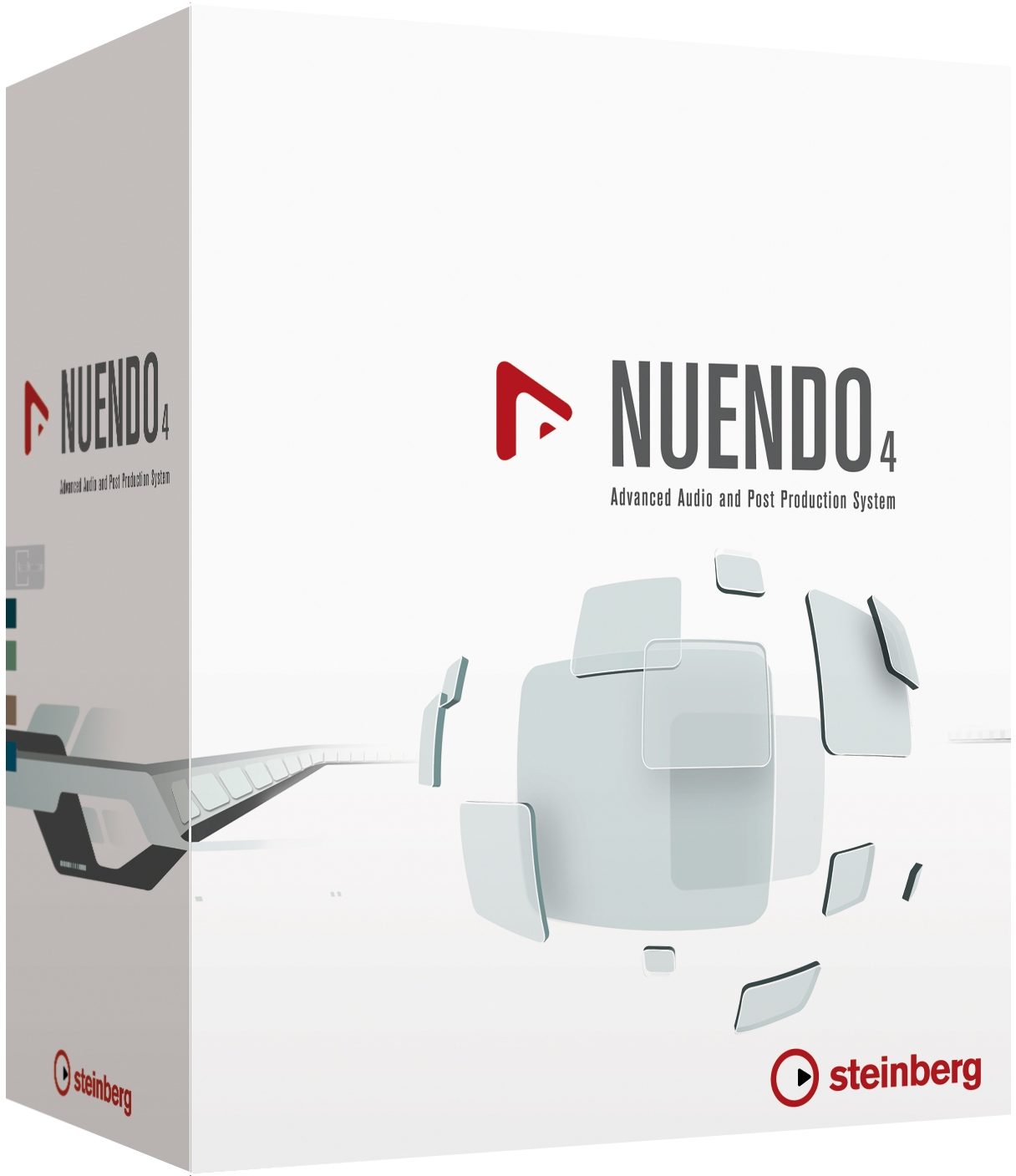
Steinberg Nuendo Recording Software (Macintosh and Windows)
No longer available at zZounds


zZounds Gear Experts Say...
Completely redesigned Automation System in Version 4.
Overview
Delivering a next-generation audio production environment for audio post, studio production and live recording, Nuendo 4 empowers audio professionals by elevating creativity and productivity to new heights. Technologically advanced yet extraordinarily intuitive and fully customizable, Nuendo 4 offers streamlined, precision tools that save time and boost creativity for audio professionals in today's media, recording and film industries.
Nuendo 4 provides scaleable, cross-platform systems that integrate easily and fully with premiere components by industry-leading plug-in and hardware manufacturers. Steinberg technologies provide unprecedented power, flexibility and speed, accelerating recording, mixing, editing and sound design workflows to an unprecedented level.
Features
State-of-the-art digital audio production environment
Crystal-clear 32-bit audio engine with full surround throughout
Faster, more efficient workflow with dedicated tools, options and features
Complete set of next-generation VST3 surround effect plug-ins
Utilizes best available audio and computer hardware and plug-ins
Advanced new automation system for full control
Powerful Control Room integrates into any monitoring setup
Innovative Network Collaboration for multi-seat projects via LAN or WAN
Full project exchange with other leading audio and video editing systems
Cross platform for latest Windows and Macintosh operating systems
New Features
Nuendo 4 offers a state-of-the-art automation system,… read more which combines with new recording functionality and Track Preset management features to speed up audio production workflows. A next-generation VST3 effect plug-in suite, the innovative MediaBay database, new editing commands and the Track Quick Controls raise production efficiency and quality to new heights.
New Automation System
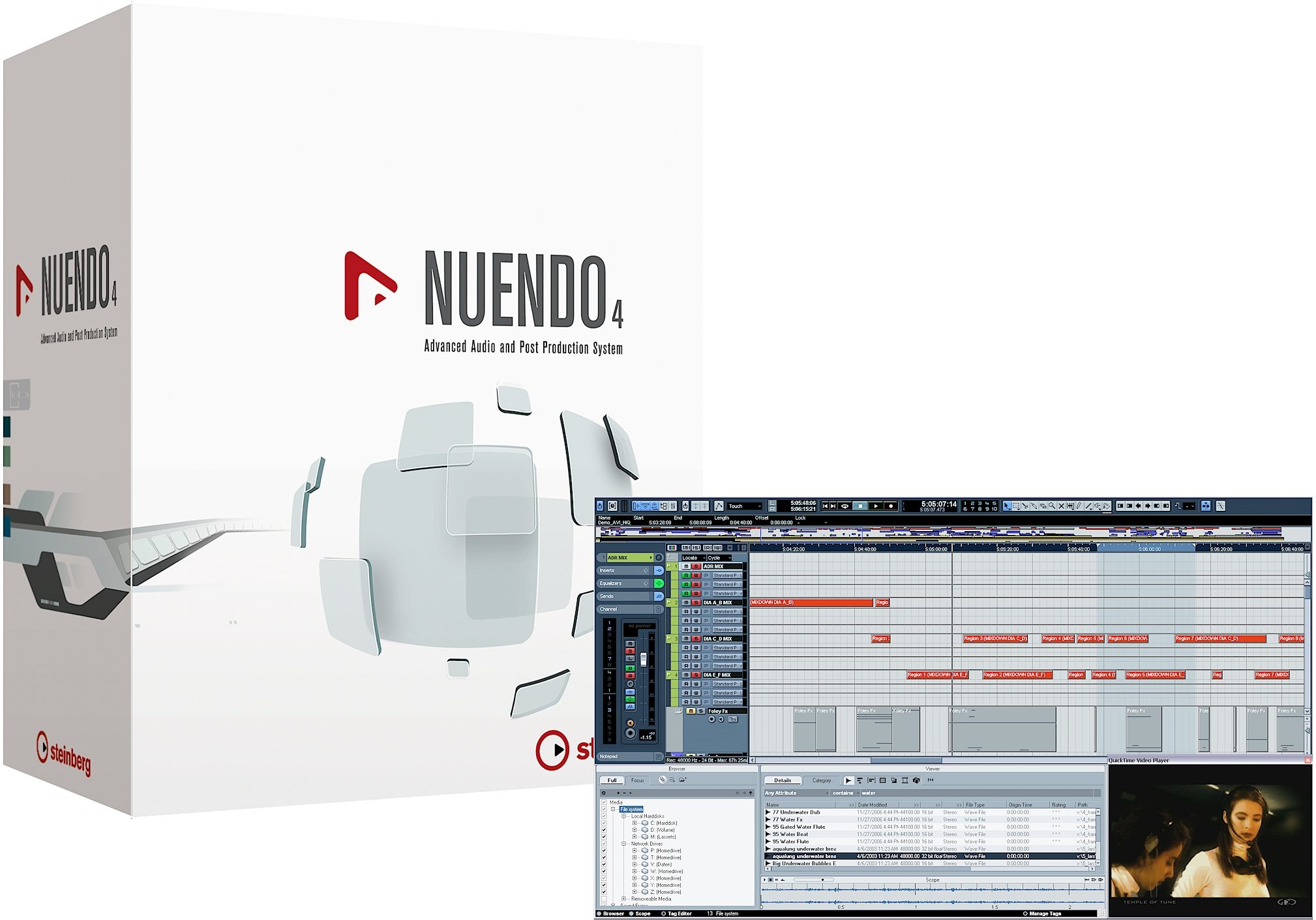
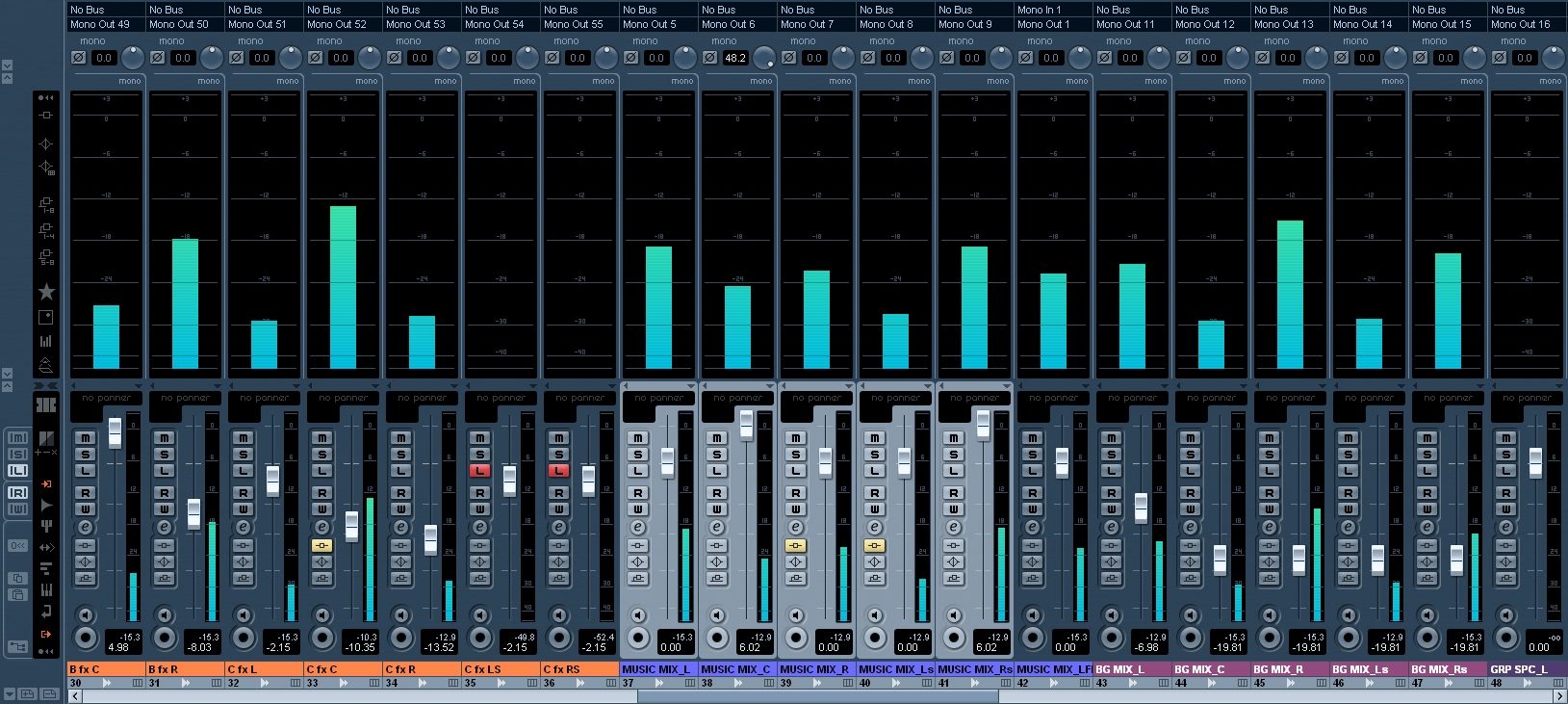
The completely redesigned Automation System in Nuendo 4 was engineered with the demands of today's mixing engineers in mind. The new dynamic automation is a perfect fusion of functionalities found in traditional mixing consoles and the innovative possibilities of a modern, feature rich and flexible DAW like Nuendo 4. The large, fully customizable automation panel provides access to all automation functionality and settings.
- Individual punch out modes per channel
- Optional Virgin Territories
- Fill commands for writing automation to end, start, punch or loop
- Multi-functional Preview Mode helps find the right parameters, changes - Automation Suspend for read and write excludes parameters
- Unique Touch Collect Assistant
These new Features and much more puts Nuendo on par with world-class automation systems. Additional unique features such as the Touch Collect Assistant and a stack of Punch Logs turn mixing with Nuendo into a comfortable and creative process. Reflecting the scalability inherent to Nuendo systems, the new Automation System offers outstanding automation tools.
MediaBay Database Environment
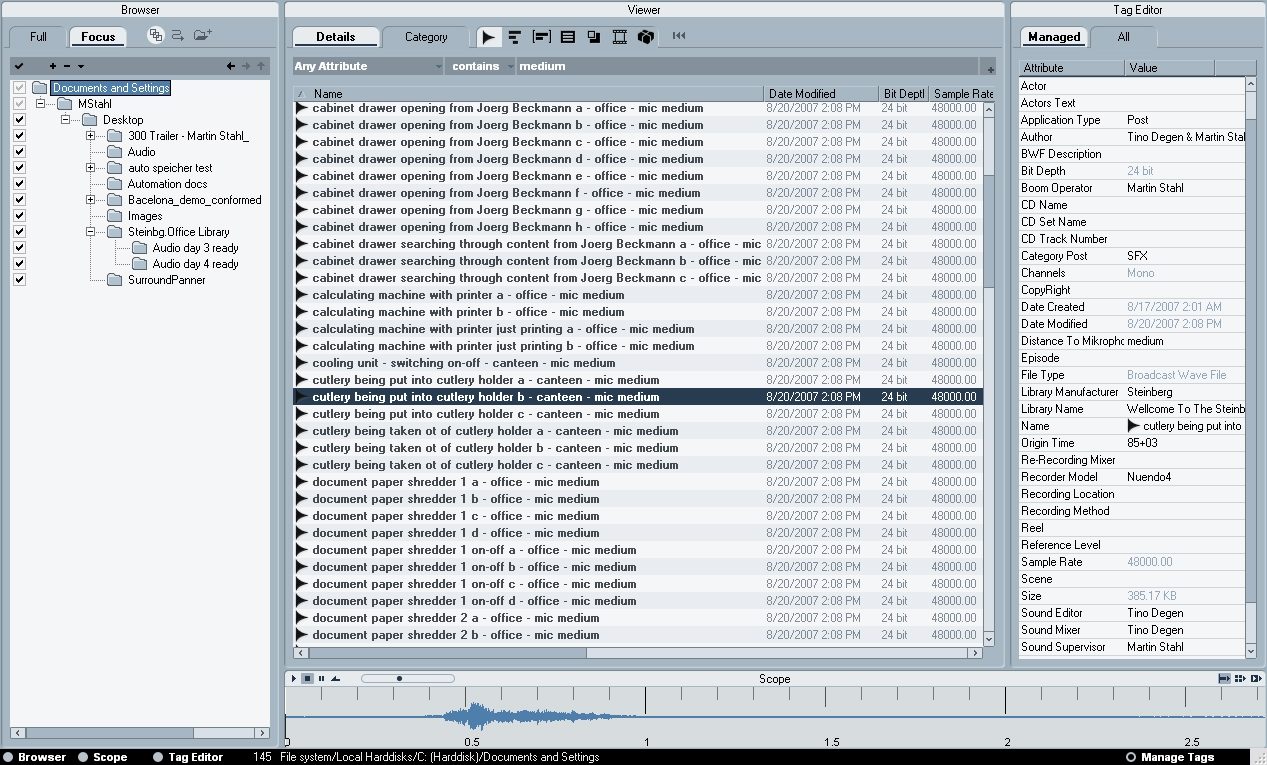
To keep up with the ever-growing number of sounds files included in sound effects libraries, sample databases, loop collections and preset libraries, Nuendo 4 is equipped with a powerful media file management system known as MediaBay. MediaBay offers full control over sample and FX libraries from within Nuendo, with lightning-fast browsing, searching and retrieving of media files, including audio and MIDI files, video data, project files as well as instrument and plug-in presets. The files can be organized in a folder structure and at the same time be outfitted with a variety of predefined or user definable attributes. Using any one or the combination of these two file management mechanisms will provide instant results for any search. The powerful search tools support even most complex tasks such as simultaneous searching in various attributes or extremely fast filtering of results. The latter is achieved by a very user-friendly category search system which includes an intuitive list of graphical filter elements. This way hundreds or even thousands of search results can be downsized with very few mouse clicks. MediaBay naturally includes a tag editor to apply existing attributes or create totally new ones and a Scope section features previewing options of selected material.
New Post Pro Editing Features
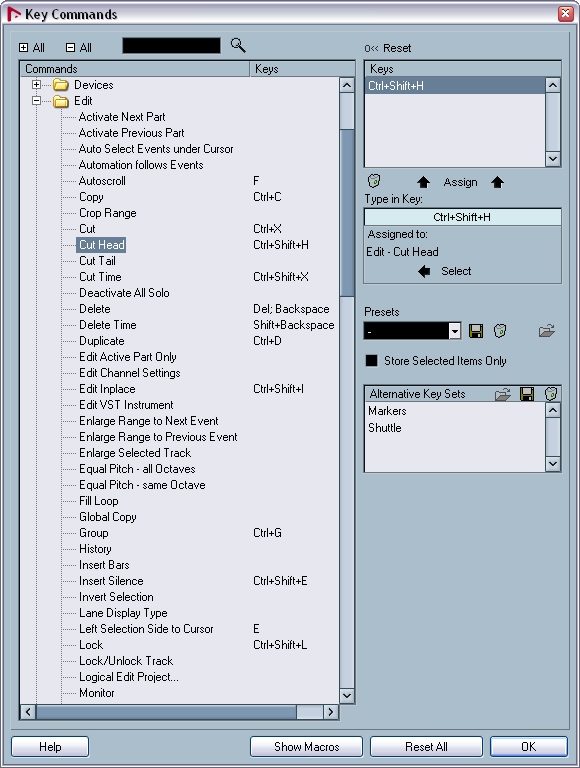
To speed up the editing workflow, Nuendo 4 features a total of twenty new editing commands and tool modifiers. Included are often used standards like "Cut Head" "Cut Tail", daily helpers such as "Enlarge/Move Range to previous/next Event" and a long list of key modifiers which support aligning of events with other events or the cursor.
The new editing commands and shortcuts mean extremely fast and easy positioning events to end at the play head position, stack events vertically or lay them down as a string of events across multiple tracks with Nuendo 4.
38 all-New VST 3 Audio Effect Plug-ins
Nuendo 4 includes 38 all-new surround-capable VST3 audio plug-ins that deliver a powerful set of next-generation processing tools of the very highest quality. Reworked and updated versions of plug-ins from previous Nuendo versions push the total number of plug-ins to over 60 right out of the box, often obviating the need for additional plug-ins.
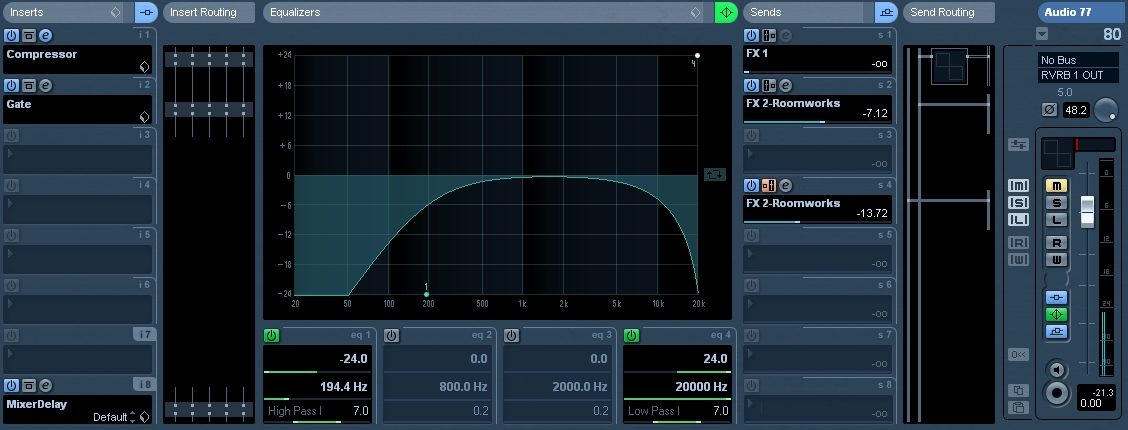
Among the new plug-ins is a first-class 4-band parametric equalizer that is featured as standard on every audio channel. Specifically designed for post production, the new Post Filter is ideal for quickly finding and removing unwanted noise with standard low/high cut, an extremely narrow banded notch filter as well as a useful Preview facility.
Nuendo 4 also includes new VST3 dynamic tools including three compressors, an Expander and a Limiter, which, like all VST3 plug-ins, can be inserted on surround tracks and automatically adapt to provide full surround processing. A series of great sound design plug-ins allow creative shaping and crafting of sounds.
Advanced Routing and Recording from Summing Objects
Nuendo 4 introduces completely re-engineered routing capabilities throughout the entire VST Mixer that allow unrestricted and free routing between group channels regardless of their order, and support sending signals from groups to FX returns and from FX returns into group channels. In addition, audio tracks can not only send signals into groups and FX returns by using the pre fader sends but now also patch signals post fader from the output tab to group channels and FX returns. Another major new feature is the ability to re-route signals of all summing objects such as buses, FX returns and groups directly into audio tracks, allowing instant re-recording of signals from summing objects onto audio tracks in real-time. To prevent feedback loops that can damage equipment and hearing, Nuendo 4 automatically detects which routing combinations would cause a feedback loop, and disables those combinations.
Side Chaining and Drag & Drop for FX plug-ins
The new side chaining ability of selected new VST 3 plug-ins included in Nuendo opens up new creative possibilities for Nuendo users.
Signals received from the channel sends or track outputs and can be routed to any side chain-enabled plug-in and control predefined parameters in the plug-ins or used as a modulation source. This allows fast and easy setup for ducking effects, frequency-specific dynamic processing or controlling a modulation effect with another signal. Nuendo 4 insert FX plug-ins can be copied or swapped using drag & drop both as inserts on individual tracks and between tracks for fast, smooth effect handling.
Track Quick Controls
A new section has been added to the Track Inspector: Track Quick Controls. This set of eight user-definable real-time controllers can be assigned to any parameter available on the current track. Track Quick Controls are available for Audio, MIDI and Instrument Tracks. These parameters include any mixer parameter for audio and instrument tracks, insert plug-in parameters, VSTi parameters and MIDI controllers for MIDI and instrument tracks. Track Quick Controls are assigned individually for track and saved with the project, as well as in the new track presets. MIDI Learn functionality makes setting up Track Quick Controls with a remote controller extremely easy. Once assigned, remote control knobs or fader functions will follow the track selection.
Track Presets
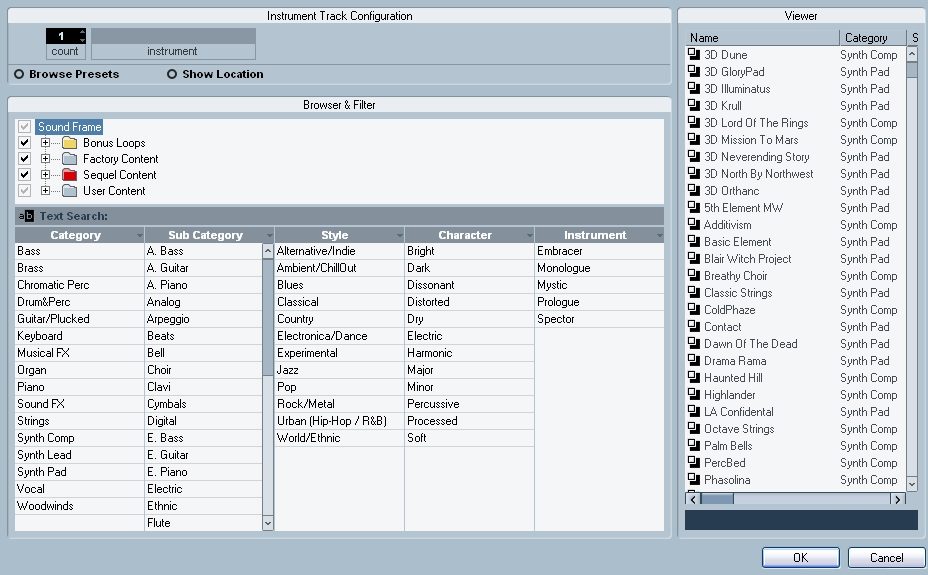
A further convenient and powerful new feature in Nuendo 4 is the ability to work with Track Presets - especially when they're combined with the new MediaBay. Track Presets are snapshots of entire track/channel strips. They are available for Audio, MIDI and Instrument Tracks and can be categorized and managed using the MediaBay search engine and attributes such as Category, Style, Character etc. Audio Track Presets contain EQ and insert effect information, while MIDI Track Presets save the MIDI port, channel and patch data, as well as additional MIDI track parameters like MIDI plug-ins. Instrument Track Presets include a combination of all of the above, as well as selected instrument/preset information.
Track Presets open a whole new dimension in sound and track management. Besides being used as templates for new tracks, Track Presets can also be used to extract EQ or FX settings and paste these into other tracks. Track Presets are also available in the Nuendo MediaBay. Multiple Tracks can even be saved into a single (Multi-)Track-Template, allowing swift access to complex track setups for multiple tracks.
New state-of-the-art Channel EQ
The new Channel EQ in Nuendo 4 is one of the key new plug-ins in Nuendo 4. One of the best-sounding "onboard" EQs available today, the Nuendo 4 Channel EQ provides unparalleled sonic detail and flexibility when compared to "standard" channel EQs in other DAWs. The new Channel EQ now provides up to 7 different characteristics per band and features an inverse switch for quick flipping between amplification and gain reduction. The Q factors of the new shelving modes now act as adjustable slopes of the shelf, allowing creation of resonant peaks for more punch and advanced frequency differentiation. This new EQ - also available in the new StudioEQ plug-in - offers great tools to add character and depth to any sound and represent a major advancement in sound quality and usability for Nuendo.
Ready for Intel-based Macintosh computers, Windows Vista 64
Not only does Steinberg continue to deliver a cross platform product in a single Nuendo package but Nuendo 4 is also ready to run on the latest operating systems by both Microsoft and Apple. While Windows XP and the Apple PPC platform continue to be supported, Nuendo 4 also runs on latest Intel-based Macintosh computers and on Windows Vista. The latter, of course, not only in 32 Bit mode, but also as a real 64 Bit compilation allowing the user to scale projects to an unknown maximum and address up to 128 GB of RAM in a single computer. If plug-ins need to be used which are not available for these new platforms, the included VST Plug-In Bridge for Intel-based Macintosh and Vista 64 will start them in a separate process, thus allowing these plug-ins to run side by side with the native ones.
Redesigned Sample Editor
The Nuendo 4 sample editor now features a new inspector-style section to the left. Features that were spread across many different parts of the program are now in one place. This includes tools for audio tempo definition, quantization, audio warp and Hitpoint-related functions.
Project Logical Editor
A new powerful logical editor opens up countless new possibilities for task automation and project-wide "power-editing". The Project Logical Editor allows manipulation of tracks and parts/events, including folder tracks with actions such as deleting everything beyond the cursor, un-muting all muted parts, renaming tracks/events or even deleting automation of a specific type. And this can selectively be done to any, all or multiple selected parts/tracks in one single step. But the Project Logical Editor comes with a large selection of presets, which are available directly from the Edit menu. In addition, users can create their own presets, which are automatically added to the preset menu. All Project Logical Editor presets are also available as targets for user definable key commands, making it an extremely powerful tool that can significantly speed up production and editing.
Instrument Tracks
Instrument Tracks combine MIDI Input and Audio Output into one single track and mixer channel, and are thus a huge time-saver for using virtual instruments in Nuendo 4. Setting up a track for a VSTi is now only two clicks away. Instrument Tracks are fully integrated with Nuendo's new SoundFrame Universal Sound Manager, use only a single channel in the VTS mixer and have the additional benefit of showing MIDI and plug-in automation in the same location.
MPEX 3 - High-quality audio time-stretching and pitch-shifting
MPEX3 is the latest and highest-quality MPEX time-stretching and pitch-shifting algorithm available. It offers improved overall sound quality, support for more sampling rates, better performance, and seven different modes to choose from. MPEX3 sounds fantastic and the new modes are optimized for specific audio material, which improves sound quality even further.
New Nuendo EuCon Adapter (Optional)
The optionally available Nuendo EuCon adapter, which provides integration with Euphonix hardware controllers and mixers, has been updated to map the new functions of Nuendo 4 directly onto the hardware surfaces of MC, System 5 MC, System 5 Hybrid and S5 Fusion. The all-new automation system of Nuendo is fully controllable from the hardware. The new routing capabilities of Nuendo 4, including side chaining of the plug-ins and the new recording from busses option, can also be easily controlled. And lastly, the new version of the EuCon adapter further enhances the MIDI implementation by providing access to MIDI routing and the new Instrument channels.
Additional New Features
Nuendo 4 also includes a range of additional new features that can make all the difference:
- VST Plug-in Bridge
- Updated WK-Audio ID Support
- Use Mouse Wheel for Event Volume and Fades
- Fade Handles always-on-top option
- Advanced QuickTime 7 Support
- Separate Goto Timecode command window
- Apple Remote support
- Direct X ASIO 64 Bit
- MP3 Surround
- New Trim Tool
- Load Projects inactive
- Arranger Track: new performance funtions
- Global Track Transpose
- New File Type: MIDI Loop
In direct consultation with users and industry partners, Steinberg has implemented a range of enhancements to existing Nuendo functionality to offer more streamlined and powerful tools in a range of tasks and processes.
- Improvement for Output Configuration of VSTi's
- Improved Channel Strip
- Improved Waveform Resolution
- Improved Audio Warp Real-time Transpose
- Track Control Context Functions Improvements
- Improvements on the Track Inspector
- Improved Audio & MIDI Hardware Setup
- Track Sheet Printing Improvements
- Time Displays Windows Improvements
- Improved Remote Controller Support
- Improved XML scripts for EuCon mapping of VST plug-in parameters
- ADM (ASIO Direct Monitoring) Improvements read less
Nuendo 4 provides scaleable, cross-platform systems that integrate easily and fully with premiere components by industry-leading plug-in and hardware manufacturers. Steinberg technologies provide unprecedented power, flexibility and speed, accelerating recording, mixing, editing and sound design workflows to an unprecedented level.
Features
State-of-the-art digital audio production environment
Crystal-clear 32-bit audio engine with full surround throughout
Faster, more efficient workflow with dedicated tools, options and features
Complete set of next-generation VST3 surround effect plug-ins
Utilizes best available audio and computer hardware and plug-ins
Advanced new automation system for full control
Powerful Control Room integrates into any monitoring setup
Innovative Network Collaboration for multi-seat projects via LAN or WAN
Full project exchange with other leading audio and video editing systems
Cross platform for latest Windows and Macintosh operating systems
New Features
Nuendo 4 offers a state-of-the-art automation system,… read more which combines with new recording functionality and Track Preset management features to speed up audio production workflows. A next-generation VST3 effect plug-in suite, the innovative MediaBay database, new editing commands and the Track Quick Controls raise production efficiency and quality to new heights.
New Automation System
The completely redesigned Automation System in Nuendo 4 was engineered with the demands of today's mixing engineers in mind. The new dynamic automation is a perfect fusion of functionalities found in traditional mixing consoles and the innovative possibilities of a modern, feature rich and flexible DAW like Nuendo 4. The large, fully customizable automation panel provides access to all automation functionality and settings.
- Individual punch out modes per channel
- Optional Virgin Territories
- Fill commands for writing automation to end, start, punch or loop
- Multi-functional Preview Mode helps find the right parameters, changes - Automation Suspend for read and write excludes parameters
- Unique Touch Collect Assistant
These new Features and much more puts Nuendo on par with world-class automation systems. Additional unique features such as the Touch Collect Assistant and a stack of Punch Logs turn mixing with Nuendo into a comfortable and creative process. Reflecting the scalability inherent to Nuendo systems, the new Automation System offers outstanding automation tools.
MediaBay Database Environment
To keep up with the ever-growing number of sounds files included in sound effects libraries, sample databases, loop collections and preset libraries, Nuendo 4 is equipped with a powerful media file management system known as MediaBay. MediaBay offers full control over sample and FX libraries from within Nuendo, with lightning-fast browsing, searching and retrieving of media files, including audio and MIDI files, video data, project files as well as instrument and plug-in presets. The files can be organized in a folder structure and at the same time be outfitted with a variety of predefined or user definable attributes. Using any one or the combination of these two file management mechanisms will provide instant results for any search. The powerful search tools support even most complex tasks such as simultaneous searching in various attributes or extremely fast filtering of results. The latter is achieved by a very user-friendly category search system which includes an intuitive list of graphical filter elements. This way hundreds or even thousands of search results can be downsized with very few mouse clicks. MediaBay naturally includes a tag editor to apply existing attributes or create totally new ones and a Scope section features previewing options of selected material.
New Post Pro Editing Features
To speed up the editing workflow, Nuendo 4 features a total of twenty new editing commands and tool modifiers. Included are often used standards like "Cut Head" "Cut Tail", daily helpers such as "Enlarge/Move Range to previous/next Event" and a long list of key modifiers which support aligning of events with other events or the cursor.
The new editing commands and shortcuts mean extremely fast and easy positioning events to end at the play head position, stack events vertically or lay them down as a string of events across multiple tracks with Nuendo 4.
38 all-New VST 3 Audio Effect Plug-ins
Nuendo 4 includes 38 all-new surround-capable VST3 audio plug-ins that deliver a powerful set of next-generation processing tools of the very highest quality. Reworked and updated versions of plug-ins from previous Nuendo versions push the total number of plug-ins to over 60 right out of the box, often obviating the need for additional plug-ins.
Among the new plug-ins is a first-class 4-band parametric equalizer that is featured as standard on every audio channel. Specifically designed for post production, the new Post Filter is ideal for quickly finding and removing unwanted noise with standard low/high cut, an extremely narrow banded notch filter as well as a useful Preview facility.
Nuendo 4 also includes new VST3 dynamic tools including three compressors, an Expander and a Limiter, which, like all VST3 plug-ins, can be inserted on surround tracks and automatically adapt to provide full surround processing. A series of great sound design plug-ins allow creative shaping and crafting of sounds.
Advanced Routing and Recording from Summing Objects
Nuendo 4 introduces completely re-engineered routing capabilities throughout the entire VST Mixer that allow unrestricted and free routing between group channels regardless of their order, and support sending signals from groups to FX returns and from FX returns into group channels. In addition, audio tracks can not only send signals into groups and FX returns by using the pre fader sends but now also patch signals post fader from the output tab to group channels and FX returns. Another major new feature is the ability to re-route signals of all summing objects such as buses, FX returns and groups directly into audio tracks, allowing instant re-recording of signals from summing objects onto audio tracks in real-time. To prevent feedback loops that can damage equipment and hearing, Nuendo 4 automatically detects which routing combinations would cause a feedback loop, and disables those combinations.
Side Chaining and Drag & Drop for FX plug-ins
The new side chaining ability of selected new VST 3 plug-ins included in Nuendo opens up new creative possibilities for Nuendo users.
Signals received from the channel sends or track outputs and can be routed to any side chain-enabled plug-in and control predefined parameters in the plug-ins or used as a modulation source. This allows fast and easy setup for ducking effects, frequency-specific dynamic processing or controlling a modulation effect with another signal. Nuendo 4 insert FX plug-ins can be copied or swapped using drag & drop both as inserts on individual tracks and between tracks for fast, smooth effect handling.
Track Quick Controls
A new section has been added to the Track Inspector: Track Quick Controls. This set of eight user-definable real-time controllers can be assigned to any parameter available on the current track. Track Quick Controls are available for Audio, MIDI and Instrument Tracks. These parameters include any mixer parameter for audio and instrument tracks, insert plug-in parameters, VSTi parameters and MIDI controllers for MIDI and instrument tracks. Track Quick Controls are assigned individually for track and saved with the project, as well as in the new track presets. MIDI Learn functionality makes setting up Track Quick Controls with a remote controller extremely easy. Once assigned, remote control knobs or fader functions will follow the track selection.
Track Presets
A further convenient and powerful new feature in Nuendo 4 is the ability to work with Track Presets - especially when they're combined with the new MediaBay. Track Presets are snapshots of entire track/channel strips. They are available for Audio, MIDI and Instrument Tracks and can be categorized and managed using the MediaBay search engine and attributes such as Category, Style, Character etc. Audio Track Presets contain EQ and insert effect information, while MIDI Track Presets save the MIDI port, channel and patch data, as well as additional MIDI track parameters like MIDI plug-ins. Instrument Track Presets include a combination of all of the above, as well as selected instrument/preset information.
Track Presets open a whole new dimension in sound and track management. Besides being used as templates for new tracks, Track Presets can also be used to extract EQ or FX settings and paste these into other tracks. Track Presets are also available in the Nuendo MediaBay. Multiple Tracks can even be saved into a single (Multi-)Track-Template, allowing swift access to complex track setups for multiple tracks.
New state-of-the-art Channel EQ
The new Channel EQ in Nuendo 4 is one of the key new plug-ins in Nuendo 4. One of the best-sounding "onboard" EQs available today, the Nuendo 4 Channel EQ provides unparalleled sonic detail and flexibility when compared to "standard" channel EQs in other DAWs. The new Channel EQ now provides up to 7 different characteristics per band and features an inverse switch for quick flipping between amplification and gain reduction. The Q factors of the new shelving modes now act as adjustable slopes of the shelf, allowing creation of resonant peaks for more punch and advanced frequency differentiation. This new EQ - also available in the new StudioEQ plug-in - offers great tools to add character and depth to any sound and represent a major advancement in sound quality and usability for Nuendo.
Ready for Intel-based Macintosh computers, Windows Vista 64
Not only does Steinberg continue to deliver a cross platform product in a single Nuendo package but Nuendo 4 is also ready to run on the latest operating systems by both Microsoft and Apple. While Windows XP and the Apple PPC platform continue to be supported, Nuendo 4 also runs on latest Intel-based Macintosh computers and on Windows Vista. The latter, of course, not only in 32 Bit mode, but also as a real 64 Bit compilation allowing the user to scale projects to an unknown maximum and address up to 128 GB of RAM in a single computer. If plug-ins need to be used which are not available for these new platforms, the included VST Plug-In Bridge for Intel-based Macintosh and Vista 64 will start them in a separate process, thus allowing these plug-ins to run side by side with the native ones.
Redesigned Sample Editor
The Nuendo 4 sample editor now features a new inspector-style section to the left. Features that were spread across many different parts of the program are now in one place. This includes tools for audio tempo definition, quantization, audio warp and Hitpoint-related functions.
Project Logical Editor
A new powerful logical editor opens up countless new possibilities for task automation and project-wide "power-editing". The Project Logical Editor allows manipulation of tracks and parts/events, including folder tracks with actions such as deleting everything beyond the cursor, un-muting all muted parts, renaming tracks/events or even deleting automation of a specific type. And this can selectively be done to any, all or multiple selected parts/tracks in one single step. But the Project Logical Editor comes with a large selection of presets, which are available directly from the Edit menu. In addition, users can create their own presets, which are automatically added to the preset menu. All Project Logical Editor presets are also available as targets for user definable key commands, making it an extremely powerful tool that can significantly speed up production and editing.
Instrument Tracks
Instrument Tracks combine MIDI Input and Audio Output into one single track and mixer channel, and are thus a huge time-saver for using virtual instruments in Nuendo 4. Setting up a track for a VSTi is now only two clicks away. Instrument Tracks are fully integrated with Nuendo's new SoundFrame Universal Sound Manager, use only a single channel in the VTS mixer and have the additional benefit of showing MIDI and plug-in automation in the same location.
MPEX 3 - High-quality audio time-stretching and pitch-shifting
MPEX3 is the latest and highest-quality MPEX time-stretching and pitch-shifting algorithm available. It offers improved overall sound quality, support for more sampling rates, better performance, and seven different modes to choose from. MPEX3 sounds fantastic and the new modes are optimized for specific audio material, which improves sound quality even further.
New Nuendo EuCon Adapter (Optional)
The optionally available Nuendo EuCon adapter, which provides integration with Euphonix hardware controllers and mixers, has been updated to map the new functions of Nuendo 4 directly onto the hardware surfaces of MC, System 5 MC, System 5 Hybrid and S5 Fusion. The all-new automation system of Nuendo is fully controllable from the hardware. The new routing capabilities of Nuendo 4, including side chaining of the plug-ins and the new recording from busses option, can also be easily controlled. And lastly, the new version of the EuCon adapter further enhances the MIDI implementation by providing access to MIDI routing and the new Instrument channels.
Additional New Features
Nuendo 4 also includes a range of additional new features that can make all the difference:
- VST Plug-in Bridge
- Updated WK-Audio ID Support
- Use Mouse Wheel for Event Volume and Fades
- Fade Handles always-on-top option
- Advanced QuickTime 7 Support
- Separate Goto Timecode command window
- Apple Remote support
- Direct X ASIO 64 Bit
- MP3 Surround
- New Trim Tool
- Load Projects inactive
- Arranger Track: new performance funtions
- Global Track Transpose
- New File Type: MIDI Loop
In direct consultation with users and industry partners, Steinberg has implemented a range of enhancements to existing Nuendo functionality to offer more streamlined and powerful tools in a range of tasks and processes.
- Improvement for Output Configuration of VSTi's
- Improved Channel Strip
- Improved Waveform Resolution
- Improved Audio Warp Real-time Transpose
- Track Control Context Functions Improvements
- Improvements on the Track Inspector
- Improved Audio & MIDI Hardware Setup
- Track Sheet Printing Improvements
- Time Displays Windows Improvements
- Improved Remote Controller Support
- Improved XML scripts for EuCon mapping of VST plug-in parameters
- ADM (ASIO Direct Monitoring) Improvements read less
Specs
Minimum System Requirements
The minimum system requirements state the minimal specification your computer must have to be able to use the software. A more powerful system may be required for certain tasks or larger projects.
Mac
Mac OS X v10.4
Power Mac G4 1 GHz or Core Solo 1.5 GHz
1 GB RAM
DVD drive required for installation
CoreAudio compatible audio hardware is required
USB port required for Steinberg Key (copy protection device)*
Internet connection required for license activation
PC
Windows Vista, Windows XP Home and Professional with SP2
Intel/AMD Processor 2 GHz minimum
1 GB RAM
DVD drive required for installation
Windows DirectX compatible audio hardware; ASIO compatible audio hardware recommended for low latency performance
USB port required for Steinberg Key (copy protection device)
Internet connection required for license activation
* Steinberg Key for licensing product already included in box.
The minimum system requirements state the minimal specification your computer must have to be able to use the software. A more powerful system may be required for certain tasks or larger projects.
Mac
Mac OS X v10.4
Power Mac G4 1 GHz or Core Solo 1.5 GHz
1 GB RAM
DVD drive required for installation
CoreAudio compatible audio hardware is required
USB port required for Steinberg Key (copy protection device)*
Internet connection required for license activation
PC
Windows Vista, Windows XP Home and Professional with SP2
Intel/AMD Processor 2 GHz minimum
1 GB RAM
DVD drive required for installation
Windows DirectX compatible audio hardware; ASIO compatible audio hardware recommended for low latency performance
USB port required for Steinberg Key (copy protection device)
Internet connection required for license activation
* Steinberg Key for licensing product already included in box.
Documents and Manuals
For support or warranty questions, please contact the manufacturer:
Phone: 844-358-4022
Email: steinbergussupport@yamaha.com
Web: https://helpcenter.steinberg.de
Phone: 844-358-4022
Email: steinbergussupport@yamaha.com
Web: https://helpcenter.steinberg.de
Reviews
Reviewers gave this product an overall rating of 5 out of 5 stars.
(76 ratings)
Submitted December 9, 2003 by a customer from netscape.net
"You want to record, master, and mix surround? Nuendo is your friend."
Upgrades have kept me more than happy thus far. I don't see anything that can compete in this price range in the near future. I have no dislikes.
Sound
Perfect sound with the higher resolutions and just as near with the lower ones.
Features
Great for surround mixing and mastering. Setting up for midi and audio recording is a real snap; just like a hardware recorder.
Quality
Nuendo never freezes and it has no evident bugs that I have found. The look and "feel" can't be beat.
Value
If your serious, and you don't want to spend huge on Pro Tools, this is the best way to go.
Manufacturer Support
Steinberg, need I say more?
The Wow Factor
The best in every way. Full featured color schemes and window sizing, and the best file architecture I have seen to date.
Musical Style:
contemporary christian
57 of 70 people (81%) people found this review helpful. Did you?
Thanks for your opinion!
No longer available at zZounds
In most cases, a product is unavailable because it has been discontinued by the manufacturer

This is a carousel with product cards. Use the previous and next buttons to navigate.
People who bought this item also bought


Universal Audio Apollo Twin X Duo Gen 2 Thunderbolt Audio Interface, Essentials+ Edition
$999.00
- 12 payments of$83.25/mo
- No Credit Check6 payments of$166.50/mo
-

Universal Audio Apollo Solo Thunderbolt 3 Audio Interface
$699.00
- 12 payments of$58.25/mo
- No Credit Check6 payments of$116.50/mo
-