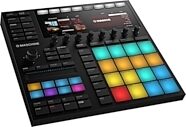
Native Instruments Maschine MK3 Groove Production Studio
Loaded with tactile controls, color screens, and Komplete sounds, NI's groundbreaking groovebox turns your computer into a music-production powerhouse.
$499.00
- 8 payments of$62.38/mo
- No Credit Check6 payments of$83.17/mo
Native Instruments Maschine Groove Production Studio (Mac and Windows)
No longer available at zZounds

zZounds Gear Experts Say...
The Native Instruments Maschine Groove Production Studio features an intuitive controller and upgraded software to take your beats to the next level.
Overview
The history of hip-hop production can be measured along two timelines: "Before Maschine" and "After Maschine." Before Maschine, beat-based producers had to choose one of two different production paths -- either the MPC-style hardware route, or the virtual world of computer-based production. You'd either get the tactile satisfaction and and inspiring workflow of the somewhat limited MPC, or the virtually limitless but antiseptic tool that computer composition can be. After Maschine, however, the choice has become clear: have both. Native Instruments Maschine is a complete hardware/software production system that melds MPC functionality and tactile expression for an exciting way to make beats and produce tracks. There are two basic ways you can think about Native Instruments Maschine: as a plug-in you can touch, and as the world's most powerful hardware sequencer.
A Plug-in You Can Touch
For all the limitless possibilities that a computer-based sequencer affords you, there's nothing quite like getting your hands on a solid piece of gear. A mouse is not an instrument of inspiration, but the MPC, SP-1200, TB-303 and other legendary units changed the way producers and musicians thought about interacting with their sounds. Maschine taps into that same part of the creative brain. If you've got the nascent spark of an idea in your head, tap it out on Maschine's hardware controller. The sixteen rubberized pads are solid and responsive, the rotary knobs and transport controls robust,… read more and the experience enthralling. It's the difference between programming a beat and actually playing one. The controller integrates seamlessly with the plug-in's on-screen interface so you won't have to switch from your right brain to your left to call up a new sound or record parameter automation. Two big LCDs on the controller give you patch and track information, and the buttons map so completely to the software's control and browsing functions, you'll hardly ever have to touch your mouse.The World's Most Powerful Hardware Sequencer
Because it's a plug-in that can be used in virtually any digital audio workstation (DAW), using Maschine is like using an MPC with all the power and flexibility of software applications like Pro Tools, Logic, Cubase, or SONAR. Plus you'll have the hardware infrastructure of your computer, giving you more processing power, more RAM, and more memory for samples than any hardware sequencer can possibly lay claim to. It's common for a hardware sequencer to come pre-loaded with at least 128 MB of sounds, but Maschine ships with an astounding 6+ GB worth of samples and virtual instruments. The editing of individual samples and loops is easier with Maschine for the simple fact that you're looking at a computer screen instead of a tiny LCD display. Slices will be more exact and faster-executed, and because of its DAW integration, you'll be able to take your music from idea to finalized production without having to leave the familiar environment. Plus, with its MIDI I/O port and MIDI/MMC-over-USB compatibility, you can use Maschine as the control center for your entire studio. Use it as a master controller for your DAW and use it to control all your hardware sound modules and sequencers. read lessSpecs
Hardware Specifications
General Interface Specifications
- Width: 320 mm / 12.6 in.
- Length: 295 mm / 11.6 in.
- Height: 60 mm / 2.4 in.
- 1811 Grams / 4 lbs
- 2 displays with 64x256 pixels
- 16 high-quality, illuminated pads with velocity and aftertouch
- 11 endless rotary encoders
- 41 backlit buttons
- Midi-In/Out
- USB 2.0
- Kensington(R) Lock
System Requirements
Windows:
Windows 7 (latest Service Pack, 32/64 Bit), Intel Core Duo or AMD Athlon 64 X2, 2 GB RAM
Mac:
Mac OS X 10.6 or 10.7 (latest update), Intel Core Duo, 2 GB RAM
USB 2.0 Port, 6 GB free disk space for complete installation
Supported Interfaces
Runs as a standalone application, or as a VST(R), Audio Units(TM), or RTAS(R) (under Pro Tools(R) 7/8) plug-in.
ASIO(TM), Core Audio(TM), DirectSound, WASAPI(TM)
General Interface Specifications
- Width: 320 mm / 12.6 in.
- Length: 295 mm / 11.6 in.
- Height: 60 mm / 2.4 in.
- 1811 Grams / 4 lbs
- 2 displays with 64x256 pixels
- 16 high-quality, illuminated pads with velocity and aftertouch
- 11 endless rotary encoders
- 41 backlit buttons
- Midi-In/Out
- USB 2.0
- Kensington(R) Lock
System Requirements
Windows:
Windows 7 (latest Service Pack, 32/64 Bit), Intel Core Duo or AMD Athlon 64 X2, 2 GB RAM
Mac:
Mac OS X 10.6 or 10.7 (latest update), Intel Core Duo, 2 GB RAM
USB 2.0 Port, 6 GB free disk space for complete installation
Supported Interfaces
Runs as a standalone application, or as a VST(R), Audio Units(TM), or RTAS(R) (under Pro Tools(R) 7/8) plug-in.
ASIO(TM), Core Audio(TM), DirectSound, WASAPI(TM)
Documents and Manuals
For support or warranty questions, please contact the manufacturer:
Web: https://support.native-instruments.com/
Web: https://support.native-instruments.com/
Native Instruments' Description
Native Instruments Maschine Controller
What's New In MASCHINE 1.6?
Use any Native Instruments or 3rd party VST(R) or Audio Units(TM) plug-ins directly inside MASCHINE. You can even hook up combinations: e.g. load MASSIVE* to Slot 1 and GUITAR RIG* to Slot 2 - and tweak them both from the hardware controller - the parameters are automatically mapped to the knobs on the MASCHINE hardware.Komplete Elements Included
To get you started using plug-ins inside MASCHINE a free copy of KOMPLETE ELEMENTS is included with this update. KOMPLETE ELEMENTS comprises over 1,000 stunning sounds drawn from the flagship KOMPLETE software bundle, including KONTAKT's vintage ABBEY ROAD drum kit and Vienna Symphonic orchestral instruments, six REAKTOR synthesizers and 35 GUITAR RIG amps and effects.
Workflow Enhancements
In addition to plug-in hosting, many other new improvements have been made. These include pad-link, swing per sound, internal drag and drop of audio, renaming of clips, duplication improvements, and 16 stereo outputs.
Pad Link
Any pads in the same link group can trigger each other - play multiple sounds such as two snares and a clap by hitting just one pad. Select one or more pads to be the master, and others in the group to follow as the slaves - perfect for musicians using MASCHINE in a live context.
Swing Per Sound
Swing allows for rhythmic shifting of a pattern, creating a shuffled, live feel.
Swing can now also be applied to individual sounds in MASCHINE 1.6, rather than just at the Group or Master level.
Module Slots
The architecture of MASCHINE's module slots have been modified to allow great freedom and flexibility, with instrument and effect plug-ins now selectable in the first module position - select either Sampler, Input, MIDI Out or Plug-ins for the first module slot and use the remaining slots to host any combination of effects, external or internal.
Enhanced Drag & Drop
Now you can drag-and-drop single or multiple files into MASCHINE directly from your operating system, and build up your own customized library of samples.
Plus it's now easy to move audio within MASCHINE from one location to another - great for converting a Group to audio to free up resources in MASCHINE.
Also in Maschine 1.6
- Extended audio channels: Now 16 stereo outputs
- Renaming objects (now clips, scenes and samples can be renamed inside MASCHINE)
- Full 64-bit compatibility (incl. VST Mac)
- Duplication improvements: Duplicate Scenes along with the pattern events
- Mapping improvement when dragging multiple samples (similar to KONTAKT)
- Snap events to grid, when moving with mouse
- REX 2 import
* MASSIVE and GUITAR RIG are not included, but available separately
Extended Sample Library and New FX
The much lauded MASCHINE library has just grown even stronger. The update comes with a ton of high quality content, made up of 100 new sounds and new acoustic and hip-hop kits. These additions include more premium content from NI's ever-expanding network of pro sound designers.
Over 1 GB of all-new drum kits and multi-sampled instruments -- over 6GB total
Meticulously sampled strings, acoustic kits, vintage synths, electric basses and pianos. Includes professional samples from studio legends like Abbey Road and Scarbee and vintage MPC60 kits sampled by Goldbaby.
Grain Stretch - stretch out the break, until you're ready to drop the beat. A dramatic new effect designed to perform.
New Sampler Features
MASCHINE's sampler has been upgraded with several new and improved features, making the process of perfecting your loops and samples simpler and smarter. This update truly sees MASCHINE refining the science of making beats.
Program import from major MPC models
- 5 new Vintage Sampling Modes emulating the sound of MPC60 / SP1200
- More than 10 new destructive audio editing tools such as normalize, reverse, fade in & out, silence, cut, copy and paste
- Extended Slicing options: new split mode, preview and 8 tools for individual editing of slices
- 16 Velocity Levels: Map a sound to the 16 pads for dynamic grooves
Improved polyphony with choke and legato options on the Sound level
- MIDI pitch bend and CC (i.e. mod wheel) support
Improved Workflow and Studio Integration
This update adds a new level of integration between MASCHINE and your host DAW and other hardware and software in your studio, as well as some elegant improvements that further elevate the general beat-making workflow.
- Extended import (REX2 files) and export: Drag MIDI or audio to host
- Extensive MIDI I/O: sequence your MIDI gear with MASCHINE and vice versa
- Save Project With Samples: Easily share and collaborate on projects
- More than 10 new hardware shortcuts for mouse-free editing and navigation
- Group Macro Controls for assigning any parameter to the 8 knobs on the hardware -- easy control that also works perfectly with host automation
- Increased performance of many effects
- Quiet sound selection, customisable defaults and much more
MASCHINE combines the hands-on feel and sequencing of classic grooveboxes with advanced sampling, effects, and seamless DAW integration. Now featuring 6GB of production-ready sounds, and numerous feature improvements, MASCHINE continues to evolve so you can focus on finding the perfect beat.
Rise of the MASCHINE
Integrating the flexibility of computer-based music production with the hands-on creative clout of MPC-style hardware, MASCHINE is the next step in beat production. Once you touch the hugely playable controller, the slick, intuitive and immensely fast workflow takes over, allowing you to stay focused on what matters - the groove. MASCHINE's blending of classic feel and cutting edge technology makes it the perfect tool used on its own, performing in the club, or working within your DAW.
As Easy as MPC
With MASCHINE the boundaries that defined beat making for years are blown away by an all-in-one approach. Starting from the iconic strengths of the MPC - including the intuitive pad layout, 16 velocity levels and Note Repeat - MASCHINE is instantly familiar, yet breaks free of hardware-only limitations. The library comes with a staggering 6GB of premium sounds and of course can be easily expanded. The simple-to-arrange sequencer, intuitive sampling, re-sampling and slicing features, and fully integrated FX and automation create a blazing workflow that takes your idea from a rough sketch to a professional production in no time. As a studio centerpiece, MASCHINE plays all your existing gear - and to make for an easy transition, it even lets you import your old MPC programs. MASCHINE perfectly preserves the instant pleasure of groove box beat-making, introducing the flexibility and power only software can provide.
Rock the Joint
Set MASCHINE loose in a club or live environment and its heavyweight punch will tear the joint up. Its super-sturdy build, premium pads and knobs are perfect for performing in uncompromising conditions. Thanks to the visual feedback provided by the screens and backlit buttons, MASCHINE thrives free of mouse and keyboard control. Use MASCHINE live as a solo instrument for performing your own productions without further prep time, or sync it up with other gear with the minimum of fuss. What's more, you can instantly switch into MIDI mode and use it as a controller for any other software - such as the tightly integrated TRAKTOR PRO DJ software. Perform with MASCHINE once, and you'll never leave home without it again.
Studio Workflow
MASCHINE's immense versatility means it also excels when working with your existing studio set up. Want to freshen up an idea you recorded in your DAW? Open MASCHINE as a plug-in and drop some beats. Got a good groove flowing in MASCHINE? Drag and drop sections, loops or full tracks directly into your DAW as either audio or MIDI. Built in to MASCHINE is a powerful arsenal of studio-quality effects including modulation, distortion, delays, reverbs, filters and EQs. Combine all this with MASCHINE's vast library of drum kits, multi-sampled instruments, sliced loops and one shot samples - many of which have been prepared by renowned beat-makers, artists and sound designers - and you have a powerhouse capable of revolutionizing your studio productions.
Free Online Update to Version 1.7
Maschine Version 1.7 offers hosting of VST or Audio Units plug-ins inside Maschine, new pad-link function, swing per sound, internal drag and drop of audio, renaming of clips, duplication improvements, and 16 stereo outputs. Update available when registering your Maschine at the Native Instruments website.
Reviews
Reviewers gave this product an overall rating of 4.5 out of 5 stars.
(66 ratings)
Submitted June 9, 2011 by a customer from live.com
"Over all, this product is well priced, loaded with features, easy to use with your other equipment..."
Verified Purchaser
zZounds has verified that this reviewer purchased this specific product from us.
Hopefully I will be satisfied until they come NI comes out with a new design of the product. Competing products always hold an interest. I choose this product because I believe it is the future of pattern based music and I want to stay hip to what's going on with products like this. Product does help me meet my musical goals.
Sound
The sound of the unit is very good. Unit responds precisely. The sound of the unit is as expressive as you can play. This product does help me choose and design a certain sound quickly. Product is very compatible with my style of music. Of course some sounds are better than others! Product sounds great by itself, and can be used as a stand alone unit. It sounds great in conjunction with my other equipment. I do not use this product for live use yet. Other equipment used: MPC2500, midi controller keyboard, DAW, soft synths, audio interface. I would suggest to incorporate a true stand alone mode for this machine for use without the computer as an alternative.
Features
Product did include accessories. The most useful features are the access of sounds. Least useful features: None found yet. I wish the sequencer would be modified with more options, similar to the MPC.
Ease of Use
Very very intuitive interface. Somewhat easy to modify sound to taste. Very easy to use with my other equipment. Learning curve seemed daunting at first, but after a few days it was… read more very easy. Manual is clear, but I wish it would have been a physical copy instead of a pdf.
Quality
Product is made very well. Finish is great, no loose parts. Very reliable product. Very dependable. On the road use not so much.
Value
For the price, this unit can NOT be beat.
Manufacturer Support
Never dealt with company as of yet.
The Wow Factor
Very sexy indeed. small, stylish, well built, with no screwy buttons. It's a unit where I look at it and don't think about modifying it to make it look better like I did with the MPC.
Musical Background:
Recording Engineer
Musical Style:
pattern based beats read less
Sound
The sound of the unit is very good. Unit responds precisely. The sound of the unit is as expressive as you can play. This product does help me choose and design a certain sound quickly. Product is very compatible with my style of music. Of course some sounds are better than others! Product sounds great by itself, and can be used as a stand alone unit. It sounds great in conjunction with my other equipment. I do not use this product for live use yet. Other equipment used: MPC2500, midi controller keyboard, DAW, soft synths, audio interface. I would suggest to incorporate a true stand alone mode for this machine for use without the computer as an alternative.
Features
Product did include accessories. The most useful features are the access of sounds. Least useful features: None found yet. I wish the sequencer would be modified with more options, similar to the MPC.
Ease of Use
Very very intuitive interface. Somewhat easy to modify sound to taste. Very easy to use with my other equipment. Learning curve seemed daunting at first, but after a few days it was… read more very easy. Manual is clear, but I wish it would have been a physical copy instead of a pdf.
Quality
Product is made very well. Finish is great, no loose parts. Very reliable product. Very dependable. On the road use not so much.
Value
For the price, this unit can NOT be beat.
Manufacturer Support
Never dealt with company as of yet.
The Wow Factor
Very sexy indeed. small, stylish, well built, with no screwy buttons. It's a unit where I look at it and don't think about modifying it to make it look better like I did with the MPC.
Musical Background:
Recording Engineer
Musical Style:
pattern based beats read less
37 of 39 people (95%) people found this review helpful. Did you?
Thanks for your opinion!
No longer available at zZounds

This is a carousel with product cards. Use the previous and next buttons to navigate.
People who bought this item also bought

Arturia V Collection 11 Pro Software
$699.00
- 12 payments of$58.25/mo
- No Credit Check6 payments of$116.50/mo
-
Native Instruments Kontrol S88 MK3 USB MIDI Keyboard Controller, 88-Key
$1,299.00
- 12 payments of$108.25/mo
-
Native Instruments Kontrol S61 MK3 USB MIDI Keyboard Controller, 61-Key
$849.00
- 12 payments of$70.75/mo
- No Credit Check6 payments of$141.50/mo
-

Native Instruments Komplete 26 Ultimate Software
$1,249.00
- 12 payments of$104.08/mo
- No Credit Check6 payments of$208.17/mo
-
Rode RODECaster Video S All-In-One Production Console for Audio and Video
$799.00
- 12 payments of$66.58/mo
- No Credit Check6 payments of$133.17/mo
-
FabFilter Total Bundle Plug-ins Software
$1,069.00
- 12 payments of$89.08/mo
- No Credit Check6 payments of$178.17/mo
-