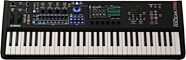
Yamaha MODX M6 Keyboard Synthesizer, 61-Key


zZounds Gear Experts Say...
Perform live and in-studio with the Yamaha MODX M6, a keyboard synth with three separate sound engines and a huge repertoire of tones.
Overview
Built for synthesists, the 61-key MODX M6 combines expressive control, streamlined workflow, and exceptional sound in a compact, lightweight design. Sharing the same DNA as Yamaha's flagship MONTAGE M synthesizer, along with three powerful engines that recreate classic analog synths, modern synths, and realistic instruments, the MODX M6 offers a stunning variety of sounds. Intuitive performance controls, including 8 physical faders and Super Knob, give you real-time hands-on expression, while the improved keyboard action gives you better playability. And the free ESP plugin puts MODX M in your favorite DAW. Perfect for stage or studio, MODX M6 elevates expression everywhere.
Yamaha MODX M Keyboard Synthesizer Overview & Demo:

Built for synthesists, the 61-key MODX M6 delivers exceptional sound, expressive control and optimized workflow in a lightweight design for stage or studio.
- 3 powerful sound engines
- Analog synth, modern FM synth, & realistic instrument tones
- 8 physical faders & the Super Knob
- Upgraded navigation for an optimized workflow
- Color touch screen & 6 dedicated display knobs
- Expanded Softsynth Plugin (ESP) replicates MODX M in your favorite DAW
- Create, edit & mix sounds anywhere
- Compact, lightweight design
Exceptional Sound
3 powerful engines recreate classic analog synths, modern FM synths, and realistic instruments for a variety of sounds
Expressive Control
Intuitive… read more performance controls, including 8 physical faders and Super Knob, give you real-time hands-on expression
Optimized Workflow
Upgraded navigation enables quick, intuitive sound editing and operation with features like a color touch screen and 6 dedicated display knobs
Improved Keyboard Action
61 semi-weighted keys delivers faster, more substantial feeling synth action for improved playability when compared to MODX+
Stage and Studio Integration
Expanded Softsynth Plugin (ESP) replicates MODX M in your favorite DAW - create, edit and mix sounds anywhere
read less
Yamaha MODX M Keyboard Synthesizer Overview & Demo:
Built for synthesists, the 61-key MODX M6 delivers exceptional sound, expressive control and optimized workflow in a lightweight design for stage or studio.
Features:
- 61 semi-weighted keys for improved playability- 3 powerful sound engines
- Analog synth, modern FM synth, & realistic instrument tones
- 8 physical faders & the Super Knob
- Upgraded navigation for an optimized workflow
- Color touch screen & 6 dedicated display knobs
- Expanded Softsynth Plugin (ESP) replicates MODX M in your favorite DAW
- Create, edit & mix sounds anywhere
- Compact, lightweight design
Exceptional Sound
3 powerful engines recreate classic analog synths, modern FM synths, and realistic instruments for a variety of sounds
Expressive Control
Intuitive… read more performance controls, including 8 physical faders and Super Knob, give you real-time hands-on expression
Optimized Workflow
Upgraded navigation enables quick, intuitive sound editing and operation with features like a color touch screen and 6 dedicated display knobs
Improved Keyboard Action
61 semi-weighted keys delivers faster, more substantial feeling synth action for improved playability when compared to MODX+
Stage and Studio Integration
Expanded Softsynth Plugin (ESP) replicates MODX M in your favorite DAW - create, edit and mix sounds anywhere
Specs
- Number of Keys: 61
- Key Action: Semi-weighted FSB (Fully Balanced Semi-Weighted)
- Touch Response: Initial Touch
- Sound Source: AWM2 + FM-X + AN-X + Motion Control Synthesis Engine
- Maximum Polyphony: 268 notes total (128 AWM2, 128 FM-X, 12 AN-X)
- Number of Voices: Over 3,400 preset Performances
- Number of Performances: Over 3,400 preset + user programmable
- Number of Effects: 13 Reverb types, 88-91 Variation types, 88-94 Insertion types, 26-28 Master Effects
- Effects Types: Reverb, Variation, Insertion, Master Effects, 5-band Master EQ
- Multitimbral Capacity: 16 parts
- Sequencer Tracks: 16 tracks
- Song Capacity: 128 songs
- Pattern Capacity: 128 patterns
- Arpeggiator Types: 10,922 preset arpeggios, 256 user arpeggios, up to 8 parts simultaneous
- Display Type: 7-inch TFT Color Wide VGA LCD Touch Screen
- Display Size: 7 inches
- Connectors: MIDI In/Out: MIDI IN/OUT (5-pin DIN)
- Connectors: USB: USB TO HOST (Type B), USB TO DEVICE (Type A)
- Connectors: Audio Output: OUTPUT L/MONO, R (6.3mm TRS)
- Connectors: Headphone: PHONES (6.3mm stereo TRS)
- Connectors: Pedal: FOOT CONTROLLER 1/2, FOOT SWITCH SUSTAIN/ASSIGNABLE, A/D INPUT L/MONO, R
- Power Supply: PA-300C AC Adapter
- Power Consumption: 119W (when using PA-300C AC adapter)
Dimensions and Weight in Packaging
Base Item
- Shipping Weight: 22.75 lbs
- Shipping Dimensions: 41 x 18 x 9 in
- Manufacturer Part Number (MPN): MODX M6
Open Box (Like New)
- Shipping Weight: 22.75 lbs
- Shipping Dimensions: 41 x 18 x 9 in
- Manufacturer Part Number (MPN): YAM MODXM6 NFS
Documents and Manuals
For support or warranty questions, please contact the manufacturer:
Phone: 866-430-2652
Web: https://usa.yamaha.com/support
Phone: 866-430-2652
Web: https://usa.yamaha.com/support
Open Box (Like New)
What is Open Box (Like New)?
$1,749.00
FREE
-Day
Shipping!
Get it
for
Get it
(or get it
with an order of
),
if you order within
Shipping to
Cases and Bags

Cases and Bags
This is a carousel with product cards. Use the previous and next buttons to navigate.
People who bought this item also bought


JBL JRX218S Passive, Unpowered Compact Subwoofer Speaker
$680.00
- 8 payments of$85.00/mo
- No Credit Check6 payments of$113.33/mo
Comes in 2 Quantities-
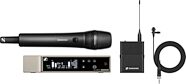
Sennheiser EW-D ME 2/835-S Combo Set Wireless Microphone System
$1,099.00
- 12 payments of$91.58/mo
- No Credit Check6 payments of$183.17/mo
Comes in 3 Frequencies-

Neumann TLM 103 Studio Microphone
$1,295.00
- 12 payments of$107.92/mo
Comes in 2 Colors, 2 Mfg Models-
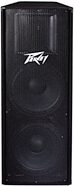
Peavey PV215 Passive Unpowered PA Enclosure (2x15")
$449.99
- 8 payments of$56.25/mo
- No Credit Check6 payments of$75.00/mo
-

Yamaha HS8 Active Studio Monitor
$398.99
- 8 payments of$49.87/mo
- No Credit Check6 payments of$66.50/mo
Comes in 2 Quantities, 2 Colors-
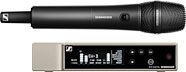
Sennheiser EW-D 835-S Vocal Set Wireless Microphone System
$749.00
- 8 payments of$93.63/mo
- No Credit Check6 payments of$124.83/mo
Comes in 3 Frequencies-