
iCON V1-M USB and MIDI Control Surface

zZounds Gear Experts Say...
Get hands-on with your DAW. The VM-1 offers 9x 100mm motor faders, a large hi-res jog wheel, a 7" touchscreen to access your most-used commands, and more.
Overview
The V1-M is a powerful DAW controller that gives you tactile control of your Digital Audio Workstation helping you streamline your workflow and get your projects done faster. Here are some of the features that will make the V1-M work for you:
Hands On Control: The V1-M has 8 channels of motorized faders, which can be expanded up to 64 channels (depending on your DAW) with the addition of optional V1-X DAW Control Expanders. This gives you plenty of control over your mix, even if you're working on a complex project.
Customizable Touchscreen: The V1-M has a large customizable touchscreen display with 5 color coded layers of commands that can be used to control your DAW and match your specific workflow. This makes it easy to quickly access the controls you need, without having to take your eyes off the mix.
TFT Display and Meter Bridge: The large TFT display and meter bridge show the current levels, pan positions, and other information. This makes it easy to see what's going on with your mix, even if you're not looking at the computer monitor.
Integration with popular DAWs: The V1-M is compatible with a wide range of popular DAWs, including Bitwig, Cubase/Nuendo, Logic Pro X, Ableton Live, and Pro Tools. Additionally, you can run up to 3 DAWs at one time with no interruption to your workflow.
- Large, programmable 7", 24-panel digital touchscreen display showing DAW functions per five color modes--a… read more potential total of 120 displayable and actionable functions
- Organize DAW functions in the 24-panel touchscreen easily via drag and drop in the iMAP--changes made in real time
- Capability of connecting to three DAWs at one time via the DAW select buttons
- Extremely durable and versatile
- Onboard 2" TFT display, showing channel name, control values, channel colors, etc. (DAW dependent)
- Attractive, modern meter bridge, featuring precise, clear, and eye-catching LED meters
- Additional lower 1.14" TFT display for each channel (some DAWs are equipped to display additional information on this screen)
- Extremely high-quality, large optical encoder jog wheel with very precise, smooth control, for fast search, scrub, etc.
- Eight smooth-action, dual-function encoder knobs (Rotate and Enter)
- Two-segment LED display shows timecode or location of your project in either SMPTE or beat clock (bars:beats:ticks) formats
- Illuminated function buttons for Read, Write, Touch, Latch, Trim, and Off--activated/deactivated as required per DAW
- Illuminated buttons for channel control, including Mute, Solo, and Record
- Six illuminated transport buttons including Play, Stop, Record, Rewind, Fast Forward, and Loop
- Dedicated Master/Assign button, for quick switching the master fader from the master channel to a pre-designated track
- Illuminated Zoom button with 2-D directional keys (Left/Right and Up/Down), also used in combination with the jog wheel
- Illuminated Focus button, which allows the user to focus in and adjust plug-in, EQ parameters, and more via the smooth-action jog wheel
- Two illuminated Track buttons, for selecting individual channels
- Two illuminated Bank buttons, for shifting eight channels at a time
- Supports Universal Mackie Control and HUI protocols, for seamless integration with compatible music production software
- Supports Ability, Audition, Ableton Live, Bitwig, Cakewalk, Cubase/Nuendo, Digital Performer, FL Studio, Mixbus 32C, Pro Tools, Logic Pro, Luna, Reaper, Reason, Samplitude, Studio One, and Tracktion Waveform
- iMap software downloadable from the product page
- USB-C high-speed connectivity
- Firmware upgrade available via USB-C connection and iMap software
- User A and User B 1/4" inputs, for connecting footswitch pedals
- Class-compliant with MacOS 10.15 or above and Windows 10 or above
- Superior build quality and robust metal casing with Kensington lock port
read less
Hands On Control: The V1-M has 8 channels of motorized faders, which can be expanded up to 64 channels (depending on your DAW) with the addition of optional V1-X DAW Control Expanders. This gives you plenty of control over your mix, even if you're working on a complex project.
Customizable Touchscreen: The V1-M has a large customizable touchscreen display with 5 color coded layers of commands that can be used to control your DAW and match your specific workflow. This makes it easy to quickly access the controls you need, without having to take your eyes off the mix.
TFT Display and Meter Bridge: The large TFT display and meter bridge show the current levels, pan positions, and other information. This makes it easy to see what's going on with your mix, even if you're not looking at the computer monitor.
Integration with popular DAWs: The V1-M is compatible with a wide range of popular DAWs, including Bitwig, Cubase/Nuendo, Logic Pro X, Ableton Live, and Pro Tools. Additionally, you can run up to 3 DAWs at one time with no interruption to your workflow.
Features:
- Nine touch-sensitive, motorized faders with 12-bit resolution- Large, programmable 7", 24-panel digital touchscreen display showing DAW functions per five color modes--a… read more potential total of 120 displayable and actionable functions
- Organize DAW functions in the 24-panel touchscreen easily via drag and drop in the iMAP--changes made in real time
- Capability of connecting to three DAWs at one time via the DAW select buttons
- Extremely durable and versatile
- Onboard 2" TFT display, showing channel name, control values, channel colors, etc. (DAW dependent)
- Attractive, modern meter bridge, featuring precise, clear, and eye-catching LED meters
- Additional lower 1.14" TFT display for each channel (some DAWs are equipped to display additional information on this screen)
- Extremely high-quality, large optical encoder jog wheel with very precise, smooth control, for fast search, scrub, etc.
- Eight smooth-action, dual-function encoder knobs (Rotate and Enter)
- Two-segment LED display shows timecode or location of your project in either SMPTE or beat clock (bars:beats:ticks) formats
- Illuminated function buttons for Read, Write, Touch, Latch, Trim, and Off--activated/deactivated as required per DAW
- Illuminated buttons for channel control, including Mute, Solo, and Record
- Six illuminated transport buttons including Play, Stop, Record, Rewind, Fast Forward, and Loop
- Dedicated Master/Assign button, for quick switching the master fader from the master channel to a pre-designated track
- Illuminated Zoom button with 2-D directional keys (Left/Right and Up/Down), also used in combination with the jog wheel
- Illuminated Focus button, which allows the user to focus in and adjust plug-in, EQ parameters, and more via the smooth-action jog wheel
- Two illuminated Track buttons, for selecting individual channels
- Two illuminated Bank buttons, for shifting eight channels at a time
- Supports Universal Mackie Control and HUI protocols, for seamless integration with compatible music production software
- Supports Ability, Audition, Ableton Live, Bitwig, Cakewalk, Cubase/Nuendo, Digital Performer, FL Studio, Mixbus 32C, Pro Tools, Logic Pro, Luna, Reaper, Reason, Samplitude, Studio One, and Tracktion Waveform
- iMap software downloadable from the product page
- USB-C high-speed connectivity
- Firmware upgrade available via USB-C connection and iMap software
- User A and User B 1/4" inputs, for connecting footswitch pedals
- Class-compliant with MacOS 10.15 or above and Windows 10 or above
- Superior build quality and robust metal casing with Kensington lock port
Specs
- Type: USB MIDI DAW Control Surface
- Channels: 8 channels (expandable to 64 channels with V1-X expanders)
- Faders: 9 touch-sensitive motorized faders (8 channel + 1 master)
- Motorized Faders: Yes, 12-bit resolution
- Knobs: 8 dual-function encoder knobs (Rotate and Enter)
- Buttons: Illuminated buttons including Mute, Solo, Record, transport controls, Focus, Zoom, Track, Bank
- Display: 7-inch 24-panel digital touchscreen with 5 color-coded layers, 2-inch TFT display per channel, LED meter bridge, 2-segment LED timecode display, 1.14-inch TFT display for each channel
- Input Connectors: USB-C
- Output Connectors: None (control surface only)
- Connectivity: USB-C to computer
- Protocol Support: Universal Mackie Control and HUI protocols
- Power Supply: 12V 2.5A DC external power adapter (outside negative, inside positive)
- Compatibility: Mac (10.15 or above), Windows (10 or above), supports Ability, Audition, Ableton Live, Bitwig, Cakewalk, Cubase/Nuendo, Digital Performer, FL Studio, Mixbus 32C, Pro Tools, Logic Pro, Luna, Reaper, Reason, Samplitude, Studio One, Tracktion Waveform
- Channels: 8 channels (expandable to 64 channels with V1-X expanders)
- Faders: 9 touch-sensitive motorized faders (8 channel + 1 master)
- Motorized Faders: Yes, 12-bit resolution
- Knobs: 8 dual-function encoder knobs (Rotate and Enter)
- Buttons: Illuminated buttons including Mute, Solo, Record, transport controls, Focus, Zoom, Track, Bank
- Display: 7-inch 24-panel digital touchscreen with 5 color-coded layers, 2-inch TFT display per channel, LED meter bridge, 2-segment LED timecode display, 1.14-inch TFT display for each channel
- Input Connectors: USB-C
- Output Connectors: None (control surface only)
- Connectivity: USB-C to computer
- Protocol Support: Universal Mackie Control and HUI protocols
- Power Supply: 12V 2.5A DC external power adapter (outside negative, inside positive)
- Compatibility: Mac (10.15 or above), Windows (10 or above), supports Ability, Audition, Ableton Live, Bitwig, Cakewalk, Cubase/Nuendo, Digital Performer, FL Studio, Mixbus 32C, Pro Tools, Logic Pro, Luna, Reaper, Reason, Samplitude, Studio One, Tracktion Waveform
Dimensions and Weight in Packaging
Base Item
- Shipping Weight: 19.85 lbs
- Shipping Dimensions: 26 x 21 x 11 in
- Manufacturer Part Number (MPN): IPA-V1M
Documents and Manuals
For support or warranty questions, please contact the manufacturer:
Web: https://support.iconproaudio.com/
Web: https://support.iconproaudio.com/
Reviews
Reviewers gave this product an overall rating of 0.5 out of 5 stars.
(1 ratings)
Submitted July 28, 2025 by a customer from gmail.com
"Great Product, In Concept..."
Verified Purchaser
zZounds has verified that this reviewer purchased this specific product from us.
The build quality is fantastic. All steel chassis, faders and knobs feel very comfy. Track Level meters work well. However, there are SEVERAL features that are missing from this unit. The channels do not pull track colors and do not display MAIN meter information, and other Meta data from the channel information, when using Cubase. I'm told by support, each DAW will present a new set of challenges as far as coding. iCON expects you to know JAVAscript and how to edit 3rd party code in order to get the information into the Surfaces. I spent 2 weeks going back and forth in emails with support. I eventually got it to work on the V1-M unit, but the script presented a whole new slew of issues. Track meters became glitchy, not showing accurate info, the jog wheel was rendered useless and the list goes on. It seems that iCON expects the end users to do the legwork to compensate for shoddy programming. On top of that. there is ZERO documentation on how to use the features for the units, which I have never seen before. For the amount of money these cost, in 2025 all of this should be baked into the iMAP software by default. Having users edit code to make the product work does not seem to be the way forward as a business model. I can only hope that iCON can get it together moving forward. It's almost like they don't want you to use these things. So much potential, but highly disappointing.
3 of 3 people (100%) people found this review helpful. Did you?
Thanks for your opinion!
New
$999.00
you're approved! No credit check!
- No interest and no late fees
- No paperwork
- No social security number required
- No questions about your income
Just provide your credit or debit card number in checkout as usual, and we’ll ship your order before the end of the business day.
- 12 payments of$83.25/mo
FREE
-Day
Shipping!
Get it
for
Get it
(or get it
with an order of
),
if you order within
Shipping to
This is a carousel with product cards. Use the previous and next buttons to navigate.
Related Accessories

This is a carousel with product cards. Use the previous and next buttons to navigate.
Related Accessories
This is a carousel with product cards. Use the previous and next buttons to navigate.
People who bought this item also bought
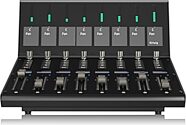
iCON V1-X DAW Control Extender for V1-M Control Surface
$899.00
- 12 payments of$74.92/mo
- No Credit Check6 payments of$149.83/mo
-


Neumann TLM 103 Mono Set Large-Diaphragm Condenser Microphone with Shock Mount and Aluminum Case
$1,595.00
- 12 payments of$132.92/mo
Comes in 2 Colors, 2 Mfg Models-

IsoVox 2 VocalStudio Mobile Vocal Isolation Booth
$1,249.00
- 12 payments of$104.08/mo
- No Credit Check6 payments of$208.17/mo
Comes in 2 Colors-
M-Audio Oxygen Pro 49 USB MIDI Keyboard Controller
$299.00
- 8 payments of$37.38/mo
- No Credit Check6 payments of$49.83/mo
-
Avantone Pro CLA-10 Passive Studio Monitors
$699.00
- 12 payments of$58.25/mo
- No Credit Check6 payments of$116.50/mo
-

PreSonus Central Station Plus Studio Monitor Control Center with Remote
$649.99
- 12 payments of$54.17/mo
- No Credit Check6 payments of$108.33/mo
-
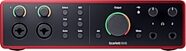
Focusrite Scarlett 16i16 Gen 4 USB Audio Interface
$409.99
- 8 payments of$51.25/mo
- No Credit Check6 payments of$68.33/mo
-

dbx 286S Microphone Preamplifier and Channel Strip Processor
$339.00
- 8 payments of$42.38/mo
- No Credit Check6 payments of$56.50/mo
-
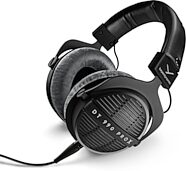
Beyerdynamic DT 990 PRO X Open-Back Studio Headphones
$229.99
- No Credit Check6 payments of$38.33/mo
-
Items You Recently Viewed
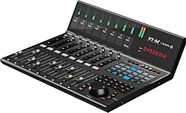
iCON V1-M USB and MIDI Control Surface
$999.00
- 12 payments of$83.25/mo
- No Credit Check6 payments of$166.50/mo
-