
Novation Remote Zero SL USB MIDI Controller
No longer available at zZounds
zZounds Gear Experts Say...
2 giant LCD screens. Fantastic new Automap mode.
Overview
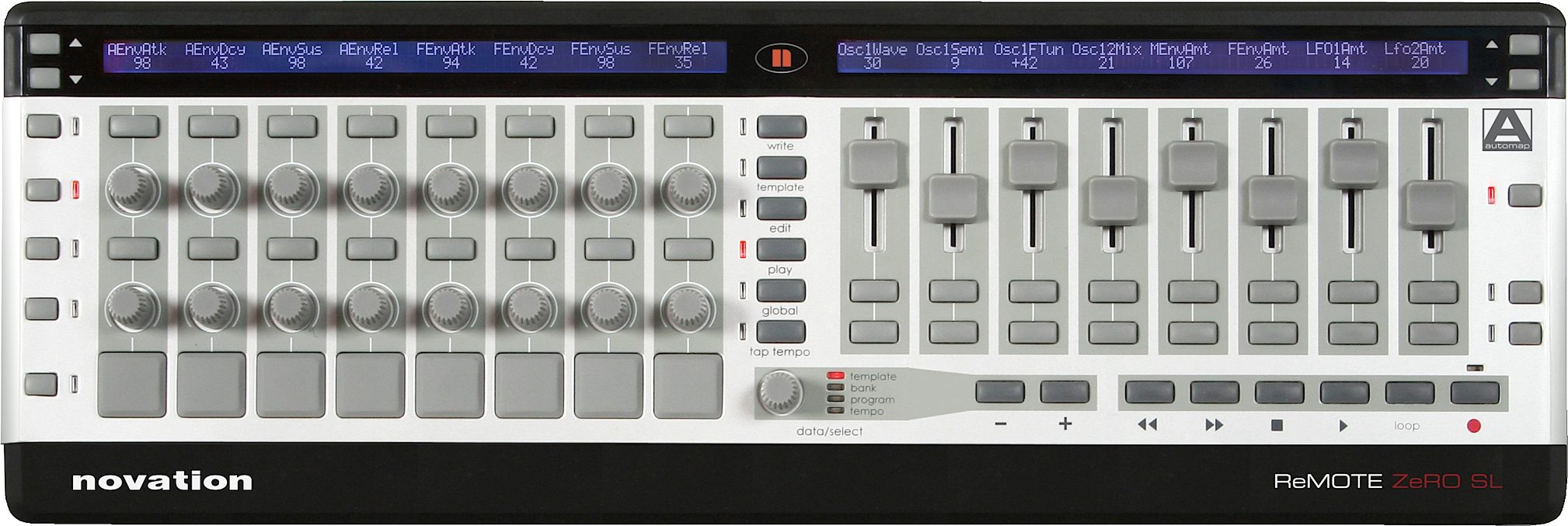
Finally, recording in the dark is a thing of the past. The SL shines a light on the murky world of MIDI control by providing 2 giant, brightly lit LCD screens alongside an intelligent Automap mode*, which detects what instruments you have in your project and intelligently and logically maps the controls to the SL's front panel.
2 Giant LCD Screens for Displaying Control Names and Values
Running along the top of the ReMOTE SL front panel are two 144-character screens, which can display up to 16 parameter names and values simultaneously. This makes controlling in the dark a thing of the past and does away with Template overlays or having to remember the function of each control. It also makes navigating though menus simple as each page is laid out side by side and edited using the buttons or knobs directly below.
Fantastic New Automap Mode
This new intelligent mode is set to revolutionise the way you make music! When an Automap-supported application boots up (currently Reason 3, Cubase SL/SX 3, Nuendo 3, Logic Pro 7 and Ableton Live 5, with more on their way), the SL loads up the Automap Template and all the parameter assignment is done for you, showing you everything clearly on the gigantic screens. All you have to do to switch between controlling different instruments or areas of your session is click once with the mouse or press one button on the SL, depending on the application. Go to the Automap page here to find out more.
8 Musically Responsive Trigger Pads
Brand new to… read more Novation controllers are these dynamic trigger pads for sketching out beats or bashing out samples. Each pad can be calibrated any way the user desires, with sensitivity and assigned data both fully programmable. For example, the pads can be set up as velocity-sensitive MIDI notes or buttons assigned to a CC number, where the value of that number is defined by the strength the pad is hit.
Hands-On Responsive Control for Every Application
The ergonomically designed front panel is inviting and simple to use. And it's all there -- 8 rotary potentiometers, 8 sliders, 8 rotary encoders and 24 switches that are entirely programmable. All controls can be named and memorised as a collection with a group template name, then saved in any one of the 64 template memories.
Use-Anywhere Portability and Rechargeable Power
The ReMOTE SL may be powered by six C-size alkaline/rechargeable batteries or external mains PSU. When connected to a computer via USB, rechargeable batteries are charged without the need of a mains re-charger.
Dedicated Transport Controls and Fast Template Function Buttons
Total control over your sequencer's transport and locate functions are yours via the dedicated transport and four function button controls. Select a new template, scroll through templates, send snapshots, transmit a panic command, etc. this kind of instant flexibility will streamline your working practice.
Built In USB / MIDI Interface
Now shipped with both Windows and Mac OSX USB MIDI drivers, just plug into the USB port, install the driver software and the ReMOTE is fully operational. Alternatively if your computer system does not have USB then simply plug into the MIDI ports. The ReMOTE SL provides two MIDI Out ports, one MIDI thru port and one MIDI In port. Information originating from the ReMOTE controls can be sent directly to the USB port and/or any of the MIDI out ports. The MIDI ports can be used to integrate the rest of your MIDI gear into your computer system.
* Open up certain applications with the SL connected and all instruments (and mixers etc. in some applications) within the session will be detected and mapped to logical areas of the SL, with their controls displayed clearly on the screens. All the user needs to do is press one button or click once with the mouse to switch between controlling different instruments. Currently supported applications are Reason 3, Cubase SL/SX3, Nuendo 3, Logic 7 and Ableton Live 5. read less
2 Giant LCD Screens for Displaying Control Names and Values
Running along the top of the ReMOTE SL front panel are two 144-character screens, which can display up to 16 parameter names and values simultaneously. This makes controlling in the dark a thing of the past and does away with Template overlays or having to remember the function of each control. It also makes navigating though menus simple as each page is laid out side by side and edited using the buttons or knobs directly below.
Fantastic New Automap Mode
This new intelligent mode is set to revolutionise the way you make music! When an Automap-supported application boots up (currently Reason 3, Cubase SL/SX 3, Nuendo 3, Logic Pro 7 and Ableton Live 5, with more on their way), the SL loads up the Automap Template and all the parameter assignment is done for you, showing you everything clearly on the gigantic screens. All you have to do to switch between controlling different instruments or areas of your session is click once with the mouse or press one button on the SL, depending on the application. Go to the Automap page here to find out more.
8 Musically Responsive Trigger Pads
Brand new to… read more Novation controllers are these dynamic trigger pads for sketching out beats or bashing out samples. Each pad can be calibrated any way the user desires, with sensitivity and assigned data both fully programmable. For example, the pads can be set up as velocity-sensitive MIDI notes or buttons assigned to a CC number, where the value of that number is defined by the strength the pad is hit.
Hands-On Responsive Control for Every Application
The ergonomically designed front panel is inviting and simple to use. And it's all there -- 8 rotary potentiometers, 8 sliders, 8 rotary encoders and 24 switches that are entirely programmable. All controls can be named and memorised as a collection with a group template name, then saved in any one of the 64 template memories.
Use-Anywhere Portability and Rechargeable Power
The ReMOTE SL may be powered by six C-size alkaline/rechargeable batteries or external mains PSU. When connected to a computer via USB, rechargeable batteries are charged without the need of a mains re-charger.
Dedicated Transport Controls and Fast Template Function Buttons
Total control over your sequencer's transport and locate functions are yours via the dedicated transport and four function button controls. Select a new template, scroll through templates, send snapshots, transmit a panic command, etc. this kind of instant flexibility will streamline your working practice.
Built In USB / MIDI Interface
Now shipped with both Windows and Mac OSX USB MIDI drivers, just plug into the USB port, install the driver software and the ReMOTE is fully operational. Alternatively if your computer system does not have USB then simply plug into the MIDI ports. The ReMOTE SL provides two MIDI Out ports, one MIDI thru port and one MIDI In port. Information originating from the ReMOTE controls can be sent directly to the USB port and/or any of the MIDI out ports. The MIDI ports can be used to integrate the rest of your MIDI gear into your computer system.
* Open up certain applications with the SL connected and all instruments (and mixers etc. in some applications) within the session will be detected and mapped to logical areas of the SL, with their controls displayed clearly on the screens. All the user needs to do is press one button or click once with the mouse to switch between controlling different instruments. Currently supported applications are Reason 3, Cubase SL/SX3, Nuendo 3, Logic 7 and Ableton Live 5. read less
Specs
LCD Display
LCD: 2 x 144 character silver. Blue LED backlit
Interfacing
Data Ports: 1 x USB MIDI (Win XP/Mac OSX class-compliant)
MIDI: 2 x MIDI Out, 1 x MIDI In, 1 x MIDI Thru
Sustain Pedal: 1 x 1/4 Jack Input
Expression pedal: 1 x 1/4 Jack Input
Controls
Rotary Encoders: 8 - Infinite Rotation
Rotary Potentiometers: 8 - Rotation 0 to 270 Degrees
Sliders: 8
Buttons: 32
Trigger pads: 8
Transport Controls: Rewind/Fast Forward/Stop/Start/Record/Loop (assignable buttons)
TAP TEMPO Button: 1
General Operation: Play/Edit/Template/Global/Write buttons
Data select: 1 x rotary encoder, press to change function
General
Battery Operation: 4 x Standard 'C' Size
External Power Supply: Standard Centre Positive 9V DC 600mA Power Supply (optional)
Size: W=468mm, H=68mm, D=163mm
Weight: 1.6kg (3.5lbs)
Pre-Installed Onboard Templates and Automaps
Novation:
V-Station
Bass Station
Propellerhead (only Automap):
Reason -- All Instruments, Mixer, rack effects
Native Instruments:
FM7
Pro 53
Battery II
Kontakt II
B4
G Media:
Oddity
ImpOSCar
Minimonsta
Steinberg:
Cubase/Nuendo Automap - Mixer/Effects and VSTs
Halion
Cakewalk:
Z3ta
Korg:
Legacy Cell
MS-20
Polysix
reFX:
Vanguard
Arturia:
CS-80V
Arp 2600V
Rob Papen/Linplug:
Albino
Apple:
Logic Automap - Mixer and Instruments
Ableton:
Live Automap - Mixer/Navigation and Effects
LCD: 2 x 144 character silver. Blue LED backlit
Interfacing
Data Ports: 1 x USB MIDI (Win XP/Mac OSX class-compliant)
MIDI: 2 x MIDI Out, 1 x MIDI In, 1 x MIDI Thru
Sustain Pedal: 1 x 1/4 Jack Input
Expression pedal: 1 x 1/4 Jack Input
Controls
Rotary Encoders: 8 - Infinite Rotation
Rotary Potentiometers: 8 - Rotation 0 to 270 Degrees
Sliders: 8
Buttons: 32
Trigger pads: 8
Transport Controls: Rewind/Fast Forward/Stop/Start/Record/Loop (assignable buttons)
TAP TEMPO Button: 1
General Operation: Play/Edit/Template/Global/Write buttons
Data select: 1 x rotary encoder, press to change function
General
Battery Operation: 4 x Standard 'C' Size
External Power Supply: Standard Centre Positive 9V DC 600mA Power Supply (optional)
Size: W=468mm, H=68mm, D=163mm
Weight: 1.6kg (3.5lbs)
Pre-Installed Onboard Templates and Automaps
Novation:
V-Station
Bass Station
Propellerhead (only Automap):
Reason -- All Instruments, Mixer, rack effects
Native Instruments:
FM7
Pro 53
Battery II
Kontakt II
B4
G Media:
Oddity
ImpOSCar
Minimonsta
Steinberg:
Cubase/Nuendo Automap - Mixer/Effects and VSTs
Halion
Cakewalk:
Z3ta
Korg:
Legacy Cell
MS-20
Polysix
reFX:
Vanguard
Arturia:
CS-80V
Arp 2600V
Rob Papen/Linplug:
Albino
Apple:
Logic Automap - Mixer and Instruments
Ableton:
Live Automap - Mixer/Navigation and Effects
Reviews
Reviewers gave this product an overall rating of 5 out of 5 stars.
(10 ratings)
Submitted December 10, 2008 by a customer from hotmail.com
"Great product that makes making music more fun!"
Verified Purchaser
zZounds has verified that this reviewer purchased this specific product from us.
I liked this controller so much, I also got the Remote 37 keyboard. It makes tweaking alot more fun, especially when automating during playback. If you own Reason, you will want to get this product.
Sound
Unit does not make sound.
Features
Many knobs, buttons and faders, with LCD display of what you are tweaking. The only negative is that you cannot map an unassigned controller to anything else. The assigned controllers can be mapped to other devices, but the device name of the parameter will not change. Have not tried the drum pads yet.
Ease of Use
You will need to go to the Novation site for the latest download. I use it with Reason 4, where is maps quickly to each device by simply clicking on them. The control mapping is extensive for each Reason device and includes Thor. For my purposes, not really wanting to do anything with midi configurations (as if I could anyway!), or using their editor, it is my best controller by far, because of the LCD display. I found both the manual and the video tutorials confusing for more esoteric programming tasks, but that just might be due to my lack of experience or interest in these areas. For someone savvy in the programming area, there appear to be quite a number of things you can do to customize for both software and hardware configurations.
Quality
This controller seems well-built. The faders work smoothly,… read more knobs work fine, but the rubberized buttons have a cushy feeling, rather than a hard on/off click that I would prefer.
Value
It would be hard to compare it in value to other products, because it seems to be in a class by itself. However, for what it does, it certainly is worth what you will pay for it. It will definitely save you remote mapping time and effort in Reason.
Manufacturer Support
I e-mailed Novation when I questioned the inability to map to unassigned controllers. They responded the next day. The web site has tutorials, but a limited FAQ.
The Wow Factor
Looks good, but I am more interested in functionality - which is where this product excels.
Musical Background:
Hobbyist
Musical Style:
Classical, New Age,Trance, and other electronic genres read less
Sound
Unit does not make sound.
Features
Many knobs, buttons and faders, with LCD display of what you are tweaking. The only negative is that you cannot map an unassigned controller to anything else. The assigned controllers can be mapped to other devices, but the device name of the parameter will not change. Have not tried the drum pads yet.
Ease of Use
You will need to go to the Novation site for the latest download. I use it with Reason 4, where is maps quickly to each device by simply clicking on them. The control mapping is extensive for each Reason device and includes Thor. For my purposes, not really wanting to do anything with midi configurations (as if I could anyway!), or using their editor, it is my best controller by far, because of the LCD display. I found both the manual and the video tutorials confusing for more esoteric programming tasks, but that just might be due to my lack of experience or interest in these areas. For someone savvy in the programming area, there appear to be quite a number of things you can do to customize for both software and hardware configurations.
Quality
This controller seems well-built. The faders work smoothly,… read more knobs work fine, but the rubberized buttons have a cushy feeling, rather than a hard on/off click that I would prefer.
Value
It would be hard to compare it in value to other products, because it seems to be in a class by itself. However, for what it does, it certainly is worth what you will pay for it. It will definitely save you remote mapping time and effort in Reason.
Manufacturer Support
I e-mailed Novation when I questioned the inability to map to unassigned controllers. They responded the next day. The web site has tutorials, but a limited FAQ.
The Wow Factor
Looks good, but I am more interested in functionality - which is where this product excels.
Musical Background:
Hobbyist
Musical Style:
Classical, New Age,Trance, and other electronic genres read less
6 of 7 people (86%) people found this review helpful. Did you?
Thanks for your opinion!
No longer available at zZounds
In most cases, a product is unavailable because it has been discontinued by the manufacturer
Related Accessories


Related Accessories
This is a carousel with product cards. Use the previous and next buttons to navigate.
People who bought this item also bought



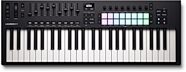
Novation Launchkey 49 MK4 USB MIDI Keyboard Controller
$279.99
- No Credit Check6 payments of$46.66/mo
Comes in 2 Colors-
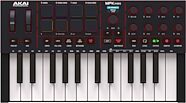
Akai MPK Mini IV USB MIDI Keyboard Controller, 25-Key
$99.00
- No Credit Check6 payments of$16.50/mo
Comes in 2 Colors-
On-Stage WS7700 Large Studio Workstation
$698.95
- 12 payments of$58.25/mo
- No Credit Check6 payments of$116.49/mo
-
PRS Paul Reed Smith SE Ed Sheeran Hollowbody I Baritone Electric Guitar (with Gig Bag)
$1,599.00
- 18 payments of$83.28/mo
Comes in 4 Colors-

Korg Multi/Poly Virtual Analog Synthesizer
$899.99
- 12 payments of$75.00/mo
- No Credit Check6 payments of$150.00/mo
-