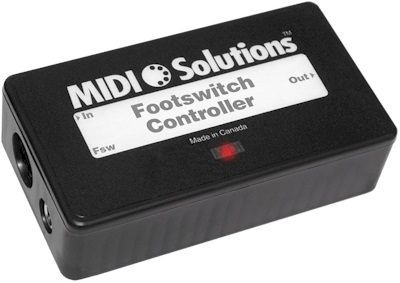
MIDI Solutions Footswitch Controller
No longer available at zZounds
zZounds Gear Experts Say...
No footswitch jack on your MIDI gear? Just plug your 1/4" footswitch pedal into this box. It can send MIDI CC messages, start/stop, tap tempo, and more.
Overview
The MIDI Solutions Footswitch Controller can be programmed to generate MIDI messages and perform MIDI functions via a footswitch or contact closure.
The MIDI Solutions Footswitch Controller provides a 1/4-inch TS jack input for connection to a footswitch or contact closure which can be used to trigger MIDI events. Triggered MIDI events are merged with incoming MIDI messages and sent to the MIDI output of the Footswitch Controller.
The Footswitch Controller can be programmed to send out a Note-on message of programmable Note number, velocity, and MIDI channel (a single MIDI channel or all 16 MIDI channels) when the footswitch is depressed, with a corresponding Note-off message sent when the footswitch is released. In addition to the above Note, a second Note with programmable Note number and velocity can be sent out simultaneously with the first.
It is also possible to cause the Footswitch Controller to alternate between sending the Note-on and Note-off messages each time the footswitch is depressed by programming the Footswitch Controller's Toggle parameter to ON.
It is also possible to cause the Footswitch Controller to alternate between sending the programmed value and the zero value each time the footswitch is depressed by programming the Footswitch Controller's Toggle parameter to ON.
It is also possible to cause the Footswitch Controller to alternate between sending the programmed value and the zero pitch bend value each time the footswitch is depressed by programming the Footswitch Controller's Toggle parameter to ON.
It is also possible to cause the Footswitch Controller to alternate between sending the Start and Stop messages each time the footswitch is depressed by programming the Footswitch Controller's Toggle parameter to ON.
It is also possible to cause the Footswitch Controller to alternate between System Exclusive messages with each tap of the footswitch by programming the Footswitch Controller's Toggle parameter to ON.
A Program Change INC/DEC function can also be created by programming a second Footswitch Controller (or using a Dual Footswitch Controller) as a Program Change DEC device and connecting its MIDI Out to the MIDI In of an INC device. When the footswitch of the DEC device is depressed, a special System Exclusive message is sent to the INC device, causing it to decrement its internal Program number and send out the next value.
The above messages can be sent out on a selected MIDI channel or all 16 MIDI channels.
An All-Notes-Off message on the current MIDI channel is sent out on depression of the footswitch to turn off any notes that may still be playing before switching to the next channel. Any notes played on the current MIDI channel while the footswitch is depressed are not echoed to the Footswitch Controller's MIDI Out, allowing you to enter the next channel information without being heard. Also, once a channel has been entered you can switch back and forth between that channel and the original without having to reenter the notes each time.
An All-Notes-Off message on the selected MIDI channel is sent out on depression of the footswitch to turn off any notes that may still be playing before switching to the next key. Any notes played on the selected MIDI channel while the footswitch is depressed are not echoed to the MIDI Out, allowing you to enter the next transpose interval without being heard. Also, once an interval has been entered you can switch back and forth between that interval and the original without having to reenter the key each time.
To transpose without turning existing notes off, see the Pitch Bend Function.
The Note-on Filter function can be applied to messages on a selected MIDI channel or all 16 MIDI channels.
It is also possible to cause the Footswitch Controller to alternate between filtering/not filtering the Note-on messages with each tap of the footswitch by programming the Footswitch Controller's Toggle parameter to ON. Or the Footswitch Controller can be programmed to filter Note-on messages only when the footswitch is released by programming the Polarity parameter of the footswitch opposite to its normal operation.
MIDI Echo and Footswitch Toggle parameters are selectable on/off.
The Polarity of the footswitch can be determined automatically on power-up, or programmed to normally-open or normally-closed.
The Footswitch Controller is programmed by sending it MIDI System Exclusive messages (see FAQs - Programming). This can be done easily with the Processors Programming Tools software. Once programmed, its settings are retained even after power is removed. The Footswitch Controller can be reprogrammed with different settings as often as needed.
The Footswitch Controller is MIDI-powered, and requires no batteries or power supply to operate with most MIDI products (see FAQs - Power and FAQs - LED for more information). A MIDI indicator LED lights up when the product is powered and flashes when MIDI data passes through it. read less
The MIDI Solutions Footswitch Controller provides a 1/4-inch TS jack input for connection to a footswitch or contact closure which can be used to trigger MIDI events. Triggered MIDI events are merged with incoming MIDI messages and sent to the MIDI output of the Footswitch Controller.
The Footswitch Controller can be programmed to send out a Note-on message of programmable Note number, velocity, and MIDI channel (a single MIDI channel or all 16 MIDI channels) when the footswitch is depressed, with a corresponding Note-off message sent when the footswitch is released. In addition to the above Note, a second Note with programmable Note number and velocity can be sent out simultaneously with the first.
It is also possible to cause the Footswitch Controller to alternate between sending the Note-on and Note-off messages each time the footswitch is depressed by programming the Footswitch Controller's Toggle parameter to ON.
Control Change
The Footswitch Controller can be programmed to send out a Control Change message of programmable Control Change number, value, and MIDI channel (a single MIDI channel or all 16 MIDI channels) when the footswitch is depressed, with a zero value of the Control Change message sent when the footswitch is released. In addition to the above Control Change message, a second Control Change message with… read more programmable Control Change number and value can be sent out simultaneously with the first.It is also possible to cause the Footswitch Controller to alternate between sending the programmed value and the zero value each time the footswitch is depressed by programming the Footswitch Controller's Toggle parameter to ON.
Pitch Bend
The Footswitch Controller can be programmed to send out a Pitch Bend message of programmable value and MIDI channel (a single MIDI channel or all 16 MIDI channels) when the footswitch is depressed, with a zero pitch bend message sent when the footswitch is released.It is also possible to cause the Footswitch Controller to alternate between sending the programmed value and the zero pitch bend value each time the footswitch is depressed by programming the Footswitch Controller's Toggle parameter to ON.
Program Change
The Footswitch Controller can be programmed to send out a Program Change message of programmable Program Change number and MIDI channel (a single MIDI channel or all 16 MIDI channels) when the footswitch is depressed. Nothing is sent on release of the footswitch.Start/Stop
The Footswitch Controller can be programmed to send out a MIDI Start message when the footswitch is depressed, with a MIDI Stop message sent when the footswitch is released.It is also possible to cause the Footswitch Controller to alternate between sending the Start and Stop messages each time the footswitch is depressed by programming the Footswitch Controller's Toggle parameter to ON.
System Exclusive
The Footswitch Controller can be programmed to send out a System Exclusive message when the footswitch is depressed, and/or another System Exclusive message when the footswitch is released. The maximum length of each System Exclusive message is 20 bytes.It is also possible to cause the Footswitch Controller to alternate between System Exclusive messages with each tap of the footswitch by programming the Footswitch Controller's Toggle parameter to ON.
Program Change INC/DEC
When a single Footswitch Controller unit is programmed as a Program Change INC device, a tap of the footswitch causes it to increment its current Program number and send out the next Program value (nothing is sent on release of the footswitch). The Program number continues to increment with each tap of the footswitch until it reaches 127, after which it wraps around to 0. If a Program Change is received by the Footswitch Controller at any time, it will update its current Program number to that value. This is useful when overriding the Footswitch Controller and jumping to other Programs because this value is picked up by the Footswitch Controller, and the next tap of the footswitch causes it to increment from this position.A Program Change INC/DEC function can also be created by programming a second Footswitch Controller (or using a Dual Footswitch Controller) as a Program Change DEC device and connecting its MIDI Out to the MIDI In of an INC device. When the footswitch of the DEC device is depressed, a special System Exclusive message is sent to the INC device, causing it to decrement its internal Program number and send out the next value.
The above messages can be sent out on a selected MIDI channel or all 16 MIDI channels.
Rechannelize
The Footswitch Controller can be programmed to operate as a MIDI Rechannelizing device. In this mode a depression of the footswitch allows you to enter any number of notes corresponding to the MIDI channel you would like to rechannelize to. For example, to rechannelize to MIDI channel 5, depress the footswitch, press any five notes (the notes don't need to be played sequentially, they can be played at the same time to allow them to be entered as quickly as possible), and then release the footswitch. After releasing the footswitch, all incoming MIDI messages are rechannelized to the selected MIDI channel. The Rechannelize function can be applied to messages on a selected MIDI channel, or all 16 MIDI channels. The power-up state is for all channels to pass through unchanged. If you are looking for a product that allows you to set and forget its rechannelize settings, see the MIDI Solutions Router.An All-Notes-Off message on the current MIDI channel is sent out on depression of the footswitch to turn off any notes that may still be playing before switching to the next channel. Any notes played on the current MIDI channel while the footswitch is depressed are not echoed to the Footswitch Controller's MIDI Out, allowing you to enter the next channel information without being heard. Also, once a channel has been entered you can switch back and forth between that channel and the original without having to reenter the notes each time.
Transpose
The Footswitch Controller can be programmed to operate as a Note Transposing device. In this mode a depression of the footswitch allows you to enter a note corresponding to the transpose interval. For example, to transpose up by a major third depress the footswitch, press the E above middle C, and then release the footswitch. After releasing the footswitch, all incoming MIDI Notes are transposed by the selected interval. The Transpose function can be applied to notes on a selected MIDI channel, or all 16 MIDI channels. The power-up state is for incoming notes to pass through untransposed.An All-Notes-Off message on the selected MIDI channel is sent out on depression of the footswitch to turn off any notes that may still be playing before switching to the next key. Any notes played on the selected MIDI channel while the footswitch is depressed are not echoed to the MIDI Out, allowing you to enter the next transpose interval without being heard. Also, once an interval has been entered you can switch back and forth between that interval and the original without having to reenter the key each time.
To transpose without turning existing notes off, see the Pitch Bend Function.
Tap Tempo
The Footswitch Controller can be programmed to operate in Tap Tempo mode. In this mode, the Footswitch Controller continuously sends out MIDI Timing Clock messages at a tempo corresponding to the most recent taps of the footswitch. For example, to send out MIDI clock messages at a tempo of 120 bpm, tap the footswitch at 1/2 second intervals. The Footswitch Controller continues to send out MIDI timing clock messages at the current tempo until a different tempo is entered by retapping the footswitch.Note-on Filter
The Footswitch Controller can be programmed to operate as a Note-on Filter. In this mode a depression of the footswitch causes the Footswitch Controller to filter incoming Note-on messages. An All-Notes-Off message is sent on depression of the footswitch to turn off any notes that may still be playing.The Note-on Filter function can be applied to messages on a selected MIDI channel or all 16 MIDI channels.
It is also possible to cause the Footswitch Controller to alternate between filtering/not filtering the Note-on messages with each tap of the footswitch by programming the Footswitch Controller's Toggle parameter to ON. Or the Footswitch Controller can be programmed to filter Note-on messages only when the footswitch is released by programming the Polarity parameter of the footswitch opposite to its normal operation.
MIDI Echo and Footswitch Toggle parameters are selectable on/off.
The Polarity of the footswitch can be determined automatically on power-up, or programmed to normally-open or normally-closed.
The Footswitch Controller is programmed by sending it MIDI System Exclusive messages (see FAQs - Programming). This can be done easily with the Processors Programming Tools software. Once programmed, its settings are retained even after power is removed. The Footswitch Controller can be reprogrammed with different settings as often as needed.
The Footswitch Controller is MIDI-powered, and requires no batteries or power supply to operate with most MIDI products (see FAQs - Power and FAQs - LED for more information). A MIDI indicator LED lights up when the product is powered and flashes when MIDI data passes through it. read less
Specs
Weight: 3.9 oz.
Dimensions: 4-3/16 in. x 2-3/16 in. x 1-3/32 in.
Dimensions: 4-3/16 in. x 2-3/16 in. x 1-3/32 in.
No longer available at zZounds
In most cases, a product is unavailable because it has been discontinued by the manufacturer

This is a carousel with product cards. Use the previous and next buttons to navigate.
People who bought this item also bought


Akai MPK Mini IV USB MIDI Keyboard Controller, 25-Key
$99.99
- No Credit Check6 payments of$16.66/mo
Comes in 2 Colors-
On-Stage WS7700 Large Studio Workstation
$698.95
- 12 payments of$58.25/mo
- No Credit Check6 payments of$116.49/mo
-
Novation Launchkey 49 MK4 USB MIDI Keyboard Controller
$279.99
- No Credit Check6 payments of$46.66/mo
Comes in 2 Colors-
Pioneer DJ DDJ-FLX4 DJ Controller
$329.00
- 8 payments of$41.13/mo
- No Credit Check6 payments of$54.83/mo
Comes in 2 Colors, 2 Mfg Models-

Korg Multi/Poly Virtual Analog Synthesizer
$899.99
- 12 payments of$75.00/mo
- No Credit Check6 payments of$150.00/mo
-