

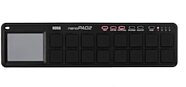
Korg nanoPAD2 USB Drum Pad Controller
Plug the nanoPAD2 into your iPad or laptop -- and capture your ideas anywhere with 16 velocity-sensitive drum pads and a Kaoss-style X/Y touch controller!
Korg padKontrol USB Drum Pad Controller
No longer available at zZounds

zZounds Gear Experts Say...
Control softsynths and effects, launch loops and video clips -- even your DAW transport. The 16 velocity-sensitive illuminated pads give you visual feedback.
Overview
Korg's padKontrol USB Drum Pad Controller is an entry-level MIDI drum machine designed for use in studio environments. It offers 16 LED illuminated, velocity-sensitive sample pads and comes preloaded with 30 Scenes (sample banks) so you can start sequencing beats as soon as you take your padKontrol out of its box. It also includes 16 user-assignable sample banks, so you can load it up with your own favorite sample sets -- and Mac- and PC-based library/editor software is provided, so you can do so with ease.
- Includes 30 preloaded sample sets 16 user Scene banks for saving sample… read more sets
- Kaoss-style X/Y touchpad allows you to manipulate multiple parameters simultaneously
- Includes Hold, Flam, and Roll functions
- Two assignable control knobs for controlling parameters
- Three-digit LED display shows sample and parameter values
- USB port
- MIDI in and out
- One assignable 1/4-inch pedal jack (pedal sold separately)
- Powered via USB or optional AC adapter (sold separately)
- USB cable and software installation CD included read less
16 Drum Pads, X/Y Touchpad, and 2 Control Knobs
Sample parameters can be manipulated on-the-fly using two large assignable control knobs or by using the Kaoss-style X/Y touchpad. There's also controls for triggering flams and rolls or holding a sample indefinitely -- giving you hardware access to diverse beat-making possibilities.Sounds to Kontrol
The padKontrol is more than just a drum machine -- use it to trigger drums, soft synths, samples, sound effects, or even video clips. And with 480 samples to choose from out of the box, plus room to add 64 of your own samples, the padKontrol is all you need to start creating your own beats. MIDI capable and extremely affordable for what it offers, padKontrol is a perfect addition to any professional or home recording studio.Features:
- USB drum machine controller with 16 LED-illuminated, velocity-sensitive trigger pads and an X/Y touchpad- Includes 30 preloaded sample sets 16 user Scene banks for saving sample… read more sets
- Kaoss-style X/Y touchpad allows you to manipulate multiple parameters simultaneously
- Includes Hold, Flam, and Roll functions
- Two assignable control knobs for controlling parameters
- Three-digit LED display shows sample and parameter values
- USB port
- MIDI in and out
- One assignable 1/4-inch pedal jack (pedal sold separately)
- Powered via USB or optional AC adapter (sold separately)
- USB cable and software installation CD included read less
Specs
Controllers:
- 16 velocity-sensitive Trigger pads with LED illumination
- X-Y pad
- Two assignable knobs
- Assignable pedal jack (requires a separately sold DS-1H or PS-1)
- Display: 7-segment, 3-digit LED
- Memory: 16 user scene memories, 30 preloaded scene templates
Connectors:
- Pedal
- MIDI In/Out
- USB (type B)
- Power supply jack (DC9V)
- Power Supply: DC9V AC adapter (optional), USB bus power (when using the USB connector)
- Current Consumption: Approximately 150 mA (maximum 180 mA)
- Dimensions: 12.36" (W) x 9.21" (D) x 2.17" (H), 314 (W) x 234 (D) x 55 (H) mm
- Weight: 2.12 lbs. / 960 g
Included Items:
- USB cable
- CD-ROM containing padKONTROL Editor/Librarian software etc.
- Software license agreement
- padKONTROL options: AC adapter, DS-1H Damper Pedal, PS-1 Pedal Switch
System Requirements Windows
- Operating System: Microsoft Windows XP Home Edition / Professional / x64 Edition
- Computer: Computer with a USB port, satisfying the operating requirements of Windows XP (USB chipset made by Intel Corporation is recommended)
*Driver software for Windows XP x64 Edition is beta-version.
System Requirements Macintosh
- Operating System: Mac OS X 10.2 or later
- Computer: Apple Macintosh computer with a USB port, satisfying the operating requirements of Mac OS X
*Apple, the Apple logo and Mac are trademarks of Apple Computer, Inc., registered in the U.S. and other countries.
*Windows XP is a registered trademark of Microsoft Corporation in the U.S. and other countries.
*All other product and company names are trademarks or registered trademarks of their respective holders.
- 16 velocity-sensitive Trigger pads with LED illumination
- X-Y pad
- Two assignable knobs
- Assignable pedal jack (requires a separately sold DS-1H or PS-1)
- Display: 7-segment, 3-digit LED
- Memory: 16 user scene memories, 30 preloaded scene templates
Connectors:
- Pedal
- MIDI In/Out
- USB (type B)
- Power supply jack (DC9V)
- Power Supply: DC9V AC adapter (optional), USB bus power (when using the USB connector)
- Current Consumption: Approximately 150 mA (maximum 180 mA)
- Dimensions: 12.36" (W) x 9.21" (D) x 2.17" (H), 314 (W) x 234 (D) x 55 (H) mm
- Weight: 2.12 lbs. / 960 g
Included Items:
- USB cable
- CD-ROM containing padKONTROL Editor/Librarian software etc.
- Software license agreement
- padKONTROL options: AC adapter, DS-1H Damper Pedal, PS-1 Pedal Switch
System Requirements Windows
- Operating System: Microsoft Windows XP Home Edition / Professional / x64 Edition
- Computer: Computer with a USB port, satisfying the operating requirements of Windows XP (USB chipset made by Intel Corporation is recommended)
*Driver software for Windows XP x64 Edition is beta-version.
System Requirements Macintosh
- Operating System: Mac OS X 10.2 or later
- Computer: Apple Macintosh computer with a USB port, satisfying the operating requirements of Mac OS X
*Apple, the Apple logo and Mac are trademarks of Apple Computer, Inc., registered in the U.S. and other countries.
*Windows XP is a registered trademark of Microsoft Corporation in the U.S. and other countries.
*All other product and company names are trademarks or registered trademarks of their respective holders.
Documents and Manuals
For support or warranty questions, please contact the manufacturer:
Phone: 631-390-6800
Web: https://www.korgusa.com/support
Phone: 631-390-6800
Web: https://www.korgusa.com/support
Korg's Description
Korg PadKontrol USB Drum Pad Controller
The Korg padKONTROL has proven to be one of most innovative and popular controllers ever. Now available in a sleek black package, the padKONTROL offers solid, responsive pads to inspire confidence when performing, while the unique X-Y touchpad allows many levels of expression. With vibrant pad lighting added for good measure, the padKONTROL continues Korg's long legacy of crafting some of the most innovative controllers out there.Beat It
The padKONTROL is ideal for creating natural, organic sounding drumbeats. Each of the 16 pads can be individually assigned a note number and MIDI channel so you can control a single drumkit or map it to control different devices in your setup at the same time. Eight different dynamic curves are available for each pad, or you can set each pad to its own fixed level. This allows you to set up certain instruments to feel as you like, and others to always play the perfect velocity, no matter how you strike the pad. You can also set up multiple pads to play the same drum but at different fixed velocities, giving you varied but predictable performance every time.Comfortable and Responsive Pads
No matter how you set them up, you'll appreciate the great feel of the pads. They respond well no matter where you strike them, not just in the center like many other systems. So you can freely play the pads with both hands, hit the edges or the center and get responsive, musical results -- every time. The X-Y pad adds real-time control of both flam and roll timing and dynamics. Moving from left to right increases the speed of the roll, or the distance between the 'flammed' notes. Moving up increase the volume of the roll, or the second note in the flam. This is a highly expressive and intuitive way to produce these natural drum techniques. With an optional footswitch, you can even add real 'kick' drum parts, or close a open hi-hat.Tons of Different Functions
In addition to accessing drum sounds and samples, the padKONTROL can also control soft synths and effects, trigger loops and video clips, and even act as transport controls for DAW software programs. Combining an assignable X-Y touchpad that also provides for natural-sounding flams and rolls, 16 great-feeling illuminated trigger pads, assignable knobs and a footpedal input, the padKONTROL provides unsurpassed evocative control. A MIDI message can be assigned to each pad, and they can be set for momentary or toggle operation. In addition to sending a value as the pad is touched, a specific value can be sent as the pad is released, so they can be used like buttons or switches to control any function on your soft synths and DAWs.Based on Korg's renowned KAOSS technology, the X-Y pad can be assigned to control any two continuous controllers in real-time. You might set the X Axis to control pitch bend on a synth while the Y Axis controls reverb depth. Or set them to control filter cutoff and resonance, or multiple delay parameters for evocative and expressive performance and mixing possibilities. Two assignable knobs provide continuous control of two other MIDI parameters. You can easily invert the values sent from any of these controllers so you can quickly adjust them to your needs. Even the footswitch input can be set as a momentary or toggle switch for any parameter. Like the X-Y and trigger pads, the pedal also can send a specific release value.
See It
Whenever you strike a pad or move a controller the built-in display shows what message or value is being sent, giving you accurate confirmation of what you're doing. The pads have a striking visual behavior, which will move you to visually groove along with your playing. Pads assigned to notes light up when struck and then shut off. Pads assigned to CC messages stay lit to show their status. Three variations of the Illumination mode cause the trigger pads to light up in unique patterns. Two begin when a trigger pad is struck, and a third starts automatically when the padKONTROL sits idle for a few minutes. The great feel of the trigger pads and the Illumination mode work together synergistically to catapult your performance to a higher intensity level than ever before.Manage it!
Thankfully, once you have all the controllers set the way you like, you can save the entire set of assignments as a "User Scene." Sixteen User Scenes are available in the padKONTROL itself, and they can be quickly selected using the pads. In addition, thirty preset scenes are included, designed to instantly match the padKONTROL to some of the most popular music software programs.The padKONTROL also comes with free Editor/Librarian software for Windows XP and Mac OSX. Using the computer's graphic capabilities, the Editor/Librarian software makes it easy to create, store and organize vast libraries of scenes and "scene sets."
Reviews
Reviewers gave this product an overall rating of 4.5 out of 5 stars.
(55 ratings)
Submitted October 15, 2006 by a customer from yahoo.com
"Better Midi controller than the AKAI MPC!"
Verified Customer
zZounds has verified that this reviewer made a purchase from us.
It has plenty of useful features, its more responsive than the AKAI MPC, the pads are big enough so that your fingers don't fall off, and its pretty easy to use.
Features
Very responsive pads which are easy on you fingers. The pads are assignable too. You can even save your different arrangements!
Ease of Use
Just hook it up to a midi device and you're ready to go!
Value
A little pricy since it is only a midi controller, but it's worth the $.
The Wow Factor
Tell me you don't want one. The pads light up when you press them.
Musical Background:
Producer, recording engineer, and musician
Musical Style:
Drum and Bass
20 of 21 people (95%) people found this review helpful. Did you?
Thanks for your opinion!
No longer available at zZounds

This is a carousel with product cards. Use the previous and next buttons to navigate.
People who bought this item also bought
ADJ WMX1 MK2 Wolfmix Lighting Controller
$859.99
- 12 x$71.67
- 8 x$107.50
- No Credit Check6 x$143.33
- No Credit Check4 x$215.00
Native Instruments Kontrol S88 MK3 USB MIDI Keyboard Controller, 88-Key
$1,299.00
- 18 x
- 12 x$108.25
- 8 x$162.38
PreSonus Quantum HD 8 26x30 USB-C Audio Interface
$1,049.99
- 18 x
- 12 x$87.50
- 8 x$131.25
- No Credit Check6 x$175.00
- No Credit Check4 x$262.50
Fender American Professional II Telecaster Electric Guitar, Maple Fingerboard (with Case)
$1,839.99
- 12 x$153.33
- 8 x$230.00

Akai MPC Key 37 Synthesizer Production Keyboard
$899.00
- 12 x$74.92
- 8 x$112.38
- No Credit Check6 x$149.83
- No Credit Check4 x$224.75
Akai MPK Mini Plus USB MIDI Keyboard Controller, 37-Key
$169.00
- No Credit Check6 x$28.17
- No Credit Check4 x$42.25
Shure SLXD24D/N8CB Dual Handheld Wireless Nexadyne 8/C Microphone System
$1,959.00
- 18 x
- 12 x$163.25
- 8 x$244.88