Antares Auto-Tune Pitch Software
No longer available at zZounds
zZounds Gear Experts Say...
The Next Generation of the Worldwide Standard in Professional Pitch Correction
Overview
Auto-Tune corrects intonation problems in vocals or solo instruments, in real time, without distortion or artifacts, while preserving all of the expressive nuance of the original performance - with audio quality so pristine that the only difference between what goes in and what comes out is the intonation. All with a user-interface that is a model of clarity, speed and ease-of-use.
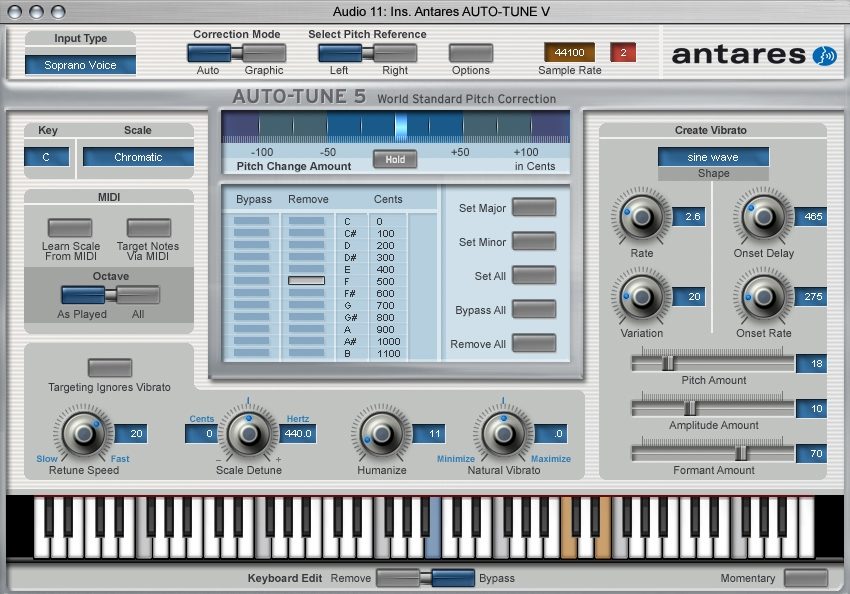
For most common pitch problems, Auto-Tune 5's Automatic Mode instantaneously detects the pitch of the input, identifies the closest pitch in a user-specified scale (including minor, major, chromatic and 26 historical and microtonal scales), and corrects the input pitch to match the scale pitch. A Retune Speed control lets you match the retune rate to virtually any performance style.
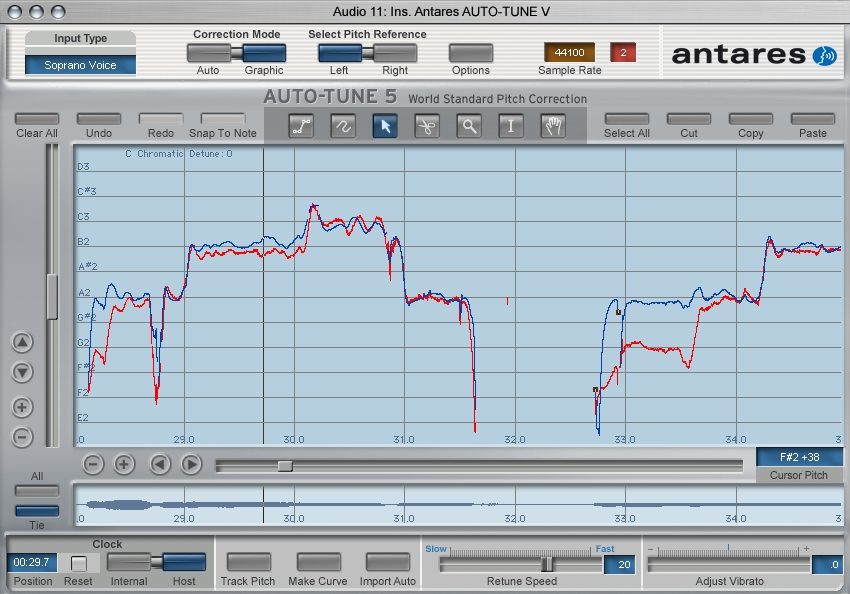
For meticulous tweaking, the Graphical Mode displays the performance's detected pitch envelope and allows you to draw in the desired pitch using a variety of graphics tools. This mode gives complete control over the correction or modification of the most elaborate expressive gestures.
Auto-Tune is used daily by thousands of audio professionals around the world. Whether to save studio and editing time, ease the frustration of endless retakes, to save that otherwise once-in-a-lifetime performance, or to create striking special effects, Auto-Tune 5 is the tool of choice.
Prepare to be amazed.
What's New in Auto-Tune 5
Building on the great sound quality, transparent processing and ease of use that have always distinguished… read more Auto-Tune, Auto-Tune 5 adds significant new features as well as a sleek new user interface.
Key new Auto-Tune 5 features include:
Improved pitch detection algorithm: While Auto Tune's patented pitch detection technology has always provided unmatched speed and accuracy, Auto-Tune 5 introduces improvements in performance with marginal quality (noisy, poorly isolated, etc.) audio.
A sleek new interface: As Auto-Tune's features have proliferated from version to version, Antares have continually focused on maintaining its ease of use. With Auto-Tune 5, they have undertaken a complete graphic redesign. The result is both easy on the eyes and logically groups related controls for intuitive functionality.
Consolidated Pitch Tracking control: The previously separate Automatic and Graphical Mode Tracking controls have been consolidated into a single control and relocated to the Options dialog for set-it-andforget-it simplicity.
Automatic Mode Features
Humanize function: For those concerned about pitch correction that is 'too perfect,' the Humanize function allows you to set a fast retune speed for short notes, while still allowing natural variation in held notes, for results that are even more natural and realistic.
Realtime natural vibrato adjustment: The new realtime Natural Vibrato function allows you to modify (either increasing or decreasing) the depth of any vibrato that is present in the original performance.
Graphical Mode Features
Larger Pitch Edit Display: As you've no doubt noticed, the Pitch Edit Display is now bigger. Lots bigger.
Sync to host transport (host dependent): For hosts that provide valid time information, Auto-Tune 5 will now maintain sync with the host program. Once you have tracked audio and created correction curves, you can move around in your track at will. No more having to always start playback at exactly the same location.
Selectable Clock Source: For hosts that do not provide valid time information, Auto-Tune 5's clock display and selection functions let you use an internal time reference for Auto-Tune 4 style operation.
Realtime pitch tracking display: During the Track Pitch process, the graphic representation of the pitch and envelope will be displayed in realtime as the audio plays.
Full-time correction mode (host dependent): Whenever Auto-Tune 5 is not specifically tracking audio, Auto-Tune 5 will be operating in correction mode. There is no longer any need to press a Correct Pitch button. Besides being convenient, that makes possible the following feature:
Multiple simultaneous Graphical Mode instances (host dependent): You can now have multiple instances of Auto-Tune Graphical Mode operating on different tracks simultaneously, even if their windows are not open. In previous versions, since you had to have plug-in windows open to engage Correct Pitch mode, only open instances could be active. No longer.
Editing functions no longer modal: You can now use all of the graphical editing features while Auto-Tune 5 is either tracking or correcting pitch.
Enhanced Envelope Display functionality: Antares have also made changes to the Envelope Display to make it much more useful for quick and easy navigation around your audio:
Realtime graphical vibrato depth adjustment: The Adjust Vibrato control allows you to modify the depth of vibrato in your audio while preserving the contour of the original vibrato. Moving this control results in a real-time graphical representation of the resulting vibrato contour.
Dedicated Snap To Note button: When using the Line Tool, clicking this button constrains the tool to exact scale notes.
Dedicated Clear All Data function: Provides a convenient method to instantly clear all saved tracked audio and correction curve data.
Compatibility with Pen Tablet Input: With a pen tablet, you can control Auto-Tune 5's graphical tools (as well as all the other controls) using a familiar pen-style input device. A pen tablet can offer increased drawing accuracy with less wrist stress in long sessions.
And lots more... read less
For most common pitch problems, Auto-Tune 5's Automatic Mode instantaneously detects the pitch of the input, identifies the closest pitch in a user-specified scale (including minor, major, chromatic and 26 historical and microtonal scales), and corrects the input pitch to match the scale pitch. A Retune Speed control lets you match the retune rate to virtually any performance style.
For meticulous tweaking, the Graphical Mode displays the performance's detected pitch envelope and allows you to draw in the desired pitch using a variety of graphics tools. This mode gives complete control over the correction or modification of the most elaborate expressive gestures.
Auto-Tune is used daily by thousands of audio professionals around the world. Whether to save studio and editing time, ease the frustration of endless retakes, to save that otherwise once-in-a-lifetime performance, or to create striking special effects, Auto-Tune 5 is the tool of choice.
Prepare to be amazed.
What's New in Auto-Tune 5
Building on the great sound quality, transparent processing and ease of use that have always distinguished… read more Auto-Tune, Auto-Tune 5 adds significant new features as well as a sleek new user interface.
Key new Auto-Tune 5 features include:
Improved pitch detection algorithm: While Auto Tune's patented pitch detection technology has always provided unmatched speed and accuracy, Auto-Tune 5 introduces improvements in performance with marginal quality (noisy, poorly isolated, etc.) audio.
A sleek new interface: As Auto-Tune's features have proliferated from version to version, Antares have continually focused on maintaining its ease of use. With Auto-Tune 5, they have undertaken a complete graphic redesign. The result is both easy on the eyes and logically groups related controls for intuitive functionality.
Consolidated Pitch Tracking control: The previously separate Automatic and Graphical Mode Tracking controls have been consolidated into a single control and relocated to the Options dialog for set-it-andforget-it simplicity.
Automatic Mode Features
Humanize function: For those concerned about pitch correction that is 'too perfect,' the Humanize function allows you to set a fast retune speed for short notes, while still allowing natural variation in held notes, for results that are even more natural and realistic.
Realtime natural vibrato adjustment: The new realtime Natural Vibrato function allows you to modify (either increasing or decreasing) the depth of any vibrato that is present in the original performance.
Graphical Mode Features
Larger Pitch Edit Display: As you've no doubt noticed, the Pitch Edit Display is now bigger. Lots bigger.
Sync to host transport (host dependent): For hosts that provide valid time information, Auto-Tune 5 will now maintain sync with the host program. Once you have tracked audio and created correction curves, you can move around in your track at will. No more having to always start playback at exactly the same location.
Selectable Clock Source: For hosts that do not provide valid time information, Auto-Tune 5's clock display and selection functions let you use an internal time reference for Auto-Tune 4 style operation.
Realtime pitch tracking display: During the Track Pitch process, the graphic representation of the pitch and envelope will be displayed in realtime as the audio plays.
Full-time correction mode (host dependent): Whenever Auto-Tune 5 is not specifically tracking audio, Auto-Tune 5 will be operating in correction mode. There is no longer any need to press a Correct Pitch button. Besides being convenient, that makes possible the following feature:
Multiple simultaneous Graphical Mode instances (host dependent): You can now have multiple instances of Auto-Tune Graphical Mode operating on different tracks simultaneously, even if their windows are not open. In previous versions, since you had to have plug-in windows open to engage Correct Pitch mode, only open instances could be active. No longer.
Editing functions no longer modal: You can now use all of the graphical editing features while Auto-Tune 5 is either tracking or correcting pitch.
Enhanced Envelope Display functionality: Antares have also made changes to the Envelope Display to make it much more useful for quick and easy navigation around your audio:
Realtime graphical vibrato depth adjustment: The Adjust Vibrato control allows you to modify the depth of vibrato in your audio while preserving the contour of the original vibrato. Moving this control results in a real-time graphical representation of the resulting vibrato contour.
Dedicated Snap To Note button: When using the Line Tool, clicking this button constrains the tool to exact scale notes.
Dedicated Clear All Data function: Provides a convenient method to instantly clear all saved tracked audio and correction curve data.
Compatibility with Pen Tablet Input: With a pen tablet, you can control Auto-Tune 5's graphical tools (as well as all the other controls) using a familiar pen-style input device. A pen tablet can offer increased drawing accuracy with less wrist stress in long sessions.
And lots more... read less
Specs
Macintosh Versions
RTAS
* Pro Tools HD or Pro Tools LE 6.2 or later
* Pro Tools HD 7.2 or Pro Tools LE 7.3 or later required for Graphical Mode sync
* Mac OS 10.3.9 or later as required by your version of Pro Tools
VST
* A host program that supports the VST plug-in format
* Mac OS 10.3.9 or later as required by your host
Audio Units
* A host program that supports the Audio Units plug-in format
* Mac OS 10.3.9 or later as required by your host
PC Versions
RTAS
* Pro Tools HD or Pro Tools LE 6.2 or later
* Pro Tools HD 7.2 or Pro Tools LE 7.3 or later required for Graphical Mode sync
* Windows XP or later as required by your version of Pro Tools
VST
* A host program that supports the VST format
* Windows XP as required by your host
MIDI
Auto-Tune 5's MIDI functions require that your computer be equipped with a MIDI interface and properly configured system level software. Some host applications may not support the routing of MIDI to plug- ins, in which case Auto-Tune 5's MIDI functions will not operate.
Auto-Tune 5 requires authorization via iLok USB smartkey.
RTAS
* Pro Tools HD or Pro Tools LE 6.2 or later
* Pro Tools HD 7.2 or Pro Tools LE 7.3 or later required for Graphical Mode sync
* Mac OS 10.3.9 or later as required by your version of Pro Tools
VST
* A host program that supports the VST plug-in format
* Mac OS 10.3.9 or later as required by your host
Audio Units
* A host program that supports the Audio Units plug-in format
* Mac OS 10.3.9 or later as required by your host
PC Versions
RTAS
* Pro Tools HD or Pro Tools LE 6.2 or later
* Pro Tools HD 7.2 or Pro Tools LE 7.3 or later required for Graphical Mode sync
* Windows XP or later as required by your version of Pro Tools
VST
* A host program that supports the VST format
* Windows XP as required by your host
MIDI
Auto-Tune 5's MIDI functions require that your computer be equipped with a MIDI interface and properly configured system level software. Some host applications may not support the routing of MIDI to plug- ins, in which case Auto-Tune 5's MIDI functions will not operate.
Auto-Tune 5 requires authorization via iLok USB smartkey.
Reviews
Reviewers gave this product an overall rating of 4.5 out of 5 stars.
(70 ratings)
Submitted October 21, 2006 by a customer from swat.coop
"Vaulable for vocal recording in any studio."
Verified Customer
zZounds has verified that this reviewer made a purchase from us.
Will use it on all vocasl whether needed or not at a wide setting. It will simply enhance the vocal.
Sound
Sound it good. You have to tweek it so that the voice does not sound processed. Any processing of vocals can be overdone to the point it is synthesized. Use it with caution.
Features
Best feature is the auto tune section. Set correctly really helps especially with new singers tyo the studio. Not every one who records are going for a hit record. I do a lot of locals who simply want a project to sell to friends or maybe only sing locally. They don't record on a regular basis and auto tune helps to some degree when they come in nerveous to lay down vocal tracks.
Ease of Use
Does take some time to get used to settings for both male or female vocals.
Quality
I actually own an older version but am looking to upgrade. But so far I haven't run into any issues with the software.
Value
Since I know of no other product that does what this one does I guess it is prices right.
Manufacturer Support
Never did use them.
Musical Background:
Recording Engineer, Revival Records
Musical Style:
Southern and Contemporary Gospel
52 of 58 people (90%) people found this review helpful. Did you?
Thanks for your opinion!
No longer available at zZounds
In most cases, a product is unavailable because it has been discontinued by the manufacturer

This is a carousel with product cards. Use the previous and next buttons to navigate.
People who bought this item also bought
Solid State Logic SSL Fusion Stereo Analogue Colour Mix Bus Processor
$2,699.99
- 12 payments of$225.00/mo
-
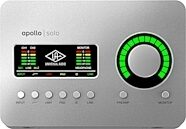
Universal Audio Apollo Solo Thunderbolt 3 Audio Interface
$699.00
- 12 payments of$58.25/mo
- No Credit Check6 payments of$116.50/mo
-
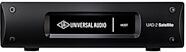
Universal Audio UAD-2 Satellite USB OCTO Core DSP Accelerator (for Windows PC)
$1,199.00
- 12 payments of$99.92/mo
- No Credit Check6 payments of$199.83/mo
-
Avid Pro Tools Studio Music Production Software (Perpetual License) with 1-Year Software Updates + Support Plan
$599.00
- 12 payments of$49.92/mo
- No Credit Check6 payments of$99.83/mo
-
Native Instruments Kontrol S49 MK3 USB MIDI Keyboard Controller, 49-Key
$749.00
- 12 payments of$62.42/mo
- No Credit Check6 payments of$124.83/mo
-
Universal Audio UAD-2 Satellite Thunderbolt 3 OCTO Core DSP Accelerator
$1,199.00
- 12 payments of$99.92/mo
- No Credit Check6 payments of$199.83/mo
-

Arturia V Collection 11 Pro Software
$699.00
- 12 payments of$58.25/mo
- No Credit Check6 payments of$116.50/mo
-