Edirol UA20 USB Audio/MIDI Interface 24/44.1kHz
No longer available at zZounds
zZounds Gear Experts Say...
Low latency. Direct Monitoring.
Overview
24-Bit, USB Bus-powered, Audio & MIDI 'Dual' Interface
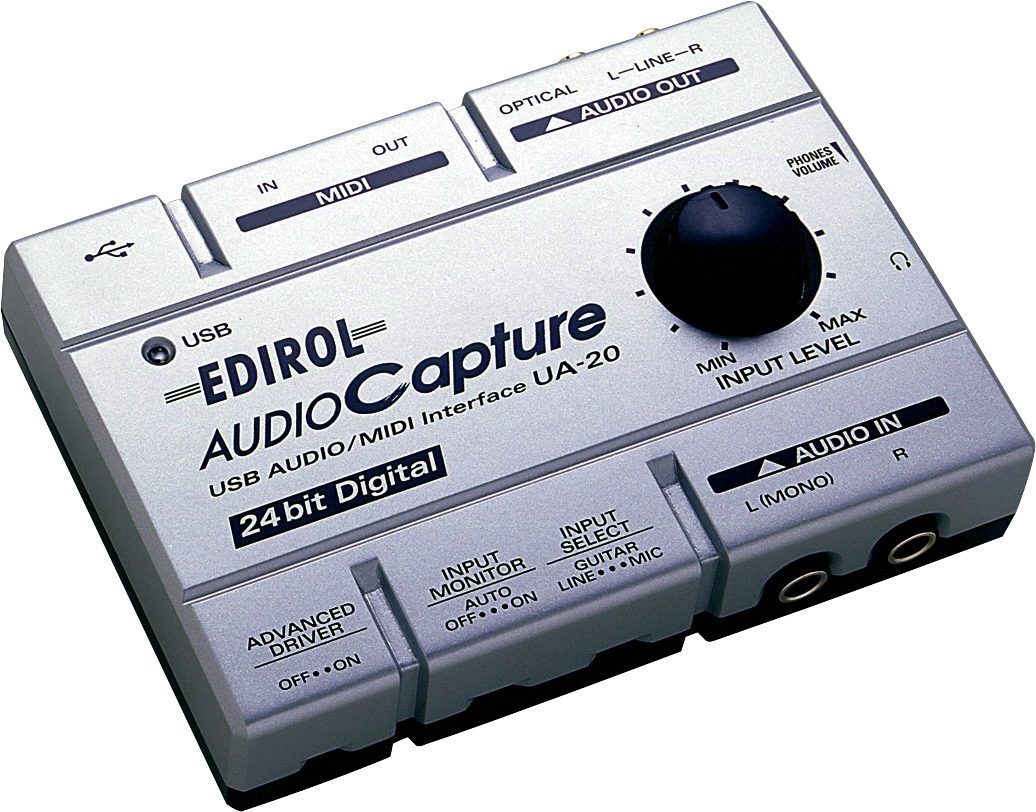
The UA-20 brings portable 24-bit quality to your Mac or PC applications. Your laptop audio is now 24-bit resolution, powered by your computer through the USB bus, and flexible! Connect your guitar, mic and line level input with Edirol's new portable, affordable UA-20 USB MIDI/Audio Interface.
Features:
A complete USB audio recording device of high-definition with 24-bit AD/DA conversion
Low latency with Direct Monitoring function
Direct Monitoring function allows for low latency performance while recording.
ASIO 2.0 (Win/Mac), MME, WDM drivers and Sound Manager (Mac) compatibility
Create with any music software program for Mac or PC. It's compatible with any audio production software and optimized for ASIO or WDM compatible music software for your music creation.
Fast and stable MIDI input/output with FPT
USB bus powered, adaptor free
USB connection supplies power as well as data
Headphone (1/8 in.) jack and headphone volume
Audio/MIDI Interface
Portable
Channels:
1 stereo record
1 stereo playback
Full duplex
The UA-20 brings portable 24-bit quality to your Mac or PC applications. Your laptop audio is now 24-bit resolution, powered by your computer through the USB bus, and flexible! Connect your guitar, mic and line level input with Edirol's new portable, affordable UA-20 USB MIDI/Audio Interface.
Features:
A complete USB audio recording device of high-definition with 24-bit AD/DA conversion
Low latency with Direct Monitoring function
Direct Monitoring function allows for low latency performance while recording.
ASIO 2.0 (Win/Mac), MME, WDM drivers and Sound Manager (Mac) compatibility
Create with any music software program for Mac or PC. It's compatible with any audio production software and optimized for ASIO or WDM compatible music software for your music creation.
Fast and stable MIDI input/output with FPT
USB bus powered, adaptor free
USB connection supplies power as well as data
Headphone (1/8 in.) jack and headphone volume
Audio/MIDI Interface
Portable
Channels:
1 stereo record
1 stereo playback
Full duplex
Specs
Signal Processing: AD/DA 24-bit
Sample Rate: Digital Out 44.1 kHz
Audio driver compatibility: ASIO2.0 (Win/Mac), WDM, MME, Sound Manager
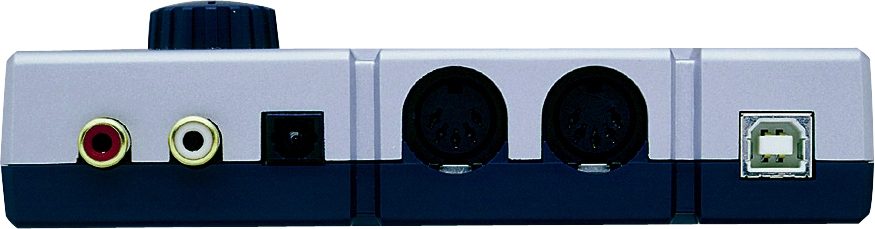
Inputs: Line/Guitar/Mic x 2
Outputs:
Line (RCA pin) x 2
S/P DIF Optical
Headphone
MIDI Interface: IN x 1/OUT x 1
System Requirements
Macintosh
MacOS 8.5, 8.6, 9.x and OS X
USB ready Apple Macintosh
PowerPC G3/233 MHz or higher
64 MB RAM or more
OMS 2.3.3 or later. FreeMIDI 1.35 or later.
Windows
Microsoft Windows Me/98/98SE/2000/XP
Windows compatible equipped with a USB* port
Pentium Processor 200 MHz or higher
32 MB RAM or more
* Must have a compatible USB host controller.
Sample Rate: Digital Out 44.1 kHz
Audio driver compatibility: ASIO2.0 (Win/Mac), WDM, MME, Sound Manager
Inputs: Line/Guitar/Mic x 2
Outputs:
Line (RCA pin) x 2
S/P DIF Optical
Headphone
MIDI Interface: IN x 1/OUT x 1
System Requirements
Macintosh
MacOS 8.5, 8.6, 9.x and OS X
USB ready Apple Macintosh
PowerPC G3/233 MHz or higher
64 MB RAM or more
OMS 2.3.3 or later. FreeMIDI 1.35 or later.
Windows
Microsoft Windows Me/98/98SE/2000/XP
Windows compatible equipped with a USB* port
Pentium Processor 200 MHz or higher
32 MB RAM or more
* Must have a compatible USB host controller.
Reviews
Submitted May 14, 2007
"Driver Nightmare - Avoid at all costs."
I want to smash this piece of crap with a sledge hammer and then take that sledge hammer to the developers at Edirol who write the drivers.
I've never, ever, had a USB device this unstable before. It boggles the mind.
Sound
Sound wise, the unit seems fine. Good for basic use.
Features
It's okay. Not bad, not spectacular.
Ease of Use
This gets a 2 because of my main issue with this piece of junk. The drivers are absolutely horrible. They don't install 90% of the time. I've tried installing this thing in four different PCs, and in all four of them I had isues with the unit just eventually "winking" out of existence. The driver suddenly gets corrupt and the unit won't work. Trying to reinstall the driver will only guarantee you membership in the nearest psychiatric ward. The drivers for this thing are total crap. It's not that I don't know how to install drivers for a USB device, I do IT for a living. Eventually, by what appears to be pure luck or chance, the drivers will "take"; but for the most part, you are stuck with errors like "The hardware was not installed because the wizard cannot find the necessary software" even though I'm pointing it directly at the software directory with the proper .inf file. Usually I have to manually clean the system, weeding through not only the registry, but also C:\Windows\System32, C:\Windows\System32\Drivers\, and C:\Windows\inf\ directories… read more to kill off the old RC files. There is absolutely no excuse for the nightmare driver install of this unit. Stay far, far, away from this thing if you value your time and sanity.
Quality
Plastic. Not super cheap, but not extremely solid either. It probably won't stand much abuse, but sturdy enough to survive normal day to day use.
Value
Not worth it for the driver instability issues. At any given moment, it could just wink out of existence on your PC. Hardly worth $150 for something that's completely unreliable in that sense.
Manufacturer Support
Non-existent, basically. WHEN you have driver issues, (and you will !) you can be content in the knowledge that you're essentially on your own. They'll only ask you if you read the instructions and/or email them to you - even after you've already explained that you've followed all those steps and they don't work. Nice to know they don't listen.
The Wow Factor
Pass this nightmare / headache by - there are far better units out there.
Musical Background:
Active Musician, have played for 30 years, been in bands since 1980
Musical Style:
Progressive Rock read less
Sound
Sound wise, the unit seems fine. Good for basic use.
Features
It's okay. Not bad, not spectacular.
Ease of Use
This gets a 2 because of my main issue with this piece of junk. The drivers are absolutely horrible. They don't install 90% of the time. I've tried installing this thing in four different PCs, and in all four of them I had isues with the unit just eventually "winking" out of existence. The driver suddenly gets corrupt and the unit won't work. Trying to reinstall the driver will only guarantee you membership in the nearest psychiatric ward. The drivers for this thing are total crap. It's not that I don't know how to install drivers for a USB device, I do IT for a living. Eventually, by what appears to be pure luck or chance, the drivers will "take"; but for the most part, you are stuck with errors like "The hardware was not installed because the wizard cannot find the necessary software" even though I'm pointing it directly at the software directory with the proper .inf file. Usually I have to manually clean the system, weeding through not only the registry, but also C:\Windows\System32, C:\Windows\System32\Drivers\, and C:\Windows\inf\ directories… read more to kill off the old RC files. There is absolutely no excuse for the nightmare driver install of this unit. Stay far, far, away from this thing if you value your time and sanity.
Quality
Plastic. Not super cheap, but not extremely solid either. It probably won't stand much abuse, but sturdy enough to survive normal day to day use.
Value
Not worth it for the driver instability issues. At any given moment, it could just wink out of existence on your PC. Hardly worth $150 for something that's completely unreliable in that sense.
Manufacturer Support
Non-existent, basically. WHEN you have driver issues, (and you will !) you can be content in the knowledge that you're essentially on your own. They'll only ask you if you read the instructions and/or email them to you - even after you've already explained that you've followed all those steps and they don't work. Nice to know they don't listen.
The Wow Factor
Pass this nightmare / headache by - there are far better units out there.
Musical Background:
Active Musician, have played for 30 years, been in bands since 1980
Musical Style:
Progressive Rock read less
of 3 people (0%) people found this review helpful. Did you?
Thanks for your opinion!
No longer available at zZounds
In most cases, a product is unavailable because it has been discontinued by the manufacturer
This is a carousel with product cards. Use the previous and next buttons to navigate.
People who bought this item also bought


Neumann TLM 102 Studio Microphone
$799.00
- 12 payments of$66.58/mo
- No Credit Check6 payments of$133.17/mo
-

Yamaha HS8 Active Studio Monitor
$398.99
- 8 payments of$49.87/mo
- No Credit Check6 payments of$66.50/mo
-

Shure SM7B Dynamic Cardioid Studio Vocal Microphone
$439.00
- 8 payments of$54.88/mo
- No Credit Check6 payments of$73.17/mo
-


Shure SM7dB Active Cardioid Dynamic Broadcast Microphone
$549.00
- 8 payments of$68.63/mo
- No Credit Check6 payments of$91.50/mo
-


Rode NT1 Signature Series Studio Condenser Microphone
$159.00
- No Credit Check6 payments of$25.59/mo
-
Yamaha HS7 Active Studio Monitor
$349.99
- 8 payments of$43.75/mo
- No Credit Check6 payments of$58.33/mo
-