
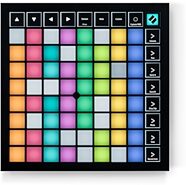
Novation Launchpad X USB MIDI Grid Controller
Launch clips and scenes, play notes and scales, and more! Take control of Ableton Live with Launchpad X's 64 large velocity- and pressure-sensitive RGB pads.
$219.99
- No Credit Check6 x$36.66
- No Credit Check4 x$55.00
Novation Launchpad Controller for Ableton Live
No longer available at zZounds

zZounds Gear Experts Say...
The compact Novation Launchpad, with its intuitive multi-color grid, is a dedicated controller for Ableton Live.
Overview
Launchpad is a dedicated controller for Ableton Live, co-developed by Novation and Ableton. Perfect for DJing, performing live or working in the studio, Launchpad features a multi-color, 64-button grid, control modes for the Session View and Live's mixer, two fully-programmable User Modes and dedicated scene-launch/function buttons. Despite the big grid, Launchpad is neat, compact and portable: 239 x 239 mm with a slim 24 mm profile and weighing only 717 g.
- Mixer Mode for controlling Live's mixer
- Two User Modes for custom device control and configuration
Hardware plus software: Ableton Live 8 Launchpad Edition
Launchpad comes with a custom-tailored software package: Ableton Live 8 Launchpad Edition. This features eight audio and eight MIDI tracks plus eight Session View scenes. It also includes Live's classic effects and even allows custom mapping, making it a basic but adequate out-of-the-box solution for studio and stage. To see the differences between this version of Live and the full version of Ableton Live 8, please check this feature comparison chart.
Launchpad and Max for Live
Max is a visual programming environment which allows you to custom build instruments and effects. Ableton announced 'Max for Live' when they launched Live 8. This means that Max and Ableton are now integrated, so you can build your own instruments (or tweak other people's) within Live.
Launchpad can be used to control these instruments. For example, parameters on Max for Live's step sequencer can be triggered using Launchpad's buttons. Launchpad gives you a huge amount of visual feedback. Multiple colours and brightnesses across different buttons display visual information about whether the note is on, the velocity, note length, pitch, and whatever else you want to see! read less
Four Operating Modes:
- Session Mode for controlling clips in Ableton Live's Session View- Mixer Mode for controlling Live's mixer
- Two User Modes for custom device control and configuration
Big Grid
Launchpad features a multi-color, 64-button grid for launching clips plus eight dedicated scene-launch buttons. The buttons are lit by LEDs displaying clip status so you can see at a glance what's loaded (orange), what's playing (green), and what's being recorded (red).Compact, Portable
Despite the big grid, Launchpad is compact and portable: it'll fit in your bag for gigs and won't hog your desk space in the studio. It's slim, sturdy, weighs less than a hardback book and it's USB powered, so there's no power adapter to drag around.Innovative Mixer Control
In Mixer Mode, the rows and columns of the grid become virtual faders, sliders and knobs controlling track volume, pan, sends, mute, solo, Clip Stop Buttons and record arm, depending on the function selected. Use the scene launch/mixer function buttons… read more to select the function you want to control.Customizable
The two fully-customizable User Modes transform the grid into a drum pad controller, DJ effect controller or anything else you can think of. The default state for User Mode 1 provides drum pad control for Live's Drum Racks--great for sketching out beats. Using Live's simple MIDI mapping, it's easy to create custom control environments, whatever devices you're using and however your Live Sets are configured.Made for Max for Live
The User Modes make Launchpad the ideal hardware counterpart for Max for Live. Launchpad is flexible enough to deal with even the most detailed Max for Live devices and can handle generic parameters and controls with ease. Eleven LED states provide visual feedback that's precise enough for complex devices. Launchpad users will soon be able to download a Max for Live step sequencer patch from Novation and more Max for Live patches are planned for the future.Communication Goes Both Ways
Live and Launchpad are in a constant, two-way, hardware-software dialog. The back-lit grid buttons show what's happening in Live and Live, in turn, shows which section of the Session View is currently under Launchpad control: a red border around the current clip group lets you see where you are with a just a cursory glance at your screen.Navigating the Session View
Obviously, you're not limited to controlling only 64 clips. The arrow buttons move the grid up, down, left and right one track or scene at a time. Hold down the 'Session' button in Session Mode, and you can use the arrow keys to jump eight tracks or rows at a time--very useful for navigating around large, complex Live Sets.More Buttons? More Launchpads
Want more buttons? Launchpads are designed to work together, with up to six units at once. That's more than 400 assignable buttons! Launchpads running on the same system can run in different modes, so you can control the Session View, mixer and custom setups all at once, with one Launchpad for each.Hardware plus software: Ableton Live 8 Launchpad Edition
Launchpad comes with a custom-tailored software package: Ableton Live 8 Launchpad Edition. This features eight audio and eight MIDI tracks plus eight Session View scenes. It also includes Live's classic effects and even allows custom mapping, making it a basic but adequate out-of-the-box solution for studio and stage. To see the differences between this version of Live and the full version of Ableton Live 8, please check this feature comparison chart.
Launchpad and Max for Live
Max is a visual programming environment which allows you to custom build instruments and effects. Ableton announced 'Max for Live' when they launched Live 8. This means that Max and Ableton are now integrated, so you can build your own instruments (or tweak other people's) within Live.
Launchpad can be used to control these instruments. For example, parameters on Max for Live's step sequencer can be triggered using Launchpad's buttons. Launchpad gives you a huge amount of visual feedback. Multiple colours and brightnesses across different buttons display visual information about whether the note is on, the velocity, note length, pitch, and whatever else you want to see! read less
Specs
Specifications
Physical controls and Indicators:
- 64 (8x8 grid) square multi-colour back-lit buttons
- 8 round multi-colour back-lit system buttons (assignable)
- 8 round multi-colour back-lit function buttons (not assignable)
Connectivity: L-shaped USB 1.1 connector.
Dimensions: Unit (W x H x D): 240 mm / 9.45 in. x 20 mm / 0.79 in. x 240 mm / 9.45 in.
Weights: Unit weight: 1.6 lbs. 717gms /unit
Software system requirements
Launchpad requires Ableton Live 7 or higher.
Mac: Any G4 or faster (Intel Mac recommended), 512 MB RAM (1 GB recommended), Mac OS X 10.3.9 (10.4 or later recommended), QuickTime 6.5 or higher, DVD-ROM drive
Windows: 1.5 GHz CPU or faster, 512 MB RAM (1 GB recommended), Windows XP or Windows Vista, Windows compatible sound card (ASIO driver support recommended), QuickTime 6.5 or higher, DVD-ROM drive
Physical controls and Indicators:
- 64 (8x8 grid) square multi-colour back-lit buttons
- 8 round multi-colour back-lit system buttons (assignable)
- 8 round multi-colour back-lit function buttons (not assignable)
Connectivity: L-shaped USB 1.1 connector.
Dimensions: Unit (W x H x D): 240 mm / 9.45 in. x 20 mm / 0.79 in. x 240 mm / 9.45 in.
Weights: Unit weight: 1.6 lbs. 717gms /unit
Software system requirements
Launchpad requires Ableton Live 7 or higher.
Mac: Any G4 or faster (Intel Mac recommended), 512 MB RAM (1 GB recommended), Mac OS X 10.3.9 (10.4 or later recommended), QuickTime 6.5 or higher, DVD-ROM drive
Windows: 1.5 GHz CPU or faster, 512 MB RAM (1 GB recommended), Windows XP or Windows Vista, Windows compatible sound card (ASIO driver support recommended), QuickTime 6.5 or higher, DVD-ROM drive
Reviews
Reviewers gave this product an overall rating of 5 out of 5 stars.
(8 ratings)
Submitted December 12, 2011 by a customer from gmail.com
"One word: Spectaculawesome"
Verified Purchaser
zZounds has verified that this reviewer purchased this specific product from us.
Fantastic. Throw one or six of these in your set and you can do some crazy controllerism. A must buy for sure.
Features
This little sucker is PACKED with out-of-the-box usability. But if you really want this puppy to shine, MAX FOR LIVE! Blam! There's a lot you can do with the standard layout which will be PLENTY for a large majority of users - but you can still squeeze more usability from it!
Ease of Use
Instant gratification at your fingertips. Driver install. Plug in. Assign it in your Ableton preferences and VOILA! Presto-Awesome-O!
Quality
Despite it's appearance and it's plastic shell - it is surprisingly rugged. I feel no flex in this unit whatsoever when mashing (not just tapping) the pads. Nice weight to it and the rubber pads on the bottom help a lot with slippage.
Value
Bang for the buck - especially if you are a Max user or if you just want to run your own Monome emulation. This unit can do a LOT for what it's worth.
Manufacturer Support
Didn't have to use Novation's support.
The Wow Factor
Appeal? Your significant other will think you are sexier... TRUST MEH!
Musical Background:
Since I was 6.
Musical Style:
Electronic, classical, horror.
13 of 14 people (93%) people found this review helpful. Did you?
Thanks for your opinion!
No longer available at zZounds

This is a carousel with product cards. Use the previous and next buttons to navigate.
People who bought this item also bought
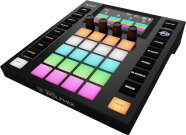
ADJ WMX1 MK2 Wolfmix Lighting Controller
$859.99
- 12 x$71.67
- 8 x$107.50
- No Credit Check6 x$143.33
- No Credit Check4 x$215.00
Native Instruments Kontrol S88 MK3 USB MIDI Keyboard Controller, 88-Key
$1,299.00
- 18 x
- 12 x$108.25
- 8 x$162.38
PreSonus Quantum HD 8 26x30 USB-C Audio Interface
$1,049.99
- 18 x
- 12 x$87.50
- 8 x$131.25
- No Credit Check6 x$175.00
- No Credit Check4 x$262.50
Fender American Professional II Telecaster Electric Guitar, Maple Fingerboard (with Case)
$1,839.99
- 12 x$153.33
- 8 x$230.00
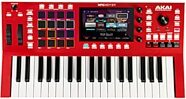
Akai MPC Key 37 Synthesizer Production Keyboard
$899.00
- 12 x$74.92
- 8 x$112.38
- No Credit Check6 x$149.83
- No Credit Check4 x$224.75
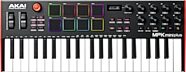
Akai MPK Mini Plus USB MIDI Keyboard Controller, 37-Key
$169.00
- No Credit Check6 x$28.17
- No Credit Check4 x$42.25
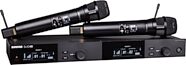
Shure SLXD24D/N8CB Dual Handheld Wireless Nexadyne 8/C Microphone System
$1,959.00
- 18 x
- 12 x$163.25
- 8 x$244.88