DP5 New Feature Overview
Six new instrument plug-ins. Track folders. Meter Bridge. Four new editing tools. Film/Video Scoring Enhancements. Streamers, flutters & punches. Enhanced click and countoff. Enhanced input monitoring. Soundbite Volume & Gain. MIDI Keys. Productivity Enhancements.
For song writing, studio production, film scoring, live performance, remixing, post production and surround mixing, Digital Performer delivers advanced features in an intuitive, streamlined design. Whether you're completing a surround DVD, or you just want to write a song and burn a CD or MP3 file, Digital Performer gets you there quickly with elegance and ease. And Version 5 adds six new virtual instruments, plus dozens of innovative new features to keep you on the cutting edge of desktop music production.
DP5 Instruments Overview
From classic FM to vintage analog, six intriguing virtual instruments will spark your creativity and get you making music in minutes. Browse the hundreds of supplied presets, choose a sound or drum kit, and then hit the record button. The rest is up to you.
Load your own samples or program custom sounds. You get two one-oscillator subtractive synths, one two-oscillator subtractive synth, a sample player, a drum module and an FM synth. Get ready to crank out some serious sound from your Mac. All six instruments are designed for easy, streamlined operation and CPU-efficient performance. If you've never used instrument plug-ins before, get ready for some heavy-duty fun. If you're a seasoned virtual instrument user, dive in and don't forget to come up for air.
BassLine
BassLine is an analog-style monophonic bass synth. Don't let the size and straightforward design fool you: BassLine puts out monstrous low end.
BassLine's controls are dedicated to the bass, the whole bass, and nothing but the bass. The result? Instant killer bass lines have never been easier to produce. BassLine has one oscillator that blends two waveforms that are perfect for bass sounds (saw and square). It also includes one low-pass filter with cutoff and resonance, simple decay envelopes for the filter and amplifier and several additional analog synth features.
BassLine's classic design will feel instantly familiar to retro analog synth enthusiasts, and for those not so familiar with its legacy, BassLine offers an easy-to-understand introduction to early synth design of a bygone (and now reborn) era.
If BassLine makes you hungry for more programming control, click the Next button below and move up to PolySynth...
PolySynth
PolySynth is a retro analog-style polyphonic pad synth inspired by the Roland Juno 106 and other one-oscillator analog synths from the '80s.
Like BassLine, PolySynth has one oscillator, but it is capable of a much wider variety of sounds, thanks to its digital controlled oscillator (DCO), which can be adjusted with varying amounts of de-tune, triangle wave, sawtooth, rectangle (square) wave, sub-oscillator 1 & 2 and noise. Lush pads, rude squawks, twisting sweeps - just choose a preset and go.
The single LFO can modulate pitch (for vibrato), pulse width (for the square wave and sub-oscillators) or filter depth (for the classic "wah" effect, among others). The resonant low-pass filter is equipped with frequency and resonance controls, key tracking, velocity control and an ADSR envelope, which can also be applied as an overall envelope for each note. Chorus and distortion provide plenty of punch for the thickest of pads and searing lead lines. Classic filter and envelope design make for quick, intuitive programming.
If you never had a chance to program analog synths from the '80s, here's your opportunity. If you yearn for even more control and programmability, click the Next button below and move up to Modulo...
Modulo
Modulo is a highly programmable 2-oscillator subtractive synth. It's like BassLine and PolySynth combined, on steroids (and other performance-enhancing drugs).
At its heart, Modulo is built on two independent oscillators each capable of producing 58 digital waveforms (including the basics such as sine, square, saw, rectangle, etc.).
A highly programmable synth
The oscillator waveforms can be further adjusted with symmetry, tuning and a unique phase shift that allows you to split the oscillator, offset the resulting waveforms by up to 180 degrees, and then either subtract or multiply the two split waveforms to produce interesting timbral shifts. This effect can even be modulated with several possible modulation sources, such as one of the two LFOs. In fact, Modulo provides five different modulation sources and up to seven destinations. Sources include the two LFOs, modulation envelope, external mod wheel and note-on velocity, all of which can be flexibly assigned to filter frequency, oscillator pitch, oscillator phase shift, oscillator symmetry, and many other controls. The results produce living, breathing, dynamic, responsive sounds that you can mold in real time as you write and mix your music.
The resonant multi-mode filter, three envelopes (for the amplifier, filter and general purpose modulation), detune, noise and modulation matrix provide plenty of additional sound shaping control.
Bank and patch management
Programming Modulo is so easy and fun, you'll likely build a significant number of your own patches. Therefore, Modulo provides built-in bank and patch management to help you organize patches and banks for quick and easy browsing, recall and exchange with your colleagues.
A perfect balance
Modulo provides the perfect balance of intuitive yet advanced classic subtractive synth programming combined with a flexible yet straightforward modulation matrix. You get enough control to really go deep, but everything is right there in front of you for easy and immediate results.
For an even more advanced synth...
If you find yourself hungering for even more controls (how about 3 oscillators, 2 multimode filters, 6 LFOs, 4 envelopes, external audio input, 16 modulation sources, unlimited modulation destinations, shapers, built-in effects, a pattern gate, an arpeggiator and much more), then you can always graduate to MX4 (sold separately). In the meantime, click Next to learn about the rest of DP5's included virtual instruments.
Nanosampler
As its name implies, Nanosampler is, quite simply, the easiest way to play samples ever devised. Load a sample and play it. Easy.
Yet consider the power and convenience of being able to drag an audio file from any other DP window, or even your Mac desktop, and then drop it into the Nanosampler LCD display to instantly play it from your MIDI controller.
Sample programming made easy
All of the basic sampler features you need are right at your fingertips: set a sample start/end time, set a crossfade loop, apply the multimode filter and automate cutoff frequency or other parameters, apply an envelope to the amplitude or filter and add some LFO effects.
Build and organize your library
Build your own personalized library of samples, organized as you wish in the Mac OS Finder and accessed instantly from Nanosampler sub-menus that reflect your customized folder organization. You can even "collect" the samples being used, regardless of their source location, into your DP project folder for easy archiving and session exchange with your colleagues. This is the way sampling was meant to be. Simple. Powerful. Convenient. And CPU efficient. Open as many Nanosamplers as you have samples to play.
Model 12
Model 12 is a twelve-part programmable drum module (sample player). Instant drums. Hundreds of drum samples. Dozens of kits. Load and go. It's as simple as that.
Or build your own kits with surprisingly deep programming features, including all of the traditional features you'd expect in a drum module, such as part linking for open and closed hi hats.
Twelve independent parts
Each of Model 12's individual parts has two sends, allowing you to independently apply any effects or other external processing you wish to each part. For example, you can apply heavy gated reverb to the snare while adding just a bit of multitap delay to the hand clap. Use the Velocity parameter on a part's tuning knob to map note-on velocity to pitch, allowing you to "bend" up or down into the root pitch of the drum, depending on how hard you strike your drum pad or MIDI controller key. This, and other similar techniques, can be applied to sample start, filter cutoff, and other parameters. Choose either a decay or gated envelope for each part independently. Each part even gets its own multimode filter for a wide range of filter effects, all applied simultaneously.
If you have more extensive percussion parts, you can instantiate multiple instances of Model 12. For example, one instance might be devoted to your basic kit, while another could supply all of your percussion parts. Need more percussion parts? Just add another Model 12.
Model 12 is so useful, you'll likely find yourself using it as an essential part of every DP5 project you create.
Proton
Proton is the sixth and final instrument plug-in included with DP5. Proton is an imaginative and provocative two-operator frequency modulation (FM) synthesizer that delivers classic, bright, shimmering and expressive FM synth sounds that serve as a perfect compliment to the rest of DP5's new instrument lineup.
FM synthesis involves modulating one oscillator's frequency (the carrier) with another oscillator (the modulator) at rates in the audible range (i.e. not slow LFO rates). Different frequency ratios of modulator and carrier operators produce a world of interesting timbres. The pioneering Yamaha DX7 delivered a wide range of sounds using only sine waves with six operators. Proton delivers an equally broad palette of sounds with a streamlined 2-op architecture driven by its unique wavetable knob, instead of the added overhead and complexity of additional operators. As such, Proton may be the most easily programmable FM synth ever created. A real-time display in the center of the window display the spectral content or periodic waveform being generated by the current settings. Additional controls include an FM LFO, modulation pitch envelope, FM amount envelope and overall ADSR envelope.
From sparkling bells to searing leads to classic Rhodes sounds, you'll be glad you have Proton as part of your DP5 instrument palette.
Track Folders
Organize your lengthy track lists into folders and sub-folders and show or hide track groups with a single click on the disclosure triangle.
You can put folders within folders for as many levels as you need. Assign a unique color to the tracks in each folder to further enhance your project organization.
Track folders appear throughout DP5 in all windows that show multiple tracks, including all track show/hide selectors.
Option-click and command-click shortcuts help you quickly collapse and expand multiple folders, or even all folders.
Meter Bridge
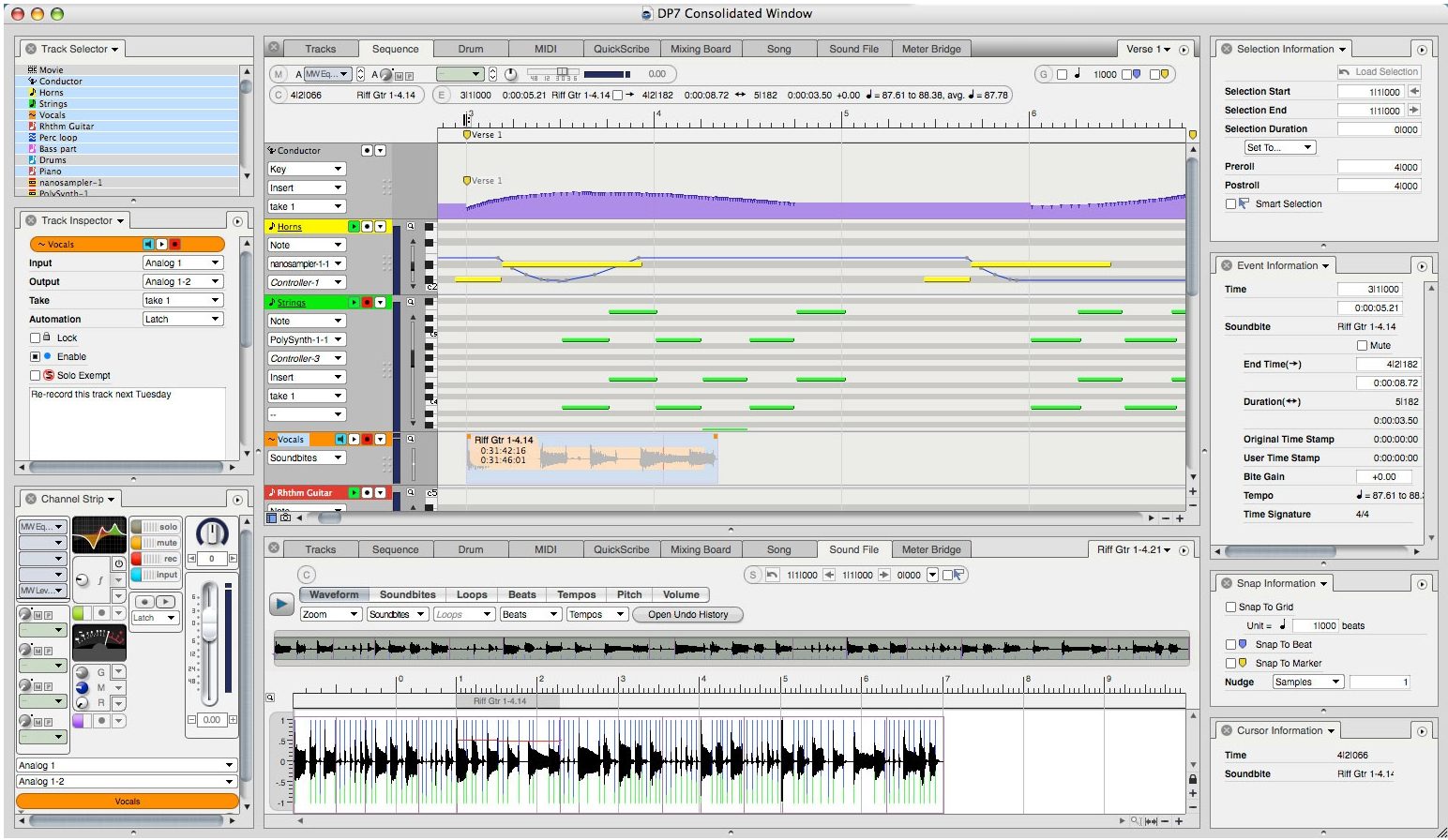
The Meter Bridge is a new window (and central pane in the Consolidated Window) that is dedicated to monitoring all signal paths in the Digital Performer mixing environment.
With a single click, you can independently show or hide available hardware inputs, available hardware outputs, busses, bundles and tracks as desired. The Meter Bridge provides long-throw, scalable meters with extremely fast, smooth and accurate ballistics.
You can quickly toggle between two different layouts: the linear layout shows all meters side by side in one row that scrolls left and right. Resize them vertically as high as you want for detailed metering, or shrink them as small as you need. Zoom in on a specific level range for extremely detailed, hi-resolution level monitoring.
The wrap-around layout displays all meters in multiple rows that fit in the space available in the window for an instant bird's-eye view of all signal paths currently being viewed. Meters turn red to clearly alert you when clipping occurs. The entire meter changes color to be highly visible, even from across the room.
Four new editing tools
The DP5 tool bar contains four new audio editing tools to speed up your edits: Trim, Slip, Slide and Roll.
Trim
Trim lets you drag the edge of an audio region. This feature was available in earlier versions of DP, but now it can be explicitly invoked with the new tool in the tool bar. This allows you to trim audio regions more quickly by clicking somewhere inside the audio region, rather than having to find and drag the edge, which may be offscreen.
Slip
The Slip tool allows you to move the waveform inside an audio clip earlier or later without affecting the left or right edge of the audio region.
Slide
The Slide tool does the opposite of Slip: it allows users to move the edges of the audio region earlier or later by the same amount in one drag operation while the audio inside the clip remains anchored to its current position in time.
Roll
The Roll tool allows users to drag the border between two adjacent audio regions in one operation, "covering up" a portion of one region while "uncovering" the other.
Film/Video Scoring Enhancements
Digital Performer is the established application of choice for those dedicated to the art and craft of writing music for picture.
Building on an already strong feature set designed for film and TV composers, DP5 includes several major enhancements for the extended music-for-picture workflow. Now, the director, producer, composer and music editor can work even more closely to quickly realize their creative vision.
Streamers, Punches & Flutters
Streamers, flutters and punches are visual cues that help composers, conductors and musicians to anticipate visual hits and, more generally, synchronize their music to what is happening on screen.
DP5 can now superimpose streamers, punches and flutters directly on a QuickTime movie playing in Digital Performer's movie window. This allows film and TV composers to collaborate more efficiently with music editors and better prepare for and conduct live orchestra sound stage scoring sessions. By bringing these visual cues to the native desktop, without expensive and cumbersome additional hardware, DP5 also paves the way for anyone to conduct small- to medium-scale scoring sessions in their personal and project studios.
Easy activation
Film scoring events can be activated in the Preferences pane.
Choose your settings
Streamers, punches and flutters are highly configurable. You can specify default settings and override them at any time on a specific streamer, flutter or punch event.
Easy programming
Streamers can be triggered by markers or by independent streamer events inserted in the Conductor track. Flutters and punches can also be inserted in the Conductor track as independent events.
Export a QuickTime movie
Once visual cues have been programmed as desired, they can be exported as part of the QuickTime movie, which can then be shared with colleagues for review or approvals before costly sound stage recording sessions with a full orchestra.
Quick and easy session changes
When time is ticking during costly sessions, changes can be made directly in your DP project quickly and effortlessly.
Third-party hardware support
DP5's ability to trigger these visual cues has also been expanded to support the CueLine ProCue 1m1 and ClickStreamMachine, two third-party devices commonly used in the industry for live orchestra sound stage scoring sessions. You can also use a MOTU Digital Timepiece or Video Timepiece.
Click
A click is such a simple thing, and yet it can be crucial to the recording process. That's why DP5 introduces another round of ground-breaking click and countoff enhancements.
Visual click
To complement DP5's new visual cueing features (Streamers, flutters & punches), a visual click has been added.
You can choose the size and color of the visual click, which then flashes - in tempo - as a large circle on Digital Performer's own QuickTime movie window or on an external video screen (via external hardware triggered by DP5). The visual click, together with the audio and MIDI click, can be programmed with unlimited flexibility with DP5's new click programming features.
Customized click
In past versions, Digital Performer's click feature was tied to meter changes. In DP5, you can also insert click change events wherever you like in the Conductor track, independent of meter changes. This allows you to quickly and easily program customized audio, MIDI and visual click tracks for a wide range of situations. Three types of click change events are provided: beat click, tacet click and pattern click. Together, these click change events give you complete flexibility in programming even the most elaborate click tracks. For example, film composers and conductors can customize the click for each cue in preparation for sound stage recording sessions. Because click events are regular Conductor track events, creating the perfect customized click track has never been easier.
Beat click
The beat click makes clicks on regular beats or beat sub-divisions, just like the beat click that is part of a meter change event, except that a beat click event is independent of any meter change events. For example, you could insert a meter change event that clicks every quarter note, but then insert a beat click event a few bars later that clicks every eighth note.
Tacet click
The tacet click silences clicking until the next click change event (or meter). For example, you might create a countoff in which the last two clicks before the downbeat are silent. Or you may want to create a period of click silence in which you then program visual elements in the Conductor track (punches, flutters or streamers) during the silence in order to provide a visual timing reference.
Pattern click
The pattern click allows you to program any imaginable click pattern you wish using a convenient shorthand method of entering the click pattern.
Click defaults
The new click defaults feature lets you choose a preferred click pattern for any meter and tempo range that you specify. For example, at a slow 6/8 time, you might prefer to click on eighth note sub-divisions, while for a fast 6/8 you might prefer to only click every dotted-quarter note. You can create as many default click patterns as you wish for any variety of meters and tempo ranges. These default preferences can go far beyond the convention of clicking once per beat, thanks to DP5's new click programming features.
Once you customize your default click patterns as desired, Digital Performer will automatically use them whenever the click is enabled and your sequence Conductor Track matches the meter and tempo of each default click.
Enhanced countoff
Digital Performer now lets you specify the countoff in any number of beats and bars (instead of just bars). This allows you to include pick-up beats, countoff for only a portion of a measure and many other applications. In addition, you can specify any click pattern you wish for the countoff, and even program a visual countoff, just like the visual click, with its own customized settings.
Enhanced Input Monitoring
Each audio track in DP5 now has its own separate input monitor button, allowing you to listen to a live audio signal from the track's assigned input, independent of the track's record-enable state. This is similar to "Record Safe" mode on a conventional mixer.
This simple feature greatly enhances all workflow processes that revolve around live input monitoring and recording. Here's just one example regarding the use of Propellerhead Reason with DP5: instead of having to set up two tracks for each Reason instrument input (an aux track for live input monitoring and a disk track for bouncing the final Reason track), you can instead set up just one stereo disk track. Engage the input monitoring button to hear live Reason input, and then simply record into that same track when you are ready to commit the part to disk for archiving, session exchange or editing. Your Reason track counts can now drop by half.
To further enhance input monitoring, four Audio Patch Thru modes give you several options for input monitoring behavior in various situations. For example, just like large-format consoles, Blend mode lets you hear both the live input and the disk audio during playback, before you punch in for recording.
Soundbite Volume & Gain
Draw a volume curve on an audio clip and it stays with all instances of the clip.
Apply an overall, non-destructive amount of gain or attenuation to a soundbite. All instances of the soundbite are affected.
MIDI Keys
The new MIDI Keys window provides convenient, basic MIDI note entry - right at your fingertips.
Trigger synths and enter MIDI notes from your computer keyboard. Step record MIDI notes without a MIDI keyboard.
DP5 Productivity Enhancements
DP5 introduces dozens of productivity enhancements. Here are just a few highlights.
Support for Pro Tools 7
Maintaining its position as the leading audio sequencer software front end for Pro Tools HD, DP5 is fully qualified for use with Pro Tools 7 systems running under DAE Version 7.1cs4 or higher.
Track enable/disable
Audio tracks can now simply be enabled or disabled to free up their system resources. Cumbersome audio voice management is now handled automatically by DP5.
MIDI Device Setup
Conveniently configure your external MIDI gear directly in DP. Everything you do is reflected in Mac OS X's Audio MIDI Setup utility. Need to transfer your DP project to another computer, or exchange it with a colleague? Now your MIDI device setup can transfer with the project, with all settings and track assignments still in tact.
Waveform Editor enhancements
The Waveform Editor provides new tabs for direct access to - and hands-on editing of - the embedded tempo, pitch and volume meta-data in your audio files.
Use Digital Performer's sophisticated Beat Detection Engine to find beats and automatically generate a tempo map. Then use the Tempo tab to refine the resulting tempo map.
The new Lock button in the Waveform Editor title bar lets you use all of the familiar controls in DP5's main transport panel to control playback and selection in the Waveform Editor. You'll even see the same playback wiper as in the Sequence Editor.
Digital Performer Overview
Digital Performer is an integrated MIDI and audio sequencer. For studio recording, film scoring, live performance, and remixing, Digital Performer is the choice of professionals worldwide.
Designed for professionals
Digital Performer has always been designed and built for professional use. For studio production, film scoring, live performance, remixing, and more, Digital Performer provides an easy to understand workflow, with all the features you need for full audio and MIDI production. You get unlimited tracks, unlimited undo, support for surround sound, 64 bit mastering tools, sample-accurate editing of audio and MIDI, automatic tempo calculation for film scoring, and much more.
Advanced features. Intuitive operation.
For beginners and experts alike, Digital Performer delivers advanced features in an intuitive, streamlined design. With support for built-in Macintosh audio and MIDI, you don't even need additional audio hardware. Whether you're completing a surround sound DVD or just want to write a song and burn a CD, Digital Performer gets you there with elegance and ease.
Complete Mac OS X support
No audio production software provides better support for Macintosh OS X Core Audio and Core MIDI services. Built from the ground up for Mac users, Digital Performer takes full advantage of sample-accurate MIDI Time Stamping, Core MIDI patch list support, Audio Unit plug-ins and virtual instruments, support for multiple Core Audio interface drivers and more.
Your music, your way
Digital Performer doesn't force you to rethink the way you want to make music. Digital Performer's flexible interface adapts to your work style. Loop-based music production? Linear sequencing and recording? Part and score notation-based composition? Digital Performer lets you work the way you think.
If you understand multitrack recording, you understand Digital Performer
Record-enable a track, check the input source and VU level, then press Record. Sound familiar? Then you should be using Digital Performer. It's that simple. Digital Performer's track layout, mixing board, and transport controls are all you need for the foundation of a powerful computer-based production system.
Digital Performer for Studio Production
Digital Performer is built from the ground up for studio professionals. Unique studio productivity features help you get your job done faster and better than ever.
Sample-accurate timing and synchronization
Say goodbye to flamming and other timing artifacts. Digital Performer is accurate to the sample for recording, editing, and playback of MIDI, audio, and automation. Work at sample level with audio and MIDI within a single window. Sync with sample address accuracy to external devices. For timing precision, it just doesn't get better Digital Performer.
Instant access to frequently-used data
Digital Performer's unique Clippings windows give you a palette of frequently-used items. Store segments of MIDI, audio, or a combination of both for quick arrangement. Hold aliases to any application or file-great for keeping track of lyric files or session notes! Easy, drag-and-drop access to loops, song sections, sound effects, even effects chains. For one project or globally across all projects, Clippings windows put it all at your fingertips.
Track grouping for enhanced control
Digital Performer's track grouping feature allows you to create an unlimited number of track groups. Link any combination of MIDI and audio tracks for mixing, editing, or any set of operations that you specify. Group solo functions, mutes, editing functions, and automation on a parameter-by-parameter basis. Track groups give you more efficient control to help you get your work done faster.
Destructive and non-destructive effects for MIDI and audio
Digital Performer ships with over 65 MIDI and audio plug-ins. Apply effects to MIDI and audio tracks alike as non-destructive playback effects with full automation or as permanent edits for final mastering. Apply effects to individual notes or groups of notes in a MIDI track, or to any slice of audio you select, down to the sample level. Or apply it to the entire track if you like!
Instant, in-memory recording with POLAR
Digital Performer has always let you build up MIDI tracks by looping and overdubbing. Digital Performer's POLAR module lets you do the same thing with full digital audio. POLAR records into RAM, writing to disk only when you decide. Loop newly-recorded material or overdub new audio with existing audio, in real time. For background vocals on a pop song, drum loops on a hip hop project, or sax solos for your jazz composition-POLAR is the powerhouse overdub tool.
Completely customizable interface
The Commands window allows you to completely customize your computer keyboard interaction with the software. You can ssign keystrokes or MIDI events to trigger virtually any function in Digital Performer. You can even save and load entire sets of commands, and pre-built command sets for Pro Tools and other software products make it even easier to switch to Digital Performer.
Plays well with others
Digital Performer has full support for Apple Core MIDI and Core Audio protocols, and includes patch lists and expansion bank support for most available synths. Digital Performer supports multiple Core Audio drivers the latest Apple Audio Unit standard for plug-ins and virtual instruments. Use any MIDI or audio interface supported by Apple OS X.
Easily import audio from Acid, REX, and many other popular formats-just drag and drop! For audio with tempo information, Digital Performer automatically adjusts tempo to match your project. Digital Performer even opens and creates Pro Tools and Final Cut Pro OMF sessions, allowing import and export of audio, region edits, crossfades, SMPTE times, and volume and pan automation with the DigiTranslator utility.
64-Bit mastering tools for crystal-clear sound
The master fader is just the beginning. Digital Performer ships with mastering tools including MasterWorks Limiter, Multi-Band Compressor, and Parametric EQ. Bring out the ultimate detail from full-bandwidth program material. With 64-bit, floating-point precision, these tools preserve the fidelity of your 24-bit audio with no added noise.
MasterWorks Limiter gives you precise control of dynamics and output level of digital audio signals, plus pro-quality bit quantization, dithering, and noise shaping. The Multi-Band Compressor provides control over dynamics of specific frequency ranges. The Parametric EQ offers phase-coherent, surgical frequency control down to one hundredth of an octave.
Built-in waveform editor with sample-level control
Digital Performer's built-in waveform editor lets you use all of Digital Performer's editing capabilities to destructively edit an audio file. A poweful unlimited undo history to reverse any change. With the pencil tool, you can actually redraw the waveform with sample-level accuracy.
Get it now
With features like these, it's no surprise that Digital Performer is the choice of studio professionals around the world. Join the ranks-get Digital Performer today.
Digital Performer for Film Scoring
From Hollywood blockbusters to indie classics, Digital Performer's film-friendly features make it the choice of film composers worldwide.
New film scoring features in DP 4.6
Digital Performer 4.6 is packed with numerous enhancements for writing music for picture, including enhancements to Find Tempo, multiple QuickTime movies, multiple QuickScribe windows and exporting audio to a QuickTime movie.
Find tempo
To score a film effectively, you need to hit cue points accurately. Digital Performer's Find Tempo feature lets you find the right tempo in seconds. Set up your master list or import a cue sheet. Choose the type of hit for various markers and assign weight according to the importance of the hit. Then let Digital Performer search your markers and suggest a tempo that hits critical cue points. If you write music to picture, whether its film, video, animation, jingles or Quicktime, Digital Performer's Find Tempo feature will be a huge time saver for you.
Insert measures
Have you ever wanted to add more time to the beginning of the sequence without moving any existing material? Insert Measures is a feature that film composers will really appreciate. Let's say you have a SMPTE sync point that starts a piece of music you have composed. This music is perfect, but the director wants to add some lead-in music to build some tension. Simply drop in as much space as you need and Insert Measures preserves all times including SMPTE hit points following the insertion point.
Track grouping
Digital Performer's track grouping feature allows you to create an unlimited number of track groups, and tracks that can be linked for mixing, editing, both or for a customized set of operations that you specify. Tracks can be a member of more than one group. Groups can also be "nested" within each other. Track grouping allows you to apply operations to the tracks in the group as a single unit. For example, for a mix group, moving the volume fader for one track in the group moves the faders in all tracks in the group.
FireWire QuickTime video playback
The Movie window has the ability to output a DV-formatted QuickTime movie via FireWire. You can then use a standard DV camera or FireWire conversion box to convert the FireWire video into composite video to view it as full screen video on a standard TV or video monitor?even on iMacs or laptops.
Get it now
With features like these, it's no surprise that Digital Performer is the choice of film composers around the world, including Don Davis (The Matrix, Matrix Reloaded, Matrix Revolutions) and many others. Join the ranks-get Digital Performer today.
Digital Performer for Live Performance
If you're supporting live performance with recorded sequences, Digital Performer's reliable, flexible control will make you a hero on stage.
Bulletproof reliability
When you're playing live, you need backup support systems that won't drop the ball, ever. Successful artists like Madonna, Fleetwood Mac, and many others depend on Digital Performer live on stage. With sample-accurate playback, you can even set up redundant DP workstations with instant, transparent cutover.
Unrivaled flexibility
With Digital Performer, wholesale, large-scale editing is as easy on the road as it was during rehearsals. Need a few more bars for your solo? Want to tweak your signature vocal effects? Make your changes at the hotel tonight?or even backstage?and you'll have a new show tomorrow. Try that on the road with dedicated playback hardware.
Powerful cueing control
Digital Performer lets you keep multiple sequences in a single file. Arrange your sequences as multiple cues within a song, or even an entire set. You can chain sequences together. and trigger sequences by mouse, keystroke, remote MIDI message, or even slaved to specific SMPTE time code locations. Just load one file and your whole show is ready to go.
Completely customizable interface
The Commands window allows you to completely customize your computer keyboard interaction with the software. You can assign keystrokes or MIDI events to trigger virtually any function in Digital Performer. You can even save and load entire sets of commands, and pre-built command sets for Pro Tools and other software products make it even easier to switch to Digital Performer.
Multi-track playback with no bouncing
Play your tracks live just like you recorded them. Easily play 120 or more full audio tracks on a standard dual G5 Macintosh, with EQ and compression on every track! Digital Performer's efficient design means you get reliable playback without having to bounce your mix down to fewer tracks.
Easy Pro Tools session exchange
Digital Performer makes it easy to work with Pro Tools users. Drag Digital Performer files directly into ProTools sessions or import from Pro Tools into Digital Performer, with no loss of region edits or time stamps. you can read and write Standard MIDI files, of course, for import and export of MIDI tracks with Pro Tools. And Digital Performer opens and creates OMF files, allowing import and export of audio, region edits, crossfades, SMPTE times, and volume and pan automation with the DigiTranslator utility.
Extensive control surface support
You can control every function of Digital Performer with standard MIDI messages. Digital Performer ships with support for Mackie Universal Control, Radical Technologies SAC2, Tascam remote control, and Mackie HUI control, and you can use any device that generates MIDI notes and controller messages.
Get it now
With features like these, it's no surprise that Digital Performer is the choice of touring professionals around the world, including Mike McKnight (Madonna, Fleetwood Mac) and many others. Join the ranks-get Digital Performer today.
Digital Performer for Remixing
Digital Performer is great for remixing, including support for REX and Acid loop import. Import loops, build up tracks, apply effects, mix looped and linear tracks, bounce to disk. Do it all in Digital Performer.
Comprehensive, integrated tools
Stop wasting your time moving your files between programs. Digital Performer provides all the tools you need to create a killer remix. From start to finish, you never have to leave Digital Performer's native environment.
Realtime, tempo-locked MIDI and audio effects
Digital Performer ships with over 50 realtime MIDI and audio effects to help you get the signature sound you're looking for. And effects let you lock their parameters to the tempo of your mix. Lock an LFO filter sweep to quarter notes or delay taps to triplet sixteenths. When you change the tempo of your mix, the effects stay with you.
Plays well with others
Easily import audio from Acid, REX, and many other popular formats?just drag and drop! For audio with tempo information, Digital Performer automatically adjusts tempo to match your project. Digital Performer even opens and creates Pro Tools and Final Cut Pro OMF sessions, allowing import and export of audio, region edits, crossfades, SMPTE times, and volume and pan automation with the DigiTranslator utility.
Seamless virtual instruments
Samplers, synths, you name it. Digital Performer's seamless virtual instrument support let's you bring it all into one integrated environment. For example, you can bring in MOTU's MachFive universal sampler, import your samples, and go. Play MIDI into MachFive, get audio out, all within Digital Performer.
Familiar yet powerful drum editing
This is the ultimate drum editor. It's as simple as a hardware step editor, but gives you control over every detail of your beat. And the unique Rhythm Brush lets you "paint" percussion instrument parts into your sequence. You can choose from a menu of many common presets, tweak them as much as you like, or create your own presets.
Freeze tracks for efficient playback
Don't let your richly-layered mixes slow you down. Digital Performer's Freeze Track feature lets you "print" fully-rendered audio of any track, complete with effects and other processing, for efficient playback. Yet you can un-Freeze the track any time, with all editing features preserved'to build it up even more.
Drive Pro Tools TDM systems
Use Digital Performer to drive any Pro Tools TDM system, including Pro Tools|HD, Pro Tools|HD Accel, and Pro Tools|24 MIX. Digital Performer is a DAE Host application, which means you can do all your creative work in Digital Performer, then use it as a front end to control your Pro Tools TDM hardware.
Native ReWire support
Route audio from ReWire synths Reason directly into an audio track in Digital Performer's mixing environment. With fully-integrated ReWire support, you can apply realtime effects and automated mixing with sample-accurate timing.
Get it now
With features like these, it's no surprise that Digital Performer is the choice of remixers worldwide, including Chris Cox (Thunderpuss), The Crystal Method and many others. Join the ranks-get Digital Performer today.
Technical Info
System Requirements
OS 10.3.7 or higher
17 in. monitor or larger
Recommended: Dual G4 1ghz or higher with at least 1GB RAM
Minimum: G4 500 power mac with 512MB RAM
Version 5 Competitive Crossgrade
The Version 5 Competitive Crossgrade offer is available to registered owners of other competing DAW software products including AudioDesk.