

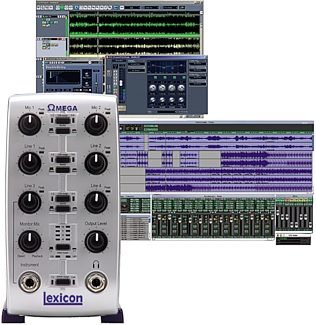
Lexicon Omega Studio USB Audio Interface (Macintosh and Windows)
The Omega Studio USB interface gives you 2 dbx Silver Series mic preamps, 4 TRS inputs, MIDI I/O and more -- plus Cubase LE and Lexicon reverb plug-ins!
Overall User Ratings (based on 151 ratings)
Submitted November 6, 2006 by a customer from zachbardon.com
"The most bang for your buck"
Verified Customer
zZounds has verified that this reviewer made a purchase from us.
I don't anticipate replacing this unit for years. Even if someday I expand to something with more channels so I can start tracking bands all at once, I'll keep this around for portable recording.
Sound
For the money, an incredible sound. The dbx preamps are clear and more transparent than I would have expected. The connectors and internal circuitry is all high quality and yields a clear, noise-free result. Don't have any qualms with the A/D converter either.
Features
As mentioned above, you can make do with the included software, but you're better off running something more powerful/competent. The Omega is capable of pro-sounding results, so it's good to be able to mix/produce those good-sounding tracks with some pro software.
Again, for the money, this is the most bang for your buck. Just look at the image of the rear, connections galore. Contrary to what someone said above, you CAN record all four channels at once, but you only have two channels with the dbx pres. You can actually record six inputs at once (and lots of MIDI), but you'd have to mix a few inputs together to share a channel, so it's not something you're likely to do in the studio, but might come in handy for live tracking. Connections are straightforward, SPDIF in and out is handy, headphone amp is powerful enough to drive a couple headsets with a splitter. Front-panel instrument input useful for basses/electrics. Balanced connections. True 48v phantom power (as opposed to a lot of these units that try to power the mics from USB). It's a lot in a little box.
Ease of Use
It's a cinch. Manual is basically unnecessary.
Quality
It's svelte and solid.
Value
Less money and more features than the MBox make this a high value. In the end, being able to track 4 channels instead of two is worth a lot, particularly if you're going to be tracking drums.
Manufacturer Support
Their website is not much help. I'm glad they released ASIO drivers, because their original drivers could be glitchy with certain systems (thankfully never mine).
The Wow Factor
This unit has been the input/A/D core of my home studio for years, and I've had great results with it. I ended up getting a nice two-channel pre running into inputs 3 and 4 of the Omega and now I've got four channels of clear, phantom-powered input going into my DAW running Sonar 5. Perfect for my needs. It's also terrific for portable recording with a laptop.
Musical Background:
musician/producer/instructor
Musical Style:
varies widely
69 of 70 people (99%) people found this review helpful. Did you?
Thanks for your opinion!
Submitted March 31, 2004 by a customer from hotmail.com
"GET IT!"
This review has been selected by our experts as particularly helpful.
I'm glad i got this thing...i used to record direct in throught the line in, or mic, but now i can mic everything i need to. GET IT, GET IT, GET IT!
Sound
This has one of the best A/D/A converters out there. Even though one may think of clips and popping when using microphones right next to a screaming amp, you don't get it. It's great.
Features
I had cakewalk homestudio to begin with, but unfortunately it doesn't seem to like lexicon. I ended up using the protracks it came with, which is pretty much the same thing. I record into protracks, and then when i'm done there, i master it through homestudio. This thing's great. IT CAN EVEN USE CONDENSER MICS!
Quality
It was made very well. The knobs are snug, and feel good when you move them around. The inputs aren't crappy, and can be plugged and unplugged alot without getting too loose. I wouldn't call it sturdy like you can throw it off the roof, but these things ren't meant to be thrown around.
Value
i was looking at pci cards, or some other stuff, but this USB recorder seemed to do the best job...anyways, for micing amps in 2 different places. I use a MOTU to mic drums.
Manufacturer Support
Never had to deal with them, but Harman Internation is a great company.
The Wow Factor
If i could afford one of those 3000 dollar multrack recorders, i'd get one of those, but it's better having more cheaper gear that can do much more than what one of those expensive boxes can do. This is great.
Musical Style:
Everything from Jazz-METAL
11 of 11 people (100%) people found this review helpful. Did you?
Thanks for your opinion!
Submitted October 27, 2008 by a customer from yahoo.com
"The Lexicon Omega, A GREAT BEGINNING!!"
Verified Customer
zZounds has verified that this reviewer made a purchase from us.
This review has been selected by our experts as particularly helpful.
I can't stress enough how great this piece is. I see others have called it trash, while some had my experience. Maybe it's all who's turning the knobs. I've been a soundguy, eq freak, guitar rig builder and home recording enthusiast for years. To me, The Omega is nothing short of a Blessing for those who are nervous about investing too much into DAW recording system. The USB connectivity is fantastic, all the inputs and even the mic pre-amps are great for beginners! The Cubase bundled software can be imposing at first, but sit with the manual and take some time to get aquainted with the platform and everything gets familiar pretty fast. I HIGHLY recommend "The Complete idiot's Guide to Cubase 4". Even though the Omega comes with Cubase 4 LE (Limited version), the book will have you off and running, laying trax and mixing in NO TIME! Soon after that, you'll be urgrading to Cubase 4 (full version) where the world seems to just explode open with new possibilities. Enjoy!
Sound
Not being a "Pro" DAW recording engineer, I want to give the Omega VERY high marks here, but I also understand that I know there is much higher priced equipment that sounds BIG studio quality. But, In MY opinion, I'd give this a 10 star rating, as the Zero latency monitoring, gorgeous Pantheon Reverb plug in and transparency and lack of coloring to the sound all just make this inexpensive, yet almost-pro setup easy to use and get GREAT sounds out of almost as fast as it takes to just load the software itself! Maybe this is "entry level" to the world of DAW recording, but as you grow and learn more, the Omega has a WORLD of advanced possiblities awaiting most home recording enthusiasts. Even the Cubase Le software bundle is enough to keep you reading and learning for a LONG time!!
Features
USB Connectivity!!!!!! Inputs!!! Inputs!!! Inputs!!!(with padding options on each!) Dedicated Instrument/Guitar input on front panel! Zero-Latency Monitoring!!! MIDI!!! Wonderful software bundle included!!! Insert inputs on Mic channels (2) for outboard effects!!! Clip leds for all inputs!!! Front control panel is as easy to navigate as an 80's Boom box! I Love this thing! ATTENTION LEXICON!!!! THE ONLY COMPLAINT I HAVE IS "WHY NO ON/OFF SWITCH???" (you have to either unplug the unit when not in use, plug it into a power supply with an on/off or INSTALL AN ON/OFF SWITCH ON THE POWER CORD. CHOOSE "C"!!! PROBLEM SOLVED.)
Ease of Use
As far as setup goes, I give it a 10 also, put in the software, follow the prompts, plug in the USB connection, open up Cubase Le, choose the Omega asio drivers and plug an instument in. That's it! The Meters start bouncing and you're ready to get levels set and record tracks!! I gave it an 8 star rating only due to the learning curve for "newbies" to the Home DAW recording world. Welcome to the "virtual" world. Be ready to read some manuals in order to achieve truly PRO sounds. WHICH YOU CAN AND WILL!!!
Quality
I acually dig the look and construction of the Omega. Sure, it's no M-Audio Pro-Fire (at nearly 1/2 the price, with virtually all the same features AND A FEW MORE) but it is attractive, all the buttons, knobs, inputs and leds are easily seen and accessable, the unit is space efficient and does look cool aesthtically. Maybe they could have used a better material for the casing though. It feels like cheap, lightweight plastic, but is actually quite durable.
Value
I just don't think you're going to find an A/D interface with as many bells and whistles as this for the price this one is available at. Don't let the great price fool you. Remember, This IS a Lexicon. It sounds like a Lexicon. It inspires like a Lexicon.
Manufacturer Support
Havn't needed to try and get any. N/A.
The Wow Factor
Exterior could use a touch up but you plug into it..... not stare at it's beauty. It does it's job. what more do you really want at this price?
Musical Background:
Active Musician, Home Recording enthusiast
Musical Style:
Rock, country, dance, smooth grooves.
59 of 61 people (97%) people found this review helpful. Did you?
Thanks for your opinion!
Submitted February 14, 2012 by a customer from gmail.com
"Tricky setup, but fantastic product"
Verified Customer
zZounds has verified that this reviewer made a purchase from us.
It took me a while to get the correct drivers installed on my 64 bit Windows 7 machine, but once I did this thing is awesome. I'm using with Ableton Live, two guitars and a mic, and it's great. I recommend downloading the newest drivers from the manufacturers support website, and use the FAQ on that site for setup troubleshooting.
5 of 5 people (100%) people found this review helpful. Did you?
Thanks for your opinion!
Submitted December 31, 2003 by a customer from hotmail.com
"Lexicon's the way to go!!"
Has all features any home studio owner would need. Would buy another one, for sure, if something happened to it.
Sound
Had no idea how the thing would be when I bought it. The first among my frnds to buy a USB thingie. Its awesome. Great sound. No noises, crackles etc.
Features
I was looking for a budget soundcard to fit all my needs - recording guitars and voice. I used max two inputs at a time. So thats no problem. The mic pre-amp with +48V phantom is great. Headphone jack is useful. I only wonder if they could ve given two of those. THE PANTHEON REVERB IS FANTABULOUS! And it DOES work in programs other than cakewalk.
Quality
No problems there. Wonder what some other readers expect from their sound cards for 350$
Value
Tough question :P
Manufacturer Support
They did reply rather promptly about a query I had
The Wow Factor
I like the blue LED the best ;)
Musical Style:
Rock
4 of 4 people (100%) people found this review helpful. Did you?
Thanks for your opinion!
Submitted December 7, 2004 by a customer from yahoo.com
"Sounds great, well made, easy to use, cheap....what else do you want?"
Verified Customer
zZounds has verified that this reviewer made a purchase from us.
This review has been selected by our experts as particularly helpful.
Every home studio owner, songwriter, solo performer, or small band who's fed up trying to make their all-in-one porta-type studios do what they need it to do, should try out this little beast. Guitar, Pod, Lexicon Omega, headphones, go.
The only thing I will add will be a small piece of Velcro to the bottom so the silly dancing musicians don't pull it down onto the floor while rocking out. Buy a small headphone mixer for the band, some headphone extension cables, and call your friends.
Sound
What you play is what you hear. My bandmates are amazed at how clean everything sounds. We're currently recording our first CD on it.
Features
It has everything a small band could ask for. I record basic drums and bass in our garage along with a guide guitar track, then we overdub everything else later on sitting in the nice warm living room. I wish it had two more mic inputs, but using adapters, we make it work.
Quality
It is plastic after all, but I don't throw my equipment around the studio, so I expect it to last a long time. It actuall looks great on the desk too. Ths knobs are smooth and linear. Connections are positive and professional. It's an amazing piece of gear for the money.
Value
I spent three times as much for an "all in one recorder/cd burner and couldn't get it to work properly after a year of trying and two conflicting manuals (thanks Roland) This is so easy to use, you'll be on your 30th track before you realize it. Great value.
Manufacturer Support
Emails were answered next day.
The Wow Factor
This one addition to my studio has streamlined our recording time a great deal. The previous machines made it a chore to overdub. Now we laugh about it because it's so easy.
Musical Background:
Professional Musician
Musical Style:
Classic rock
9 of 10 people (90%) people found this review helpful. Did you?
Thanks for your opinion!
Submitted October 31, 2007 by a customer from yahoo.com
"USB and sound, nice. . . quality of construction, not so nice."
A very nice unit with good features and USB 2.0, which is just fine. But, the unit was not dependable and had some quality problems.
Sound
Sounds just fine overall, but see below.
Features
I don't require a lot of features. I like that you can use it as a stand-alone mixer without hooking it up to your computer. The USB is nice. And people that say that USB 2.0 doesn't work as good as Firewire just don't know what they're doing. Period.
Ease of Use
No problems. But, I know what I'm doing. Very intuitive for someone with half a brain.
Quality
Cheap plastic. I've had problems with this unit. The MIDI In quit working and the digital input switch got stuck. I had those problems repaired. Then the line-out developed a lot of noise and the right input jack developed a short. I've since replaced the unit.
Value
This unit is a great buy. I had problems with the quality but that can't be true for all of the units.
Manufacturer Support
Support was responsive, prompt and personal. Very good job.
The Wow Factor
Would be a LOT higher if the quality was better.
Musical Background:
Songwriter, Home Recording, Active Musician, Portable Recording
Musical Style:
Rock, Country, Varied
9 of 9 people (100%) people found this review helpful. Did you?
Thanks for your opinion!
Submitted February 3, 2011 by a customer from gmail.com
"Best for the Price... By Far"
This thing has kept me busy and provided GREAT sounding recordings and I plan to use it for many more in the future. I would be lost without this thing. Seriously, if your thinking about buying an audio interface, GET THIS ONE!
Sound
Great sound!!! I can't complain, you can get any sound you want out of this with all the inputs the possibilities are pretty much endless. Not to brag, but my recordings sound pretty awesome through this thing.
Features
Every feature you need and more. inserts on mic inputs allow you to add effects to those inputs which is awesome. There's enough inputs for you to record the whole band at once if you wanted to, instrument(guitar) input, midi, 2 mic, 4 line inputs, spdif input, phantom power, clip LED's are really cool. You can't beat all of those features at this price.
Ease of Use
Pretty easy to use. After a year, I can record anything through this and the manual is very helpful showing you exactly where to connect what!
Quality
The sound quality is great, the build quality is kinda cheap, but hey, the price for this can't be beat, so unless you drop things a lot or are prone to harming gear, then this shouldn't be any trouble.
Value
This was worth every penny! You cannot find anything better in this price range with this many features and possibilities on a usb interface. This thing is outstanding.
Manufacturer Support
haven't used them.
The Wow Factor
It looks pretty cool. The tall design is pretty sweet. Its smaller than I thought it would be though.
Musical Background:
Active musician, Recording enthusiast
Musical Style:
Punk Rock, Alternative
1 of 1 people (100%) people found this review helpful. Did you?
Thanks for your opinion!
Submitted January 25, 2004 by a customer from yahoo.com
"Works just fine on W2K and XP and with other S/W packages."
Sound
Very nice so far, the interface seems to be very high quality.
Features
I love the phantom power, XLR ports and direct monitoring capabilities.
This is outweighted by the Cakewalk software, which is not the greated UI. I'm disappointed that no real drum sampler was included.
However: you CAN use any software with the Lexicon interface.
Also, runs just fine on Windows XP, came with specific install indtsurctions for 2000 and XP, so whoever said it doesn't run on those OS's hasn't checked recently.
Quality
I like the fact that it's bigger and sits well on the shelf, so cable drag won't pull it off the shelf.
Value
This was a much better buy than a stand alone multitrack.
Manufacturer Support
The included manuals were easy enough so far, no need for support calls.
The Wow Factor
Looks good to me
3 of 3 people (100%) people found this review helpful. Did you?
Thanks for your opinion!
Submitted October 6, 2007 by a customer from jatymusic.com
"Simply the Best at the time, but needs Firewire today."
Verified Customer
zZounds has verified that this reviewer made a purchase from us.
There is but one deficiency: They went with USB 1 to accomodate the Mac folks,and that, I'm told, is the cause of the miserable latency that I cannot tolerate (thus the purchase of the Zoom, to record acoustic tracks direct to disk without latency.) Alas, the Zoom doesn't have MIDI or Audio interface abilities, and I MUST have something. Since I sold this trusty steed a bit prematurely, I have ordered a M-Audio 410 firewire unit to replace this unit.. but reading the reviews, I'm already full of trepidation. M-Audio is no Lexicon, apparently. The fatal flaw is the lack of Firewire. Please, please, PLEASE, Lexicon, get me a firewire version of this masterpiece? I promise I'll never stray again!
Sound
The sound is impeccable, which is what I'd expect of something from Lexicon.
Features
Everything about what is provided is versatile. The inputs? There's a switch right there on the front panel to allow you to choose between mono and stereo on them. Pre or Post? Your call. Other inputs at the back can be switched (1&2 or 3&4)... the clipping indicator and main VU meter are stellar... nothing to complain about at all.
Ease of Use
I'd give this a solid ten except that the drivers have taken a couple tries to install sometimes. It's kinda wierd... they don't install properly, and you don't have the Lexicon USB as a sound option. Then they do, and you can use it transparently, listen to media in your computer through it, as your main outs for everything.. or nothing. Again, your call. Once the drivers are in and installed properly, you're set. Just bear in mind that you have to know enough to know if you want ASIO or other options.
Quality
Yes, it's plastic.. but very thick plastic, with well designed footprint, balanced so it doesn't fall over all the time.. and doesn't overheat, etc. I didnt' notice any sense of loss for that it isn't made of metal, once I started using it.
Value
At $199, this is a steal, just for the Lexicon reverb alone. Someone else said it could only be used with Cubase - NOT true. I use it with Sonus Producer, no problem or issue, and hope to continue to use it with other interfaces. That reverb alone is worth at least half the price.... but even without the Lexicon reverb, I'm stoked to have this unit.
Manufacturer Support
A solid 10. They offered to send me a new disk of drivers, and uploaded them to their site so I could download them immediately instead of waiting on the snail mail. Past that point I didn't ever need tech support, which is the best possible result.
The Wow Factor
My lust comes from what it does for me - which is to deliver a hassle-free interface. I just bought the Zoom HD16CD, which SHOULD have been able to perform as an audio and MIDI interface, but can't do either. Between that and it having NO (repeat, ZERO) aux inputs or effects returns, the Zoom is going back but I digress. Point is, this "old" unit does both, seamlessly, for far less money.
Musical Background:
Singer/songwriter, ASCAP writer, some production
Musical Style:
Alt., Folk-rock
2 of 3 people (67%) people found this review helpful. Did you?
Thanks for your opinion!
Submitted April 4, 2011 by a customer from hotmail.com
"record for less"
Verified Customer
zZounds has verified that this reviewer made a purchase from us.
like anything else I will probable use it for a year or so and get somthing better
Sound
sound is clear and it depends also on the mics and insturments used
Features
you will need some extra cordes and patch cords
Ease of Use
there is a large learning curve with this product. the sofware is not that user friendly.manual is very narrow. I even found it very lacking. But on the other hand works very well with other software that is very inexspensive or free on the net.
Quality
quality of product seems good except the one big lack is a on/off switch and needs to be unplugged when not in use
Value
good for price not great
Manufacturer Support
very helpful
The Wow Factor
looks nice setup nice
Musical Background:
retired/played in bands for 30 yrs
Musical Style:
blues country rock
1 of 1 people (100%) people found this review helpful. Did you?
Thanks for your opinion!
Submitted February 5, 2007 by a customer from comcast.net
Lexicon Omega Interface Customer Review
This review has been selected by our experts as particularly helpful.
This thing has never let me down. I have recommended it to many indiviudals, though make sure to checkout Lexicon's lesser units if you don't demand the features of the Omega and want to pay less. Those who need to work on Protools will be forced to get an Mbox or other Digidesign hardware, but if you are into music creation, get this with Cubase. Cubase is much more friendly to Midi and is an excellent music creation software, despite other reviewers negative comments. These comments are all based off of my experience with the Lexicon Omega on a PC.
Sound
First off, I am an Audio for Visual Media major, and I purchased the Lexicon Omega to help with music composition for film. I have scored three films with it, and have been very happy with the sound. Anyone that knows anything about audio knows that Lexicon makes some of the best reverb units, which can really breathe life into stale home recording studios. The sound is excellent, leaving the quality up to your microphones and room condition.
Features
Lexicon Pantheon plug-in. Once again. Lexicon Pantheon plug-in. Though you can only use this in Cubase (which is a bit depressing), the reverb from the Pantheon is 10 times better than any DAW I have worked on, which is most of them. I have used this reverb for sound design elements in film sound tracks because it can be very finely tuned. Get this box if you want the ability to do stereo recordings and run your midi controller in to control VSTs in Cubase.
I use a pair of AKG 240DFs which are 2x600 OHM headphones. The headphone output has more than enough power to provide excellent sound quality and volume levels.
Ease of Use
Very self explanatory and easy to use.
Quality
Solid quality. I have had this for little over a year and it is like new. I not only use it as my recording device, but as my main sound output device for all sounds that come out of my computer. To put it plainly, this thing has gotten a lot of use and is still running strong. It is extremely well made and sturdy.
Value
Only drawback is that I will be looking into getting a mobile usb/firewire device for location recording. The Omega is an awesome value mainly because of the bundled Cubase (which has the ability to have a video track to score to) with Lexicon Pantheon Reverb.
Manufacturer Support
Never had to deal with them, though the website is easy enough to google and download the Omega driver installers off the web. Always download the latest (non beta) drivers.
The Wow Factor
It is solid and weighs enough not to slide all over the place. XLR connectors are strong. Very nice piece of equipment.
4 of 6 people (67%) people found this review helpful. Did you?
Thanks for your opinion!
Submitted December 21, 2004 by a customer from hotmail.com
"Hardware/Pre-amp goooooood!!! Putrid Cakewalk software baaaaaaaad!!!"
Yeah, it's okay. Again, GET DIFFERENT SOFTWARE!!!! You will hardly be able to use Pro Tracks, no lie. But since it's bought and paid for, I'll use it until it dies or becomes ancient. The software might become a donation for the new Chernobyl experiment.
Sound
The HARDWARE/pre-amp/whatever of this package is VERY nice. Clean and crisp. Easy to use. The software sounds OK, too, but for other reasons, I'd recommend different software.
Features
With the Omega comes Lexicon's Holy Mother Nice Reverb plug-in, which is pretty cool, I guess. Don't know if I'll need that much reverb, but it's good to have just in case. The software sucks to no end whatsoever. They'd probably do better just to sell the hardware and lower the price, because Pro Tracks doesn't even have a decent METRONOME on it!!!!! Grrrrrrr. . . . not to mention fairly confusing program to use, too. I was ready to smash the whole unit in frustration, and then I found Cool Edit Pro 2. So ditch the software, but keep the hardware, it's nice.
Quality
It's plastic, shoot, but seems like it'll hold up as long as you don't play football with it. The knobs work well on it as far as I can see, and I haven't had any trouble with the preamp thus far. Wonder if you could shoot the Pro Tracks software with fully-auto, mercenary-styled weaponry. . . . that could be REALLY cool. . . . . Otherwise, I could put it in the cat's litter box for a target, but I don't think I want to offend the kitty's feelings so severely. . . .
Value
Again, great preamp, hardware, and the Pantheon plug-in is quite cool. I HATE the software with a PASSION, for those of you who didn't get that part yet. . . . Again, if I wanted to really keep my customers pleased, and I were Lexicon, I'd fire Cakewalk and get a real company to make software- like Sirrilium (Cool Edit Pro 2).
Manufacturer Support
Didn't contact Lexicon as I didn't need to, and they push off all the (known and anticipated, I suspect) software problems on the culprit, Cakewalk. Which is a heck of a strategic maneuver seeing how Cakewalk DOES NOT SUPPORT THIS ULTIMATE GARBAGE CAN SCUM OF A PRODUCT. No response from Cakewalk via email, and no one willing to talk on their (No)Help Line.
The Wow Factor
Very sleek design. Takes up a whole cubed foot of space by the computer, if that, which works out nicely in my efficiency apartment. Looks like something out of Star Wars, but very good at what it does. Now, after spending the dough on it, I come to find that you can get similar items (USB recording interface/preamps) out there for less money, but you don't get the shiz-nitty software (awwww, bummer)- again, no offense to the reverb plug-in: it seems pretty nice. All offense is directed at Cakewalk's "Pro Tracks." However, you can get a similar set up that has Pro Tools on it for $50 more. Or there's a similar barebones USB recording unit that costs even less. I'd go with one of those units again now that they are available if I have to replace anything.
Musical Background:
Singer/Songwriter/Recording Artist/Producer/Composer
Musical Style:
Eclectic: mainly a mix of alt-rock, folk, and world
4 of 6 people (67%) people found this review helpful. Did you?
Thanks for your opinion!
Submitted March 23, 2008 by a customer from buffalo.edu
"Lexinot."
Verified Customer
zZounds has verified that this reviewer made a purchase from us.
I will eventually replace it. And not with another Lexicon product.
Sound
Like most other converters, this has a fair amount of power supply noise passed along in the sound channel when used with a laptop. You'll want to get a couple of DI boxes and use the ground lift to eliminate the background noise.
Features
The reverb, as stated in the manual, only works with Cubase. It doesn't work with Live, FL-Studio, or Tracktion.
Ease of Use
Ease of use is fine.
Quality
Physical quality seems to be ok. Simply put, the USB drivers suck. No two ways about it. Latency, even on a highly optimized powerful system, is simply unacceptable.
Value
If you use Cubase and want the reverb, buy it separately.
Manufacturer Support
Upgrades to the drivers? Good luck.
The Wow Factor
No.
Musical Background:
musician
Musical Style:
Rock, electronic
3 of 4 people (75%) people found this review helpful. Did you?
Thanks for your opinion!
Submitted July 13, 2007 by Myspace/detjimmy.com
"Lexiconsnpros!"
Good stuff but you need three computers: One for clean music because it takes all your memory just for tracs n retakes n possibles. Another for EQing, VSTs, instruments, sends, individual effects, only and some. Third for Mastering master effects sends n returns; That's one sentense" trac and sound placement/separation; "Not nessessarily in this order" Stereo, Surround, debth, warmth, final and permanent home for finished songs project/s and if you want to do your own artwork...Oh and you can plug and unplug this unit to every computer easily, and use it to make all these things happen on each separate instance in each senario of your recording. I read you can then go to video integration with it. An engineer would greatly help. The manual is 600 pages.
Sound
The sound, monitors with all the EQ's plug ins, as expected, and if I want to pimp the recording /trak/solo or mix, it comes thru. I have gotten subs out of digitising a stereo tape cassette recording.
Features
USB MIDI Latency because it is not firewire. Quantinizing is not working for me. Having a hard time making my own Drum loops. As a matter of my experiance so far, impossible. I was told it's because it is not firewire. So right now I'm dead in the water. No firewire feature.
Ease of Use
Works great up until I need to loop my own drum tracs. Then the sound recording has to go elsware to finish drum tracks. Can't get to final mixdown without other studio and help. A final mixdown recording will probably sound fantasmic when run thru after completed. Monitors, headphone, midi, pantheon, yeh what else. Its easy to connect too.
Quality
I like it's sturdyness. nothing has ever came unplugged without an effort.
Value
Very good value for the money but like everything else It won't work for you. You have to work to make it do what you want. At least the weak links in the program can be modified for less money than most stand alone studios and it's compact.
Manufacturer Support
I go to a different newer Cubase demo site and see the improvements then decifer the differences and figure out what my software can do under my circumstances. Quality finish product is the same. Just extremely difficult with no help whatsoever. I have not figured it out yet.
The Wow Factor
Wow you said it all. Maybe a little too much because I was going to give it a 9 until I finished reading what it does for you. But I have "music mojo". Your gear as any gear helps but slows the music artist's flo, which make them "lineal"; very unsexy.
Musical Background:
life
Musical Style:
shred/bossa nova/folk/rocker
3 of 5 people (60%) people found this review helpful. Did you?
Thanks for your opinion!
Submitted April 1, 2014 by Steve E
"Could be Great !!, but it ain't :-( "
I have had this for about 3 years and apart from a couple of times it did work I have not had much luck with it... I recently had to reinstall windows and all my vsti`s etc..just to accommodate this thing...it was working great until I decided to install an extra USB hub card into my PC to share the bandwidth load and since then its not recorded a thing or output any audio for that matter...I have uninstalled drivers reinstalled drivers over and over and over to the point of tearing my now thinning hair out!!!... now my confidence in this has gone totally... and its time to switch to one of the new akai USB interfaces .. I would skip this but the Mrs got it for Xmas for me so I'd feel guilty...
Musical Background:
Hobby musician
Musical Style:
Electronic , pop
1 of 1 people (100%) people found this review helpful. Did you?
Thanks for your opinion!
Submitted May 28, 2008 by a customer from yahoo.com
"omega ate my neighbors!"
I just dink a dink around wit it and do what it is that I do wit it in my studio. layin da beats
dinkin tha vocals with da spit flyin'
oh yeah it works great
Sound
sounds good.
much better than my Audigy
notice no difference between my MAudio delta 1010
Features
what no built in compressor eq limiting gadget?
oh well.
Ease of Use
I've been using cubase anyway so it was easy peasy to set it uppitty duppity doo
Quality
my kids kicked it and it still worked
I dropped it a few times
it still worked.
I haven't drop kicked it or hit it with a hammer.
I would also avoid pouring water on it (not a good idea)
Value
the pantheon worked with my other version of Cubase so that was nice.
i did not need the cubase le4 though...extra mic preamps if I need and it is easy peasy to use it oh yes oh yes
Manufacturer Support
their text support rocks!
The Wow Factor
I would not stick anything but audio cables into it.
I am not attracted to it or anything like that.
that being said, I like the look of it on my desktop and my kids like that it looks like a toy
Musical Background:
produca
Musical Style:
electronication
3 of 6 people (50%) people found this review helpful. Did you?
Thanks for your opinion!
Submitted September 9, 2014 by Leslie A in Savannah, GA
"Waste of Money"
Verified Customer
zZounds has verified that this reviewer made a purchase from us.
This box is trash. Get an M-Box and save your money. This expensive paper weight has never worked out of the box. The channels would cut out and send feedback through the mix at barely level 2. When you plug a live instrument into it even if you use a DI box it cuts out with volume less than 5. The only time it has ever worked properly is when I ran my tv to it to play through mu studio monitors. I have never been able to use it to record. I sent it back to Lexicon and they kept it for 2 months and sent it back with the exact same malfunctions. Then when I called to send it back to be repaired again for real this time. Lexicon told me the charge to fix it would be $108, plus I'd be responsible for the shipping. AGAIN! I should have never switched from M-Audio. They're the best for a reason.
Musical Background:
15 years professionally
Musical Style:
rock, blues
3 of 3 people (100%) people found this review helpful. Did you?
Thanks for your opinion!
Submitted December 7, 2003 by a customer from sbcglobal.net
Lexicon Omega Interface Customer Review
I have had this product for 3 days..will return it asap and get the ST-Audio DSP 2000!
Sound
Sound quality is good in 24 bit mode, not great, but good.
Features
If you are new to computer recording, this is a very easy product to use. Very user-friendly interface,straight forward level controls just like on a standard mixer board.
The Worst Feature: WILL ONLY WORK WITH BUNDLED SOFTWARE!(CAKEWALK}
Quality
The whole unit appears to be very cheaply made. Not what you would expect from Lexicon.
Value
Even if you are new to software/interface type of recording, spend the bucks for a good interface. My picks? The Motu 828 and the ST-Audio DSP 2000. The Motu is as good as it gets, but a little pricy.
Read the reviews on the ST-Audio DSP 2000..thats what I'm going for next because for about a hundred bucks more, you get all the ins/outs you could possibly ever need to do home project recording with a computer.
Manufacturer Support
Won't keep it long enough for that!!
The Wow Factor
" Sex Appeal? " I don't think so-but it is functional for the money I guess..........
Musical Style:
Classic Rock, Country, R&B
2 of 4 people (50%) people found this review helpful. Did you?
Thanks for your opinion!
Submitted August 6, 2009 by a customer from yahoo.com
"SCREWED AGAIN!!!"
Well now that i know that i dont have any software--Harmans flakey help staff did say that the interface would work with Garage Band on my mac.As of yet ,i havent tried it. So if it works,thats what ill use.
Sound
this piece of crap has never worked,in the 4 years i have owned it.
Features
It was neat that it had xlrs and phantom power ,but the software (Cubase) would never allow the signals to enter the computer(PC).
Ease of Use
Directions were easy to follow...they just didnt work!!! This is also after my computer tech head wife checked it,and checked it,and checked it,,etc.
Quality
The mixer itself seemed to be well made.
Value
When I bought it ,it was $300 .It would'nt work. NOW,you can get it for $200. I myself knowing what i know about it,And-based on the other reviews ive seen,-I WOULD"nt buy it.
Manufacturer Support
Called the company a number of times.They always seemed unconcerned.Recently switched to MAC. They told me that the new operating system was not compatible with that cubase version.WOULD NOT provide an upgrade.
The Wow Factor
The mixer/interface part looks good. NO Just because it looks good, if it doesn"t work,I DON"T WANT IT.
Musical Background:
45 years , drums,keyboards,historical music.
Musical Style:
rock,country,praise and worship, civil war field music
2 of 4 people (50%) people found this review helpful. Did you?
Thanks for your opinion!
Submitted April 27, 2008 by a customer from amosmultimedia.com
"Good entry level to Pro usage unit with plenty of headroom."
The Lexicon Omega should serve my purpose for sometime to come. I record people and bands etc for a living and have always used stand alone eqipment except for mastering until recently. It is quite easy using the Omega to dump externally recorded tracks from any external recorder and then be able to manipulate them within Cubase, Cakewalk, MultitrackStudio or any other similar PC or Mac program.
Sound
Good musical response with inserts & phantom power for condenser mikes. As with all Lexicon gear the Mike input amps are pretty good!
Features
Dedicated guitar input x1 as well as XLR/Phantom powered mike inputs x2, 4 line inputs as well as Mike insert points x2 for external FX (IE Comp or FX on input), balanced outputs and dedicated 1/4" headphone socket.
Ease of Use
There is a slight learning curve if you wish to input 4 lines or a combination of 4 direct inputs to individual tracks but if you read the manual and follow the instructions; once you've done it you shouldn't forget how to acheive it!
Quality
Looks really nice and seems to be fairly robust in design.
Musical Background:
Musician, Engineer & Producer. (36 years Experience)
Musical Style:
Alternative Rock through to Pop.
3 of 4 people (75%) people found this review helpful. Did you?
Thanks for your opinion!
Submitted August 25, 2009 by a customer from cox.net
"worthless"
read above comment
Sound
waste of time an money
Features
waste of time and money, find something else
Ease of Use
it never really works properly, so how am I supposed to know how it works?
Quality
read the above comment
Value
if you pay a dollar for it you've spent too much
Manufacturer Support
call ryan at lexicon, he'll be sure not to help you.
The Wow Factor
I'm trying to get rid of it, I'll give you a great deal, $20
Musical Background:
active musician
Musical Style:
rock
1 of 4 people (25%) people found this review helpful. Did you?
Thanks for your opinion!
Submitted January 5, 2012
"OK sound, very poor build design"
I would definitely buy something else
Sound
Good
Features
Good
Ease of Use
Software is a bit buggy, hard to install, USB driver is only OK
Quality
The Lexicon is now renowned for having issues with overheating.
Some blame the ribbon cable getting too close to one of the trannys, but the truth is that as the tranny ages, its value changes with heat and therefore becomes unreliable. Fix this with a good heatsink on the back or change out the tranny to a better quality and all will be good.
Manufacturer Support
No support here in Western Australia, hopeless
The Wow Factor
There's much better devices out there now
Musical Background:
20 years
Musical Style:
all
2 of 2 people (100%) people found this review helpful. Did you?
Thanks for your opinion!
Submitted December 19, 2006
"Don't buy this audio interface"
Verified Customer
zZounds has verified that this reviewer made a purchase from us.
I am not satisfied at all. And the tech person I spoke to on the phone explained that there was "rarely anthing wrong with units sent back for repair". However, if I liked they would take a look at it.
Sound
This unit sounds fabulous when it's working.
Features
You couldn't hope for a more full featured interface. However, this unit has serious windows combatibility issues (and that's from their tech people). This unit has not worked for more than half hour since it arrived.
Ease of Use
This is not plug n' play and you know it. There is a learning curve. That comes with sophistication, a good thing... if it worked.
Quality
I can not speak well for the quality as it won't work here on our up to date, audio optimized PC. Perhaps MAC users will find this unit more useful
Value
If you own a PC I would consider another unit
Manufacturer Support
Email support is ridiculous. Broken english responses that take days to get to you. Very simplistic advice given in the begining, now they simply don't answer. My telephone call to them was polite, and the young tech who spoke with was very easy to understand. He stated there probably wasn't anything wrong with thier box, it must be my end. Aren't you sick of hearing that! No offer for money back, no offer for meaningful assistance. He made it fairly clear there was nothing they could do for me.
The Wow Factor
As audio interfaces go this one is very attractive. As a box of well connected but functionless parts, it's still attractive.
Musical Background:
musician
Musical Style:
most everything
12 of 15 people (80%) people found this review helpful. Did you?
Thanks for your opinion!
Submitted August 12, 2004
Lexicon Omega Interface Customer Review
This review has been selected by our experts as particularly helpful.
Great gear for the price!
There is also ASIO drivers available soon for the OMEGA!!!
Sound
The sound is very clear and stable! Good converters! I Had tested M-Audios FW-410, Presonus FireStation and Omega. Did not hear markable differences with the overall sound!!!!
Features
Everything needed were included. I could use more gain with the mic pres, but its fine... The Headphoneamp is good and powerfull!
Quality
This is my first LEXICON product and I am very pleased with it.
Value
Value is good. Could be cheaper here in Europe!
Manufacturer Support
Never dealt with it... Great gear.....
The Wow Factor
I own it.... wont give it away for years if the hardware lasts!!
Musical Style:
Classical
2 of 4 people (50%) people found this review helpful. Did you?
Thanks for your opinion!
Submitted June 8, 2004
"they tried to snatch the Mbox's usb crown and failed!"
Verified Customer
zZounds has verified that this reviewer made a purchase from us.
spend the extra pennies and buy an mbox, it may not have the features of the omega, but the MBox runs rock solid with every audio program i've ever used it with. Sorry Lexicon...Digidesign has u beat in this class.
Sound
Has a good clean sound, with the little software that was compatible that was compatible with it.
Features
this prob has the most going for it compared to other usb audio interfaces, what got me annoyed though was that u cannot record on all 4 tracks simultaneously. making having 4 line inputs somewhat useless.
Quality
average, feels more like a fisher price toy than a professional piece of equipment.
Value
the thing does sound great, no "USB Noise". Lots of inputs for a usb interface, it even has midi. Now if the drivers only let it work right :-/
Manufacturer Support
crap...called lexicon 10 times and never got through...I wonder if i bought their rolls royce soundsystem if it would be different?
The Wow Factor
like i said above, in terms of features u can't beat it, but the software drivers are just too shaky to merritt a purchase.
3 of 3 people (100%) people found this review helpful. Did you?
Thanks for your opinion!
Submitted April 18, 2004
"Really Amazing!"
This thing is awsome! However I didnt give it a full 10 because that would only be something that is so incredible i wouldnt even have to be writing this review. I hope more people buy this product!
Sound
Clicks and pops are non existent, sound is super clear. I was so surprised when I recorded my first song how it sounds as if i recorded in a pro studio. Awsome!
Features
All features work great. No complaints.
Quality
Never failed up untill this point.
Value
Well...wish it was cheaper, but all in all a good price.
Manufacturer Support
I have called the support line for several misunderstandings and they have helped me every time.
The Wow Factor
Geez what is it a piece of art or a musician's tool? who cares what it looks like! well anyway, its nice looking but nothing "sooo coool!" or anything...
Musical Style:
Rock
4 of 4 people (100%) people found this review helpful. Did you?
Thanks for your opinion!
Submitted December 22, 2003
"Better than the reviews below!"
I like it. I don't know what the user below is saying about not using other software. When I was having problems with the bundled soft I used a few other apps to capture audio with it. The features are great and I like the price. In the price range I would get it again.
Sound
Get's everything that I put in it. quality is great.
Quality
Good. knobs are tight. plugs are snug. Plastic seems a little cheap tho. but who knows. I will not be bouncing it like a basketball
Value
Good for the $$
Manufacturer Support
Not great. I had to figure out the problems for myself.
The Wow Factor
It is not the "coolest" looking but it is not overly cheap. The knobs are good but the over all look seems dated.
1 of 2 people (50%) people found this review helpful. Did you?
Thanks for your opinion!
Submitted December 16, 2003
"Don't get burned!"
Sound
Good sound for the $, but the Core 2 sounded better.
Quality
Cheaply made. Expect more from the premium price you're paying for the Lexicon name.
Value
Not much of a value if you can't expect support.
Manufacturer Support
Lexicon has a history of leaving "bottom feeder" (read: strapped for cash) customers out in the cold. The Core 2 fiasco was enough of a burn for me. Driver development for that card stopped with Windows 98.
2 of 3 people (67%) people found this review helpful. Did you?
Thanks for your opinion!
Please wait.