
Nektar Panorama CS12 USB MIDI Channel Strip Controller


Overview
The Nektar Panorama CS12 is a channel strip controller for Cubase, Fender Studio Pro, Logic Pro, Nuendo and Reaper. Integration is deep with complete DAW, instrument and insert effect plug-in control.
Instrument Control
Panorama CS12 controls virtual instruments from simple to complex. A top-level home page gives instant access to favorite parameters and you can get to it at any time by pressing the plug-in slot button.
Detail pages are linked from the home page so you can go deeper into a specific oscillator or filter module immediately. For very large instruments there may be more pages than navigation buttons but all pages are accessible via the Menu/Data encoder.
In Logic Pro, CS12 can access up to 256 parameters per plug-in. Cubase, Fender Studio Pro, Nuendo, and Reaper support up to 1,024 parameters per plug-in.
What's Your EQ?
From SSL, Waves to FabFilter, Universal Audio or your DAW's own EQ plug-ins, Panorama CS12 is perfect for EQ control. The 12 analog pots are often enough to control up to 4 bands of EQ on one page.
More than any other plug-in type, EQs benefit from Panorama CS12's Fine (high resolution) control option. You will notice the difference when controlling frequency.
The color coding gives visual cues to the layout of the parameters, often following the colors in the plug-in itself. Customize color coding to your liking and you'll soon know how to control your favorite EQ without needing to look at the plugin UI.
The Workflow is Advanced, Yet… read more Simple
Panorama CS12 connects directly to your DAW so you can start working straight away with any of your projects. The display shows plug-ins hosted in the current channel and pressing one of the corresponding LED buttons selects the plugin for control. It's that easy.
In the video the Mai Tai synth, Beat Delay and Compressor plug-ins are selected and controlled immediately. The track name Mai Tai is displayed just above the display button labels.
Control is fast and feels like your plugins and hardware are one and the same.
Automation
Automation can be activated directly from Panorama CS12. Better still, you can also select automation modes like read, touch, auto-latch, cross-over etc.
There are even options that are specific to CS12, such as Auto-touch. With Auto-touch selected, automation is only written when the fader is touched.
This allows you to freely adjust any other control without accidentally causing automation capture.
Set the Loop, Move the Loop
Set left and right locators to just the right loop. With complete freedom, move the loop across the timeline by turning an encoder.
Use the dedicated Goto Left and Goto Right locator to jump straight to the loop point.
Create markers and with a button press, move the play head to the marker position and the loop points with it.
You don't have to learn Panorama CS12's power features to appreciate its liberating workflow. It's the many details, like the ability to move through your timeline, that makes Panorama CS12 special.
Function Control - Preset Select
The two function encoders are labelled Zoom and Tempo. With the Zoom control you can quickly adjust both horizontal and vertical zoom.
The Tempo encoder give you much more freedom with selection from a list that includes Playhead (jog), Nudge, Loop (move forward/back), Vertical Zoom, Clip Gain and Focused Plugin Preset Select.
Preset Select scrolls through the currently controlled plug-in's presets, as long as they are present in the DAWs browser. Presets must be saved for 3rd party plugins.
- Pan, width, arm, mute and solo: Core mixer channel controls are always accessible, including Dual Pan/Stereo Width.
- Insert FX plugin control: Dedicated plugin slot buttons (1-8, with 9-16 toggle) instantly select each plugin slot for hands-on control, with plugin names shown on the CS12 display.
- Instrument plugin control: Full control of instrument plugins with included mapping for each DAW's native instruments and a wide range of popular third-party plugins.
- Pre-mapped plugins: Extensive library of pre-mapped insert and instrument plugins included out of the box, covering DAW-native plugins and major third-party developers.
- Selected parameter control: Press Select and click any parameter in the DAW to immediately assign it to the motorized fader and pan rotary for instant hands-on control of any parameter, at any time.
- High-resolution fine adjustment: Control parameters in detail at up to 10 times 7-bit MIDI, with smooth parameter adjustments across controls.
- Marker navigation: Create, delete and navigate markers directly from the hardware, keeping your hands on the controller and your eyes on the arrangement.
- Nektarine plugin mapping: Create custom plugin maps using Nektarine: build page structures, rename parameters, and assign controls using drag and drop; maps are saved and managed automatically by ControlCore.
- Transport control: 20+ key transport and DAW functions accessible from dedicated buttons.
- Zoom, clip gain and move playhead: Select clip gain, nudge, playhead jog or tempo for control from a function encoder. Control vertical/horizontal zoom from a second control.
- Track/channel selection: Navigate and select tracks, open/close plugin window directly from CS12 without touching the mouse.
- Display feedback: Plugin names, parameter names, values, and page names shown live on the CS12 display.
- Native DAW API integration: CS12 communicates directly with each DAW's own control surface API for the most stable, responsive, and deeply integrated experience possible.
- Panorama CS12 features direct integration with Cubase 13 (or later), Fender Studio Pro (from Studio One 6), Logic Pro 10.8 (or later) Nuendo 13 (or later) and Reaper 7 (or later).
- Internet connection required to create Nektar account, register CS12 and download supporting integration software.
- Box includes:
- Panorama CS12
- Quickstart guide
- USB c to A USB cable
- SYSTEM REQUIREMENTS
- USB class compliant, no driver needed
- Nektar ControlCore installation required. Unit doesn't operate on its own
- A Nektar account for registration and download of support files
- USB Power Requirement: 500 mA minimum, connect to a USB high power port recommended
- MacOS: 11.5 or later
- Windows: 10 or later
- Logic Pro: 10.7.8 or later
- Cubase: 13.0.51 / 14.0.10 or later
- Studio One: 6 and 7
- Fender Studio Pro: 8 or later
- Reaper: 7 or later
read less
Instrument Control
Panorama CS12 controls virtual instruments from simple to complex. A top-level home page gives instant access to favorite parameters and you can get to it at any time by pressing the plug-in slot button.
Detail pages are linked from the home page so you can go deeper into a specific oscillator or filter module immediately. For very large instruments there may be more pages than navigation buttons but all pages are accessible via the Menu/Data encoder.
In Logic Pro, CS12 can access up to 256 parameters per plug-in. Cubase, Fender Studio Pro, Nuendo, and Reaper support up to 1,024 parameters per plug-in.
What's Your EQ?
From SSL, Waves to FabFilter, Universal Audio or your DAW's own EQ plug-ins, Panorama CS12 is perfect for EQ control. The 12 analog pots are often enough to control up to 4 bands of EQ on one page.
More than any other plug-in type, EQs benefit from Panorama CS12's Fine (high resolution) control option. You will notice the difference when controlling frequency.
The color coding gives visual cues to the layout of the parameters, often following the colors in the plug-in itself. Customize color coding to your liking and you'll soon know how to control your favorite EQ without needing to look at the plugin UI.
The Workflow is Advanced, Yet… read more Simple
Panorama CS12 connects directly to your DAW so you can start working straight away with any of your projects. The display shows plug-ins hosted in the current channel and pressing one of the corresponding LED buttons selects the plugin for control. It's that easy.
In the video the Mai Tai synth, Beat Delay and Compressor plug-ins are selected and controlled immediately. The track name Mai Tai is displayed just above the display button labels.
Control is fast and feels like your plugins and hardware are one and the same.
Automation
Automation can be activated directly from Panorama CS12. Better still, you can also select automation modes like read, touch, auto-latch, cross-over etc.
There are even options that are specific to CS12, such as Auto-touch. With Auto-touch selected, automation is only written when the fader is touched.
This allows you to freely adjust any other control without accidentally causing automation capture.
Set the Loop, Move the Loop
Set left and right locators to just the right loop. With complete freedom, move the loop across the timeline by turning an encoder.
Use the dedicated Goto Left and Goto Right locator to jump straight to the loop point.
Create markers and with a button press, move the play head to the marker position and the loop points with it.
You don't have to learn Panorama CS12's power features to appreciate its liberating workflow. It's the many details, like the ability to move through your timeline, that makes Panorama CS12 special.
Function Control - Preset Select
The two function encoders are labelled Zoom and Tempo. With the Zoom control you can quickly adjust both horizontal and vertical zoom.
The Tempo encoder give you much more freedom with selection from a list that includes Playhead (jog), Nudge, Loop (move forward/back), Vertical Zoom, Clip Gain and Focused Plugin Preset Select.
Preset Select scrolls through the currently controlled plug-in's presets, as long as they are present in the DAWs browser. Presets must be saved for 3rd party plugins.
Features:
- Channel strip control: The 100mm motorized fader and pan rotary follow the currently selected channel, updating automatically as you switch tracks.- Pan, width, arm, mute and solo: Core mixer channel controls are always accessible, including Dual Pan/Stereo Width.
- Insert FX plugin control: Dedicated plugin slot buttons (1-8, with 9-16 toggle) instantly select each plugin slot for hands-on control, with plugin names shown on the CS12 display.
- Instrument plugin control: Full control of instrument plugins with included mapping for each DAW's native instruments and a wide range of popular third-party plugins.
- Pre-mapped plugins: Extensive library of pre-mapped insert and instrument plugins included out of the box, covering DAW-native plugins and major third-party developers.
- Selected parameter control: Press Select and click any parameter in the DAW to immediately assign it to the motorized fader and pan rotary for instant hands-on control of any parameter, at any time.
- High-resolution fine adjustment: Control parameters in detail at up to 10 times 7-bit MIDI, with smooth parameter adjustments across controls.
- Marker navigation: Create, delete and navigate markers directly from the hardware, keeping your hands on the controller and your eyes on the arrangement.
- Nektarine plugin mapping: Create custom plugin maps using Nektarine: build page structures, rename parameters, and assign controls using drag and drop; maps are saved and managed automatically by ControlCore.
- Transport control: 20+ key transport and DAW functions accessible from dedicated buttons.
- Zoom, clip gain and move playhead: Select clip gain, nudge, playhead jog or tempo for control from a function encoder. Control vertical/horizontal zoom from a second control.
- Track/channel selection: Navigate and select tracks, open/close plugin window directly from CS12 without touching the mouse.
- Display feedback: Plugin names, parameter names, values, and page names shown live on the CS12 display.
- Native DAW API integration: CS12 communicates directly with each DAW's own control surface API for the most stable, responsive, and deeply integrated experience possible.
- Panorama CS12 features direct integration with Cubase 13 (or later), Fender Studio Pro (from Studio One 6), Logic Pro 10.8 (or later) Nuendo 13 (or later) and Reaper 7 (or later).
- Internet connection required to create Nektar account, register CS12 and download supporting integration software.
- Box includes:
- Panorama CS12
- Quickstart guide
- USB c to A USB cable
- SYSTEM REQUIREMENTS
- USB class compliant, no driver needed
- Nektar ControlCore installation required. Unit doesn't operate on its own
- A Nektar account for registration and download of support files
- USB Power Requirement: 500 mA minimum, connect to a USB high power port recommended
- MacOS: 11.5 or later
- Windows: 10 or later
- Logic Pro: 10.7.8 or later
- Cubase: 13.0.51 / 14.0.10 or later
- Studio One: 6 and 7
- Fender Studio Pro: 8 or later
- Reaper: 7 or later
Specs
- Display:
6 segment LED meter.
3.5" TFT color display.
4 display buttons.
- Controls:
100mm ALPS motorized fader.
4 RGB LED control buttons.
4 channel strip LED buttons.
18 Function and navigation LED buttons
2 encoders for zoom and tempo.
1 encoder with push button for Data/Menu
13 endless or 360 potentiometers with RGB LED illumination.
11 RGB LED buttons for selection of channel strip sections.
- Connections:
1/4" TRS Footswitch socket for basic handsfree DAW control.
Connect up to two foot switches using TRS to TS Y-cable splitter.
- Dimensions (LxDxH): 39 x 18.5 x 6.5 cm
- Weight: 0.49 kg
6 segment LED meter.
3.5" TFT color display.
4 display buttons.
- Controls:
100mm ALPS motorized fader.
4 RGB LED control buttons.
4 channel strip LED buttons.
18 Function and navigation LED buttons
2 encoders for zoom and tempo.
1 encoder with push button for Data/Menu
13 endless or 360 potentiometers with RGB LED illumination.
11 RGB LED buttons for selection of channel strip sections.
- Connections:
1/4" TRS Footswitch socket for basic handsfree DAW control.
Connect up to two foot switches using TRS to TS Y-cable splitter.
- Dimensions (LxDxH): 39 x 18.5 x 6.5 cm
- Weight: 0.49 kg
Dimensions and Weight in Packaging
Base Item
- Shipping Weight: 4.37 lbs
- Shipping Dimensions: 18 x 10 x 5 in
- Manufacturer Part Number (MPN): cs12
Documents and Manuals
For support or warranty questions, please contact the manufacturer:
Web: https://nektartech.com/support/
Web: https://nektartech.com/support/
New
$399.99
you're approved! No credit check!
- No interest and no late fees
- No paperwork
- No social security number required
- No questions about your income
Just provide your credit or debit card number in checkout as usual, and we’ll ship your order before the end of the business day.
- 8 payments of$50.00/mo
FREE
-Day
Shipping!
Get it
for
Get it
(or get it
with an order of
),
if you order within
Shipping to
This is a carousel with product cards. Use the previous and next buttons to navigate.


This is a carousel with product cards. Use the previous and next buttons to navigate.
This is a carousel with product cards. Use the previous and next buttons to navigate.
People who bought this item also bought
Softube Console 1 Fader Mk III Control Surface
$1,099.00
- 12 payments of$91.58/mo
- No Credit Check6 payments of$183.17/mo
-

Black Lion Audio MIDI Eight 8x8 USB MIDI Interface
$349.00
- 8 payments of$43.63/mo
- No Credit Check6 payments of$58.17/mo
-
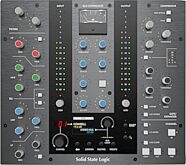
Solid State Logic SSL UC1 Hardware Controller
$799.99
- 12 payments of$66.67/mo
- No Credit Check6 payments of$133.33/mo
-

Solid State Logic SSL UF1 Single-Fader DAW Control Surface
$699.99
- 12 payments of$58.33/mo
- No Credit Check6 payments of$116.66/mo
-
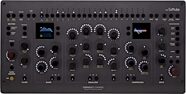
Softube Console 1 Channel Mk III Control Surface
$899.00
- 12 payments of$74.92/mo
- No Credit Check6 payments of$149.83/mo
-


Items You Recently Viewed
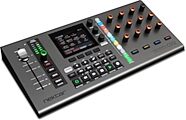
Nektar Panorama CS12 USB MIDI Channel Strip Controller
$399.99
- 8 payments of$50.00/mo
- No Credit Check6 payments of$66.66/mo
-