Cakewalk Software Home Studio Production Pack (Windows)
No longer available at zZounds
zZounds Gear Experts Say...
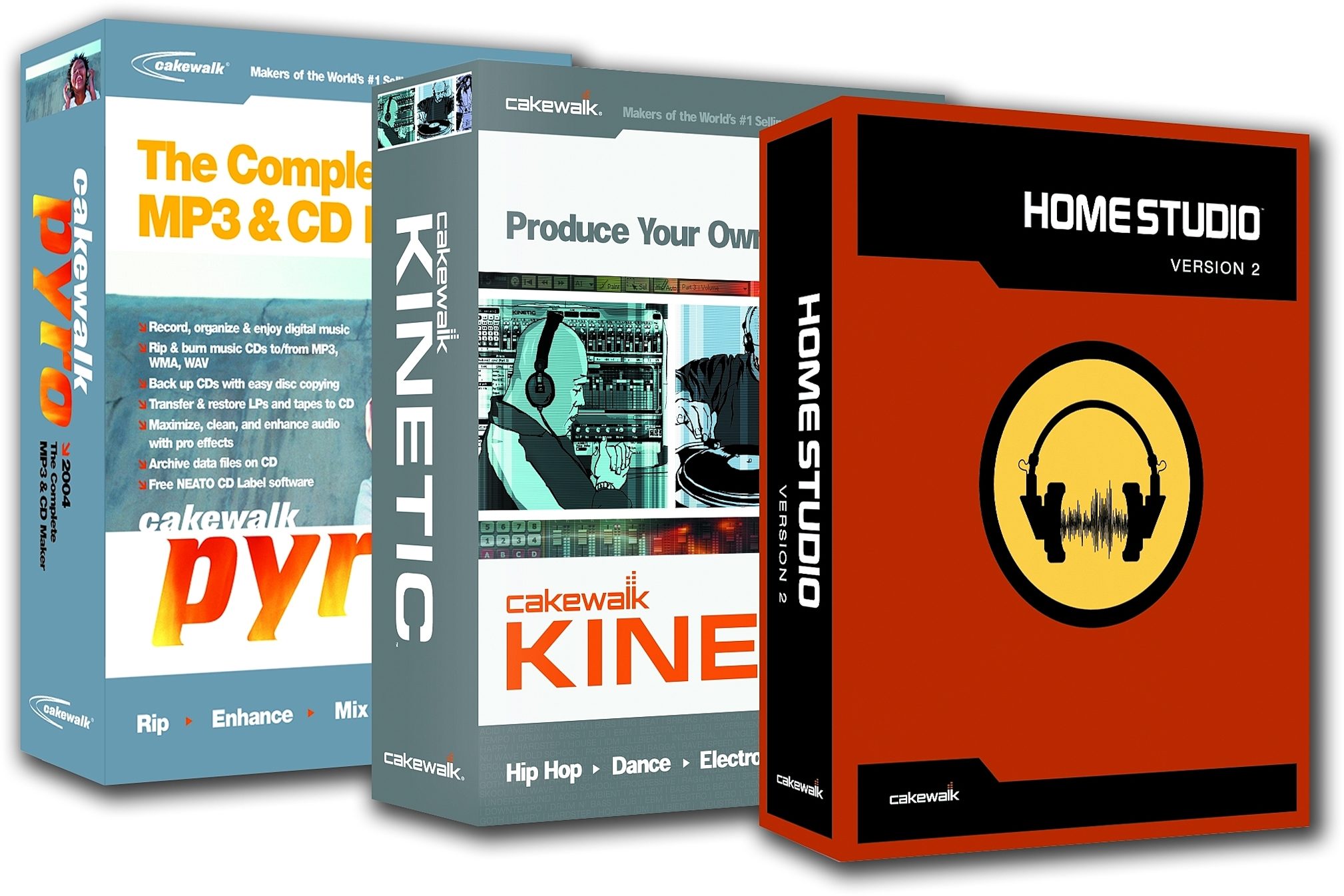
Includes Cakewalk Home Studio, Kinetic, and Pyro.
Overview
All the software you need to get from song idea to finished CD, and it's a bargain! You get Cakewalk's Home Studio recording/sequencing software, Kinetic electronic music software, and Pyro CD burning software all in one bundle. Save big bucks over the same products purchased separately.
Home Studio
It's time to take control of the creative process. Now you don't have to depend on anyone else to get your music recorded. Do it all from your PC with Cakewalk Home Studio Version 2. There is no better Windows software available for musicians taking the step into the world of digital recording. Home Studio provides you with everything you need to turn your PC into a powerful multitrack recording studio.
With support for real-time DirectX effects, DXi and ReWire software synths, MIDI FX plug-ins, and ACID-format audio loop technology, Home Studio takes your music farther, faster, and for less money than any comparable software product.
New Cakewalk VST Adapter
Adds support for VST effects & instruments to your Cakewalk software.
The Cakewalk VST Adapter seamlessly adds support for VST audio effects and instruments to Home Studio.
The Cakewalk VST Adapter converts VST format plug-ins to DirectX and DXi format, giving you sample-accurate automation with identical audio fidelity. Best of all, you will experience no additional latency and almost no additional CPU resources are required.
The Cakewalk VST Adapter to opens your studio up to hundreds of available freeware and shareware… read more VST effects plug-ins and VSTi software synths and expand your sonic palette today.
Cakewalk VST Adapter Key Benefits
Opens up Home Studio to hundreds of available freeware and shareware VST effects plug-ins and VSTi software synths
Offers identical internal processing and sound quality as VST hosts
No additional latencyn
Negligible CPU hit
Centralized Audio and MIDI Recording
Home Studio is designed to let you concentrate on creating music, instead of getting bogged down with confusing software. It's all laid out in an intuitive Track window that lets you quickly record, edit, arrange, and mix your music.
It doesn't matter what you want to record -- guitars, keyboards, vocals, live turntable scratches, CD samples, or any other sound source. Home Studio puts it all together seamlessly.
Loop-based Composition Tools
Now you can easily create and layer loop-based music tracks along with live recordings. Create entire compositions or add new sonic layers to your existing songs. The Loop Explorer helps you find the right samples fast. Browse the included Cakewalk Loops sample library created by leading producers, or thousands of available sample collections.
Preview multiple loops while your project is playing back in tempo and in key with your song. Then just click and drag to paint your canvas of sound. Even make your own loops out of any MP3 or WAV file. Opens and reads ACID-format audio loops.
Perform with Built-in Software Synthesizers
Add hundreds of high quality instrument sounds to your studio with the included DXi soft synths.
The new Synth Rack makes loading and working with the synths for your project a snap. Home Studio now supports automation from the synth interface, plus DXi synths are now more efficient and offer lower latency than ever before.
Edirol Virtual Sound Canvas DXi
A software synthesizer, modeled after the famous Roland synth of the same name. Over 990 sounds and drum sets to choose from.
Audio Simulation DreamStation DXi
A vintage analog-style synthesizer reproduced as a DXi plug-in. It combines physical models of analog circuits together with mathematical models of analog oscillators. Works just like a vintage hardware synthesizer worth thousands of dollars today.
Integrate ReWire Synths
Get more synth sounds by patching Project5, Kinetic, Reason, ReBirth, and other ReWire 1.0 and 2.0 compatible synths right into Home Studio Version 2's Synth Rack. Or use Home Studio to add audio recording and editing to your Project5, Kinetic, or Reason studio.
Use Home Studio's MIDI FX, automation, and sequencing capabilities to control Project5 or Reason
Route ReWire channels into audio tracks inside Home Studio
Process Project5's or Reason's audio outputs with DirectX effects
Add loops or recorded audio tracks to your Project5 or Reason projects
Mix Tracks with DirectX Audio Effects
Sweeten your mix with Amp Sim Lite, Chorus, Reverb, EQ, Delay, Flange and other professional audio effects, or even add hundreds of other available DirectX-compatible audio plug-ins.
DirectX is the most widely-supported audio effects plug-in format on the Windows platform. Visit www.thedirectxfiles.com for the latest news on DirectX audio software.
Cakewalk MIDI FX
Apply real-time effects to your MIDI tracks, just like audio effects. Use effects in real-time on input and during playback, or apply them as off-line edits. MIDI FX include Arpeggiator, Quantize, Delay/echo, Change Velocity, MIDI event filter, Session Drummer, NTONYX Syle Enhancer Micro 2.0 Lite and MusicLab VeloMaster Lite.
Compose and Print Sheet Music
When it comes to composing and printing sheet music, Home Studio is up to the task. You can record and transcribe any performance using any MIDI instrument, and watch your notes appear on the screen as you play. You can also just point and click to add and move notes in the Staff view.
Notation Features Edit and print multiple MIDI tracks as high-quality notation
Notes appear on-screen as you record from a MIDI instrument
Zoom-in or out the Staff view to display notation at any size
Assign any number of tracks to individual staves
Standard and single-line percussion clef notation, guitar chord grids, expression text, dynamic markings, pedal markings, composer name and title
Variable fonts for expression text and lyrics
Print up to 24 staves per page
Graphical Editing Tools
Compose and edit MIDI tracks using the Piano Roll view. Point and click to insert, copy, move, delete or modify MIDI notes and Controller data. View multiple tracks or just one at a time.
Drum Grid Editor
Creating MIDI drum parts has never been easier or faster. Paint rhythmic patterns in a single mouse stroke. Use included patterns, or create your own.
Graphical Mixing
Draw lines and curves on top of your audio and MIDI to accurately change mix parameters like volume, pan, MIDI Controller data and aux sends. Creating a mix has never been more intuitive.
Create Video Soundtracks
Home Studio provides a fast and effective way to create, edit and dub soundtracks for digital video files. Just import and sync any Windows AVI file to your Home Studio project. Then export your finished project to AVI -- perfect for enhancing home movies and multimedia presentations.
Cakewalk Home Studio Version 2 Feature Highlights
Record and play back unlimited tracks of audio and MIDI
Simultaneously record your whole band with support for multi-channel audio cards
Record up to 24-bit/96 kHz audio
Real-time mixing console
Loop-based song construction tools
Import WAV, ACID-format WAV, and MP3 files
Complete library of ACID-format audio loops
Support for DXi third-party soft synth plug-ins
Includes Virtual Sound Canvas DXi and Dreamstation DXi soft synths
Real-time DirectX audio effects: Amp Sim Lite, Reverb, Chorus, Delay, Flange, EQ
Support for hundreds of available third-party DirectX audio plug-ins
ReWire support to integrate Home Studio Version 2 with Project5, Reason, and other ReWire synths
Support for VST instruments and effects with Cakewalk VST Adapter
Edit and print notation, along with chord symbols, guitar chord grids, lyrics, dynamic markings
Unlimited Edit Undo
24-bit and 16-bit audio support
Multitrack Piano Roll view
Drum Editing Grid with Pattern brush
Import and synchronize AVI video to music projects
Non-destructive slip-editing of audio and MIDI clips
Per-track audio meters
Support for all Windows compatible audio hardware through ASIO, MME, or WDM
Kinetic
With Cakewalk Kinetic, you're the Dance and Hip Hop producer. Simply put, Kinetic represents the fastest and easiest way to create electronic music. Even if you have no musical background, it's a snap to get started making tracks. And that's not all. Your grooves are going to be huge because Kinetic features the best instrument sounds ever available on a PC.
Whether you have dance club aspirations or need beats to back your rhymes, Kinetic has all the juice you need.
The best sounds
Kinetic features 100%-genuine Roland sounds from their genre-defining groove boxes and synthesizers. The Roland name is synonymous with the cutting edge tones of Hip Hop, Dance, and Electronica. These instruments have been used by chart-toppers and underground legends for over 20 years. It would take thousands of dollars of hardware to create these sounds, but now they can instantly be yours. All you need is Kinetic and your PC.
The easiest way to make music
Kinetic doesn't just sound good; it makes musical creativity accessible to anyone, regardless of musical experience. Just select the instrument and style of music you want, and you are given hundreds of professionally recorded music patterns and loops to make music. To add your own flavor to the mix you, can modify these patterns or create your own. Then just point and click to trigger different instruments and you're composing your own song.
Features
Compose music and create beats with an easy point and click interface
Choose from over 400 instrument patches, featuring genuine Roland sounds (101, 606, 808, 909, more)
Add audio loops to your mix for even more rhythmic variety
Get started with hundreds of professionally recorded music patterns and ACID-format loops in popular styles
Quickly access patterns and sounds by instrument type and music genre through Kinetic's innovative content browser
Use the included patterns or create your own
Tweak your sounds with professional studio effects
Connect Kinetic to other recording programs like Music Creator, Home Studio, or SONAR to expand your capabilities
Export WAV files of your mix to burn on CD or MP3s* to share on the web
MP3 encoder is available as a 30-day trial version.
Rock right out of the box
Immediately start making music -- just hit play and click some buttons to trigger 64 sections of music with up to 16 instruments each. Load up other demo songs for even more fun! Then, when you're ready, explore the other music-making features that Kinetic has to offer.
You're the mixmaster
Take full control of your mix -- bring individual instruments up and down, go with the flow, move the sounds from left to right, mute and solo parts for dramatic effects.
Get your groove on
Kinetic features the actual genre-defining sounds of legendary Roland groove boxes and synths. With Kinetic, these instruments are easier than ever to use-simply select the instrument type you want (drums, bass, leads, etc.) and then select from an assortment of instrument patches. You can play these sounds live with a MIDI keyboard or instrument, or trigger them live with music patterns using your mouse.
Take it deeper
Enhance your sonic landscape by expanding the Roland instruments -- you get access to all the important parameters that shape your tone, right at your fingertips.
Unstoppable beats and grooves
Play your instruments by choosing from hundreds of professionally recorded music patterns. You can mix and match patterns and also use the included audio loops to create an infinite variety of fresh musical combinations. Kinetic helps you find the right pattern fast by intuitively grouping them by instrument and music genre.
Express yourself
You can add your own flavor to the mix by modifying existing patterns or by composing original patterns using the Pattern Editor or Piano Roll views.
Freak it like a pro
Kinetic includes all the effects you need to get that pro sound. Add reverb, delay, EQ, filter sweeps, and more.
Compose songs live as you play
Making songs has never been easier. Just hit record and Kinetic will automatically record as you trigger different sections, change the mix, and tweak your sounds. You can also point and click to arrange songs with your mouse.
Get connected
Add audio recording to your experience by connecting Kinetic to Cakewalk Music Creator, Cakewalk Home Studio, SONAR or any other recording software that supports Rewire. And connect with your friends and the music community by exporting WAV files of your mix to burn CDs, or MP3s* to share on the web.
* Kinetic includes a 30-day trial MP3 encoder
Cakewalk Pyro 2004 -- the complete MP3 & CD Maker
If you want to get the most out of your digital music experience look no further than Cakewalk Pyro 2004. Whether you want to make MP3s, burn and share mix CDs of your favorite music, digitize and restore LPs or cassettes, archive important data files, or create backup copies of your favorite CDs, Pyro does it all in one easy-to-use application.
Rip -- > Enhance > Mix > Burn
Record, organize & enjoy digital music
Rip & burn music CDs to/from MP3, WMA, WAV
Backup CDs with easy disc copying
Transfer and restore LPs and tapes to CD
Maximize, clean, and enhance audio with pro FX
Archive data files on CD
Bonus -- includes FREE NEATO CD Label software
Cakewalk has provided leading music recording technology to Grammy and Emmy winning musicians and producers for over 15 years. We've now combined the best of that technology with our years of experience to create the ultimate software for the enjoyment of digital music and more.
1. With Pyro, it's a snap to create digital music files or copy CDs. Rip songs from any CD and turn them into MP3, Windows Media, or WAV files; record and convert your old LPs or cassettes; even record internet radio broadcasts.
2. Click and drag to arrange and edit song start and end times, overlay and crossfade tracks to create smooth transitions between songs for your own megamix. Then maximize, EQ and add effects to tracks to get the perfect sound for your listening environment; even clean audio to remove pops, hiss, and hum.
3. Listen to your music on your PC, transfer it into a portable digital music player, create and share custom CD or MP3 megamixes, or upload your MP3 or WMA tracks to the internet. Even create data CDs to archive your valuable documents, digital pictures and more.
Everything is clear and intuitive. Pyro's welcome screen and customized instruction pane tell you everything you need to know to get started fast.
Rip/Record
Rip your favorite songs or entire CDs and keep that great digital quality
Create MP3, WAV, and WMA files
Convert your vinyl LPs and cassettes to CD
Simple commands let you record Internet broadcasts, even when you're away from your PC
Custom Audio Edits
Visually make precise edits right on top of the audio waveform
Control start and stop times, and raise or lower the volume of your audio to make your music sound perfect
Add a professional touch with custom song fades and control over the length of silence between songs
Pyro can automatically set volumes and crossfade songs together to create smooth transitions for DJ-style mixes
Clean and Enhance with Professional Effects
Get the most out of your audio with 64-bit Loudness Maximizer
Tweak your audio with 64-bit EQ so it sounds ideal for your personal listening environment and tastes
Restore audio that has digital distortion from being recorded at high levels with DeClipper
Remove clicks, pops, and crackles from noisy LPs with DeClipper
Clean hiss, hum, and other annoyances from LPs, cassettes, and low-quality MP3s with DeClipper
Add a special touch to your mix with Reverb, Delay, Chorus, and other effects with Plasma FXPad
Pyro is DirectX-compatible so you can add hundreds of other audio effects which are widely available online
Arrange, Organize and Play
Quickly locate and arrange audio files on your PC
Pyro instantly recognizes album names, song titles, and artists from commercial CDs using Gracenote's CDDB online database
Insert track numbers and split long audio files into multiple tracks
Create and store playlists of your favorite songs using multiple formats: MP3, WAV, WMA
Listen to Playlists on your PC, or take your favorite songs with you on CD or your portable Digital Music player*
Burn, Encode, and Copy
Set up a playlist and then burn the songs to an audio or MP3 data CD with the click of a mouse
Encode individual songs or entire mixes to MP3, WAV, or WMA format
Features professional-quality MP3 & WindowsMedia 9 encoding
Easy disc-to-disc copying makes it a snap to make back up audio CDs
Organize photos, digital video, documents, financial info, and other files the way you want, then burn CDs to safely and securely archive valuable data
Pyro works with virtually all CD-R and CD-RW drives
Bonus! NEATO CD-Labeling Graphics Package
Give your CDs a professional look with NEATO(R) MediaFACE 4 CD labeling software
Design & print full-color CD-Labels and jewel case inserts using the included images or your own
Highlights
Burn professional-quality CDs of your favorite songs
Quickly turn your CDs into MP3s, WAV, or WMA files
Rip individual songs or entire albums
Create unlimited digital files with fast, professional MP3 & WindowsMedia 9 encoding
Locate and organize all the music files on your PC
Easy disc-to-disc copying to create backup CDs
Back up your valuable files to Data CD
Convert LPs and cassettes to CD or digital files
Clean audio with professional audio restoration plug-ins: Cakewalk DeClicker, DeNoiser & DeClipper
Get the most out of your audio with 64-bit EQ & Loudness Maximizer
Add Reverb, Delay, Chorus, & other effects with Plasma FXPad
Add additional DirectX-compatible effects
Make precise edits with the ability to see the audio waveform
Control start & stop times, volume of your audio to make your music sound perfect
Create megamixes & smooth transitions by overlaying & cross-fading songs
Set volumes automatically for an even mix
Take the music with you on your favorite portable digital music player*
Instantly download song title & artist name from Gracenote/CDDB
Includes free NEATO MediaFACE 4 CD labeling software
Pyro works with virtually all CD-R & CD-RW drives
Compatible with Windows 98SE/Me/2000/XP read less
Home Studio
It's time to take control of the creative process. Now you don't have to depend on anyone else to get your music recorded. Do it all from your PC with Cakewalk Home Studio Version 2. There is no better Windows software available for musicians taking the step into the world of digital recording. Home Studio provides you with everything you need to turn your PC into a powerful multitrack recording studio.
With support for real-time DirectX effects, DXi and ReWire software synths, MIDI FX plug-ins, and ACID-format audio loop technology, Home Studio takes your music farther, faster, and for less money than any comparable software product.
New Cakewalk VST Adapter
Adds support for VST effects & instruments to your Cakewalk software.
The Cakewalk VST Adapter seamlessly adds support for VST audio effects and instruments to Home Studio.
The Cakewalk VST Adapter converts VST format plug-ins to DirectX and DXi format, giving you sample-accurate automation with identical audio fidelity. Best of all, you will experience no additional latency and almost no additional CPU resources are required.
The Cakewalk VST Adapter to opens your studio up to hundreds of available freeware and shareware… read more VST effects plug-ins and VSTi software synths and expand your sonic palette today.
Cakewalk VST Adapter Key Benefits
Opens up Home Studio to hundreds of available freeware and shareware VST effects plug-ins and VSTi software synths
Offers identical internal processing and sound quality as VST hosts
No additional latencyn
Negligible CPU hit
Centralized Audio and MIDI Recording
Home Studio is designed to let you concentrate on creating music, instead of getting bogged down with confusing software. It's all laid out in an intuitive Track window that lets you quickly record, edit, arrange, and mix your music.
It doesn't matter what you want to record -- guitars, keyboards, vocals, live turntable scratches, CD samples, or any other sound source. Home Studio puts it all together seamlessly.
Loop-based Composition Tools
Now you can easily create and layer loop-based music tracks along with live recordings. Create entire compositions or add new sonic layers to your existing songs. The Loop Explorer helps you find the right samples fast. Browse the included Cakewalk Loops sample library created by leading producers, or thousands of available sample collections.
Preview multiple loops while your project is playing back in tempo and in key with your song. Then just click and drag to paint your canvas of sound. Even make your own loops out of any MP3 or WAV file. Opens and reads ACID-format audio loops.
Perform with Built-in Software Synthesizers
Add hundreds of high quality instrument sounds to your studio with the included DXi soft synths.
The new Synth Rack makes loading and working with the synths for your project a snap. Home Studio now supports automation from the synth interface, plus DXi synths are now more efficient and offer lower latency than ever before.
Edirol Virtual Sound Canvas DXi
A software synthesizer, modeled after the famous Roland synth of the same name. Over 990 sounds and drum sets to choose from.
Audio Simulation DreamStation DXi
A vintage analog-style synthesizer reproduced as a DXi plug-in. It combines physical models of analog circuits together with mathematical models of analog oscillators. Works just like a vintage hardware synthesizer worth thousands of dollars today.
Integrate ReWire Synths
Get more synth sounds by patching Project5, Kinetic, Reason, ReBirth, and other ReWire 1.0 and 2.0 compatible synths right into Home Studio Version 2's Synth Rack. Or use Home Studio to add audio recording and editing to your Project5, Kinetic, or Reason studio.
Use Home Studio's MIDI FX, automation, and sequencing capabilities to control Project5 or Reason
Route ReWire channels into audio tracks inside Home Studio
Process Project5's or Reason's audio outputs with DirectX effects
Add loops or recorded audio tracks to your Project5 or Reason projects
Mix Tracks with DirectX Audio Effects
Sweeten your mix with Amp Sim Lite, Chorus, Reverb, EQ, Delay, Flange and other professional audio effects, or even add hundreds of other available DirectX-compatible audio plug-ins.
DirectX is the most widely-supported audio effects plug-in format on the Windows platform. Visit www.thedirectxfiles.com for the latest news on DirectX audio software.
Cakewalk MIDI FX
Apply real-time effects to your MIDI tracks, just like audio effects. Use effects in real-time on input and during playback, or apply them as off-line edits. MIDI FX include Arpeggiator, Quantize, Delay/echo, Change Velocity, MIDI event filter, Session Drummer, NTONYX Syle Enhancer Micro 2.0 Lite and MusicLab VeloMaster Lite.
Compose and Print Sheet Music
When it comes to composing and printing sheet music, Home Studio is up to the task. You can record and transcribe any performance using any MIDI instrument, and watch your notes appear on the screen as you play. You can also just point and click to add and move notes in the Staff view.
Notation Features Edit and print multiple MIDI tracks as high-quality notation
Notes appear on-screen as you record from a MIDI instrument
Zoom-in or out the Staff view to display notation at any size
Assign any number of tracks to individual staves
Standard and single-line percussion clef notation, guitar chord grids, expression text, dynamic markings, pedal markings, composer name and title
Variable fonts for expression text and lyrics
Print up to 24 staves per page
Graphical Editing Tools
Compose and edit MIDI tracks using the Piano Roll view. Point and click to insert, copy, move, delete or modify MIDI notes and Controller data. View multiple tracks or just one at a time.
Drum Grid Editor
Creating MIDI drum parts has never been easier or faster. Paint rhythmic patterns in a single mouse stroke. Use included patterns, or create your own.
Graphical Mixing
Draw lines and curves on top of your audio and MIDI to accurately change mix parameters like volume, pan, MIDI Controller data and aux sends. Creating a mix has never been more intuitive.
Create Video Soundtracks
Home Studio provides a fast and effective way to create, edit and dub soundtracks for digital video files. Just import and sync any Windows AVI file to your Home Studio project. Then export your finished project to AVI -- perfect for enhancing home movies and multimedia presentations.
Cakewalk Home Studio Version 2 Feature Highlights
Record and play back unlimited tracks of audio and MIDI
Simultaneously record your whole band with support for multi-channel audio cards
Record up to 24-bit/96 kHz audio
Real-time mixing console
Loop-based song construction tools
Import WAV, ACID-format WAV, and MP3 files
Complete library of ACID-format audio loops
Support for DXi third-party soft synth plug-ins
Includes Virtual Sound Canvas DXi and Dreamstation DXi soft synths
Real-time DirectX audio effects: Amp Sim Lite, Reverb, Chorus, Delay, Flange, EQ
Support for hundreds of available third-party DirectX audio plug-ins
ReWire support to integrate Home Studio Version 2 with Project5, Reason, and other ReWire synths
Support for VST instruments and effects with Cakewalk VST Adapter
Edit and print notation, along with chord symbols, guitar chord grids, lyrics, dynamic markings
Unlimited Edit Undo
24-bit and 16-bit audio support
Multitrack Piano Roll view
Drum Editing Grid with Pattern brush
Import and synchronize AVI video to music projects
Non-destructive slip-editing of audio and MIDI clips
Per-track audio meters
Support for all Windows compatible audio hardware through ASIO, MME, or WDM
Kinetic
With Cakewalk Kinetic, you're the Dance and Hip Hop producer. Simply put, Kinetic represents the fastest and easiest way to create electronic music. Even if you have no musical background, it's a snap to get started making tracks. And that's not all. Your grooves are going to be huge because Kinetic features the best instrument sounds ever available on a PC.
Whether you have dance club aspirations or need beats to back your rhymes, Kinetic has all the juice you need.
The best sounds
Kinetic features 100%-genuine Roland sounds from their genre-defining groove boxes and synthesizers. The Roland name is synonymous with the cutting edge tones of Hip Hop, Dance, and Electronica. These instruments have been used by chart-toppers and underground legends for over 20 years. It would take thousands of dollars of hardware to create these sounds, but now they can instantly be yours. All you need is Kinetic and your PC.
The easiest way to make music
Kinetic doesn't just sound good; it makes musical creativity accessible to anyone, regardless of musical experience. Just select the instrument and style of music you want, and you are given hundreds of professionally recorded music patterns and loops to make music. To add your own flavor to the mix you, can modify these patterns or create your own. Then just point and click to trigger different instruments and you're composing your own song.
Features
Compose music and create beats with an easy point and click interface
Choose from over 400 instrument patches, featuring genuine Roland sounds (101, 606, 808, 909, more)
Add audio loops to your mix for even more rhythmic variety
Get started with hundreds of professionally recorded music patterns and ACID-format loops in popular styles
Quickly access patterns and sounds by instrument type and music genre through Kinetic's innovative content browser
Use the included patterns or create your own
Tweak your sounds with professional studio effects
Connect Kinetic to other recording programs like Music Creator, Home Studio, or SONAR to expand your capabilities
Export WAV files of your mix to burn on CD or MP3s* to share on the web
MP3 encoder is available as a 30-day trial version.
Rock right out of the box
Immediately start making music -- just hit play and click some buttons to trigger 64 sections of music with up to 16 instruments each. Load up other demo songs for even more fun! Then, when you're ready, explore the other music-making features that Kinetic has to offer.
You're the mixmaster
Take full control of your mix -- bring individual instruments up and down, go with the flow, move the sounds from left to right, mute and solo parts for dramatic effects.
Get your groove on
Kinetic features the actual genre-defining sounds of legendary Roland groove boxes and synths. With Kinetic, these instruments are easier than ever to use-simply select the instrument type you want (drums, bass, leads, etc.) and then select from an assortment of instrument patches. You can play these sounds live with a MIDI keyboard or instrument, or trigger them live with music patterns using your mouse.
Take it deeper
Enhance your sonic landscape by expanding the Roland instruments -- you get access to all the important parameters that shape your tone, right at your fingertips.
Unstoppable beats and grooves
Play your instruments by choosing from hundreds of professionally recorded music patterns. You can mix and match patterns and also use the included audio loops to create an infinite variety of fresh musical combinations. Kinetic helps you find the right pattern fast by intuitively grouping them by instrument and music genre.
Express yourself
You can add your own flavor to the mix by modifying existing patterns or by composing original patterns using the Pattern Editor or Piano Roll views.
Freak it like a pro
Kinetic includes all the effects you need to get that pro sound. Add reverb, delay, EQ, filter sweeps, and more.
Compose songs live as you play
Making songs has never been easier. Just hit record and Kinetic will automatically record as you trigger different sections, change the mix, and tweak your sounds. You can also point and click to arrange songs with your mouse.
Get connected
Add audio recording to your experience by connecting Kinetic to Cakewalk Music Creator, Cakewalk Home Studio, SONAR or any other recording software that supports Rewire. And connect with your friends and the music community by exporting WAV files of your mix to burn CDs, or MP3s* to share on the web.
* Kinetic includes a 30-day trial MP3 encoder
Cakewalk Pyro 2004 -- the complete MP3 & CD Maker
If you want to get the most out of your digital music experience look no further than Cakewalk Pyro 2004. Whether you want to make MP3s, burn and share mix CDs of your favorite music, digitize and restore LPs or cassettes, archive important data files, or create backup copies of your favorite CDs, Pyro does it all in one easy-to-use application.
Rip -- > Enhance > Mix > Burn
Record, organize & enjoy digital music
Rip & burn music CDs to/from MP3, WMA, WAV
Backup CDs with easy disc copying
Transfer and restore LPs and tapes to CD
Maximize, clean, and enhance audio with pro FX
Archive data files on CD
Bonus -- includes FREE NEATO CD Label software
Cakewalk has provided leading music recording technology to Grammy and Emmy winning musicians and producers for over 15 years. We've now combined the best of that technology with our years of experience to create the ultimate software for the enjoyment of digital music and more.
1. With Pyro, it's a snap to create digital music files or copy CDs. Rip songs from any CD and turn them into MP3, Windows Media, or WAV files; record and convert your old LPs or cassettes; even record internet radio broadcasts.
2. Click and drag to arrange and edit song start and end times, overlay and crossfade tracks to create smooth transitions between songs for your own megamix. Then maximize, EQ and add effects to tracks to get the perfect sound for your listening environment; even clean audio to remove pops, hiss, and hum.
3. Listen to your music on your PC, transfer it into a portable digital music player, create and share custom CD or MP3 megamixes, or upload your MP3 or WMA tracks to the internet. Even create data CDs to archive your valuable documents, digital pictures and more.
Everything is clear and intuitive. Pyro's welcome screen and customized instruction pane tell you everything you need to know to get started fast.
Rip/Record
Rip your favorite songs or entire CDs and keep that great digital quality
Create MP3, WAV, and WMA files
Convert your vinyl LPs and cassettes to CD
Simple commands let you record Internet broadcasts, even when you're away from your PC
Custom Audio Edits
Visually make precise edits right on top of the audio waveform
Control start and stop times, and raise or lower the volume of your audio to make your music sound perfect
Add a professional touch with custom song fades and control over the length of silence between songs
Pyro can automatically set volumes and crossfade songs together to create smooth transitions for DJ-style mixes
Clean and Enhance with Professional Effects
Get the most out of your audio with 64-bit Loudness Maximizer
Tweak your audio with 64-bit EQ so it sounds ideal for your personal listening environment and tastes
Restore audio that has digital distortion from being recorded at high levels with DeClipper
Remove clicks, pops, and crackles from noisy LPs with DeClipper
Clean hiss, hum, and other annoyances from LPs, cassettes, and low-quality MP3s with DeClipper
Add a special touch to your mix with Reverb, Delay, Chorus, and other effects with Plasma FXPad
Pyro is DirectX-compatible so you can add hundreds of other audio effects which are widely available online
Arrange, Organize and Play
Quickly locate and arrange audio files on your PC
Pyro instantly recognizes album names, song titles, and artists from commercial CDs using Gracenote's CDDB online database
Insert track numbers and split long audio files into multiple tracks
Create and store playlists of your favorite songs using multiple formats: MP3, WAV, WMA
Listen to Playlists on your PC, or take your favorite songs with you on CD or your portable Digital Music player*
Burn, Encode, and Copy
Set up a playlist and then burn the songs to an audio or MP3 data CD with the click of a mouse
Encode individual songs or entire mixes to MP3, WAV, or WMA format
Features professional-quality MP3 & WindowsMedia 9 encoding
Easy disc-to-disc copying makes it a snap to make back up audio CDs
Organize photos, digital video, documents, financial info, and other files the way you want, then burn CDs to safely and securely archive valuable data
Pyro works with virtually all CD-R and CD-RW drives
Bonus! NEATO CD-Labeling Graphics Package
Give your CDs a professional look with NEATO(R) MediaFACE 4 CD labeling software
Design & print full-color CD-Labels and jewel case inserts using the included images or your own
Highlights
Burn professional-quality CDs of your favorite songs
Quickly turn your CDs into MP3s, WAV, or WMA files
Rip individual songs or entire albums
Create unlimited digital files with fast, professional MP3 & WindowsMedia 9 encoding
Locate and organize all the music files on your PC
Easy disc-to-disc copying to create backup CDs
Back up your valuable files to Data CD
Convert LPs and cassettes to CD or digital files
Clean audio with professional audio restoration plug-ins: Cakewalk DeClicker, DeNoiser & DeClipper
Get the most out of your audio with 64-bit EQ & Loudness Maximizer
Add Reverb, Delay, Chorus, & other effects with Plasma FXPad
Add additional DirectX-compatible effects
Make precise edits with the ability to see the audio waveform
Control start & stop times, volume of your audio to make your music sound perfect
Create megamixes & smooth transitions by overlaying & cross-fading songs
Set volumes automatically for an even mix
Take the music with you on your favorite portable digital music player*
Instantly download song title & artist name from Gracenote/CDDB
Includes free NEATO MediaFACE 4 CD labeling software
Pyro works with virtually all CD-R & CD-RW drives
Compatible with Windows 98SE/Me/2000/XP read less
Specs
System requirements
Windows 2000, XP
800 MHz processor
256 MB RAM
180 MB free hard disk space
800 X 600, 16-bit color
CD-ROM drive (for installation)
Windows-compatible sound card*
Windows-compatible MIDI interface**
*Required for audio playback
**Required to connect to external MIDI devices
Windows 2000, XP
800 MHz processor
256 MB RAM
180 MB free hard disk space
800 X 600, 16-bit color
CD-ROM drive (for installation)
Windows-compatible sound card*
Windows-compatible MIDI interface**
*Required for audio playback
**Required to connect to external MIDI devices
No longer available at zZounds
In most cases, a product is unavailable because it has been discontinued by the manufacturer

This is a carousel with product cards. Use the previous and next buttons to navigate.
People who bought this item also bought


Universal Audio Apollo Twin X Duo Gen 2 Thunderbolt Audio Interface, Essentials+ Edition
$999.00
- 12 payments of$83.25/mo
- No Credit Check6 payments of$166.50/mo
-

Universal Audio Apollo Solo Thunderbolt 3 Audio Interface
$699.00
- 12 payments of$58.25/mo
- No Credit Check6 payments of$116.50/mo
-