
ASK Video Pro Tools 8 Tutorial Level 1 Video
No longer available at zZounds
zZounds Gear Experts Say...
No matter what version of Pro Tools you use, whether it be HD, LE, or M-Powered - this DVD is perfect for you!
Overview
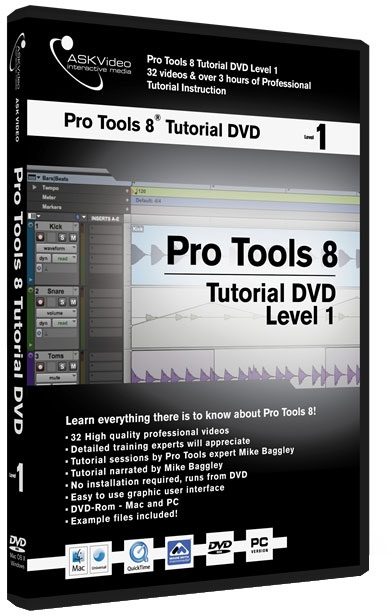
Pro Tools 8 features a sleek new interface, tons of new virtual instruments, new scoring and MIDI options, and ASK Video is here to show you how it all works in the new Pro Tools 8 Tutorial Series!
In Level 1, ASK Video is to take you through everything you need to know to get started. We're going to start right at the beginning with installation, setup, and taking a tour of the interface.
If you're new to Pro Tools or are finding the jump from Pro Tools 7 to 8 a little overwhelming, than this DVD is perfect. It's also great for those advanced users out there that haven't loaded up a session in a while and need a quick refresher. No matter what version of Pro Tools you use, whether it be HD, LE, or M-Powered - this DVD is perfect for you!
Features
- 32 Videos
- Over 3 hours of instructional video
- Extremely high quality tutorial videos
- Easy to use interface
- Great for users of Pro Tools HD, LE, or M-Powered
- Mac OSX & PC Compatible
- Requires computer with DVD-Rom Drive
Pro Tools 8 Tutorial DVD Level 1 Content:
32 High Quality Videos
1. Installation Mac
2. Installation PC
3. Hardware Setup
4. First Session
5. Mix Window
6. Edit Window
7. Creating Tracks 1
8. Creating Tracks 2
9. Transport 1
10. Transport 2
11. Click Track - example video
12. I/O Setup 1
13. I/O Setup 2
14. Recording Audio
15. Recording Modes
16. MIDI Setup
17. Recording MIDI 1
18. Recording MIDI 2 - example video
19. Editing MIDI
20. Fades & Crossfades… read more
21. Edit Tools
22. Edit Modes
23. Audio Editing 1
24. Audio Editing 2 - example video
25. Automation Basics
26. Grouping Tracks
27. Bussing
28. Managing Regions
29. Bouncing to Disk
30. Eleven Free
31. Mini Grand - example video
32. Boom read less
In Level 1, ASK Video is to take you through everything you need to know to get started. We're going to start right at the beginning with installation, setup, and taking a tour of the interface.
If you're new to Pro Tools or are finding the jump from Pro Tools 7 to 8 a little overwhelming, than this DVD is perfect. It's also great for those advanced users out there that haven't loaded up a session in a while and need a quick refresher. No matter what version of Pro Tools you use, whether it be HD, LE, or M-Powered - this DVD is perfect for you!
Features
- 32 Videos
- Over 3 hours of instructional video
- Extremely high quality tutorial videos
- Easy to use interface
- Great for users of Pro Tools HD, LE, or M-Powered
- Mac OSX & PC Compatible
- Requires computer with DVD-Rom Drive
Pro Tools 8 Tutorial DVD Level 1 Content:
32 High Quality Videos
1. Installation Mac
2. Installation PC
3. Hardware Setup
4. First Session
5. Mix Window
6. Edit Window
7. Creating Tracks 1
8. Creating Tracks 2
9. Transport 1
10. Transport 2
11. Click Track - example video
12. I/O Setup 1
13. I/O Setup 2
14. Recording Audio
15. Recording Modes
16. MIDI Setup
17. Recording MIDI 1
18. Recording MIDI 2 - example video
19. Editing MIDI
20. Fades & Crossfades… read more
21. Edit Tools
22. Edit Modes
23. Audio Editing 1
24. Audio Editing 2 - example video
25. Automation Basics
26. Grouping Tracks
27. Bussing
28. Managing Regions
29. Bouncing to Disk
30. Eleven Free
31. Mini Grand - example video
32. Boom read less
Specs
System Specifications
This product includes QuickTime 7.x Mac/PC which is required for video playback. DVD-Rom drive required for Mac/PC DVD-ROM.
Minimum screen resolution for DVD-ROM 1024 x 768.
PC: Windows XP Home or Professional, Intel Pentium or AMD Athlon 800 MHz or faster, 256 MB RAM. Windows MME or DirectSound Sound Card.
MAC: Requires Mac OS X v10.2 or higher, Power Mac G4 867 MHz, 256 MB RAM, Sound Card.
This product includes QuickTime 7.x Mac/PC which is required for video playback. DVD-Rom drive required for Mac/PC DVD-ROM.
Minimum screen resolution for DVD-ROM 1024 x 768.
PC: Windows XP Home or Professional, Intel Pentium or AMD Athlon 800 MHz or faster, 256 MB RAM. Windows MME or DirectSound Sound Card.
MAC: Requires Mac OS X v10.2 or higher, Power Mac G4 867 MHz, 256 MB RAM, Sound Card.
Documents and Manuals
For support or warranty questions, please contact the manufacturer:
No longer available at zZounds
In most cases, a product is unavailable because it has been discontinued by the manufacturer