
Apple iPod Photo Media Player
No longer available at zZounds
zZounds Gear Experts Say...
Up to 15,000 songs or up to 25,000 photos. Sharp, vivid 2 in. color LCD screen. Connect iPod Photo to a projector or TV and give slideshows.
Overview
A delight for the ears. A feast for the eyes. Though it's no bigger than a pack of playing cards and weighs in at just over 6 ounces, iPod photo delivers a one-two sensory punch. Letting you carry an entire library of your favorite music - up to 15,000 songs - or enough photos - as many as 25,000 - to fill nearly 200 slide trays or cover nearly 5,000 square feet of wall space. Got a really big den?
Features:
Take up to 15,000 songs or up to 25,000 photos wherever you go
Auto-sync your music, photos and album art with iTunes 4.7
Sharp, vivid 2-inch Color LCD screen displays more than 65 thousand colors
Connect iPod photo to a projector or TV and give slideshows - complete with music
Enjoy up to 15 hours of continuous music thanks to extended battery life(2)
Copy full-resolution photos to iPod photo as a backup or to transfer originals to another system
Find songs and photos fast with the Apple Click Wheel
Use iPod photo with Mac OS X or Windows 2000/XP
Take it everywhere - it weighs just 6.4 ounces
Shuffle songs in the main menu
Play music in MP3, AAC and Apple Lossless formats
Create and save multiple On-the-Go Playlists
Adjust the read speed for Audiobooks
Enjoy seamless integration with iTunes
Sync and charge via included FireWire or USB 2.0 cables
Use as a portable hard drive - take your files with you
Remind yourself with Text Notes
Play games on-the-go - in living color
Keep appointments… read more using the Alarm Clock/Sleep Timer
Stay organized with contacts/calendars/to-do lists, all in color
Benefit from more language support
Record voice notes (with accessory)
Choose from hundreds of cool accessories designed just for iPod photo
Take Your Photos for a Spin
Like its famous siblings, iPod photo features the touch-sensitive Apple Click Wheel that's the envy of the industry. You'll use it to navigate iPod photo's new menu. Now in living color, its easier to read than ever. That's thanks in part to the clarity of the display - it offers 220x176-pixel resolution - and in part to the new Myriad typeface. Spin the wheel to Music, and you can scroll effortlessly through dozens of playlists, hundreds of albums or thousand of songs.
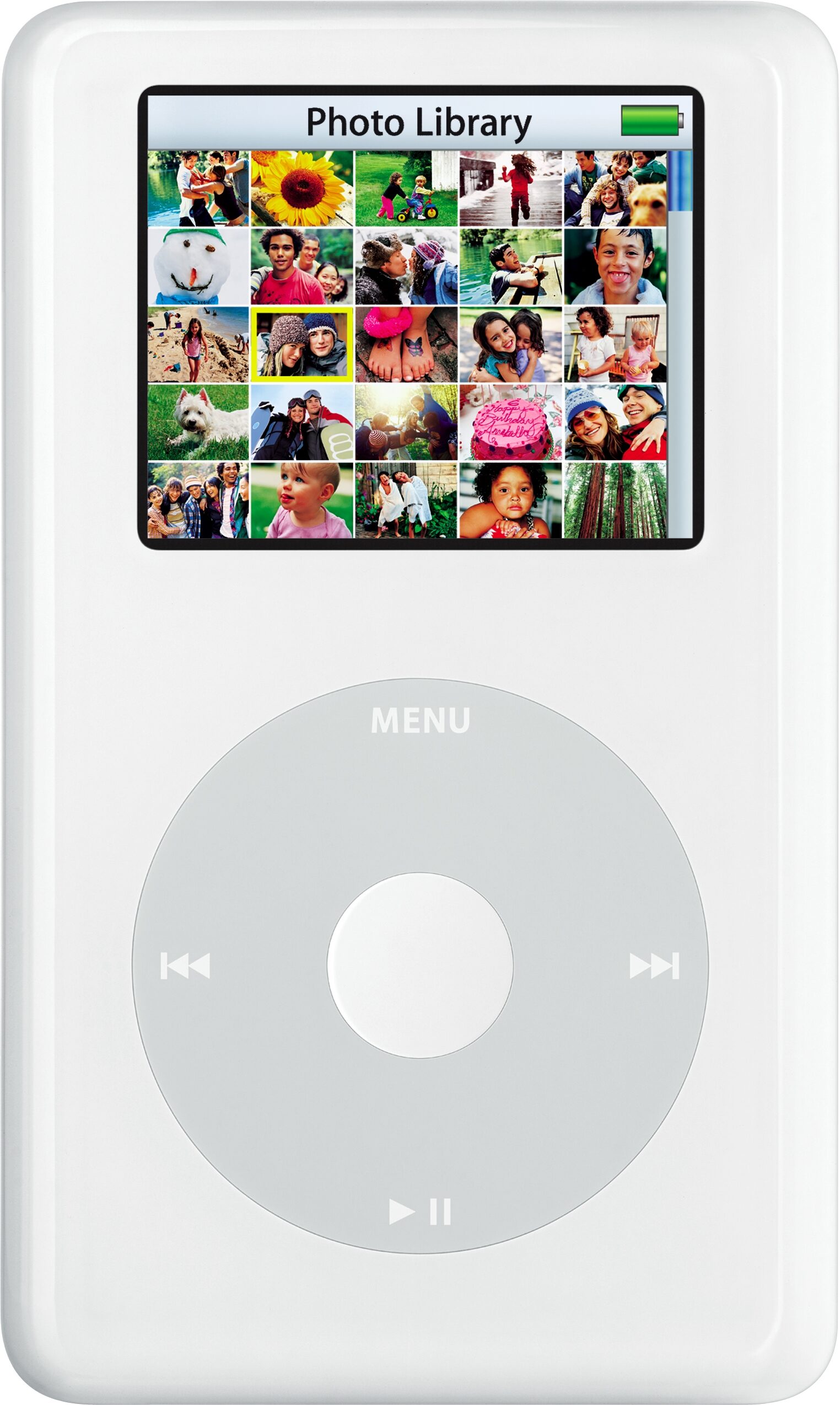
25 thumbs to full display or highlight photos. iPod photo displays 25 full-color thumbnails at a time. And you can scroll through them the same way you scroll through song titles. Quickly. Just spin the wheel to see more. And when you see a photo you'd like displayed all by its lonesome, just click the center button and voila. No one will have to say 'cheese' as long as you have iPod photo around. Whether you're listening to tunes or checking out photos, you're sure to be all smiles.
Get Brownie Points for Sharing
If you'd like everyone else to smile right along with you, iPod photo makes it easy. Sure, you could let them take the Click Wheel for a spin themselves, but here's a way to get extra points for style. Use the included AV cable to connect iPod photo to a projector or TV. You can mesmerize friends and family with a glorious multimedia experience, offering them a breathtaking slideshow accompanied by the music you already have on your iPod photo. Of course, you get to choose the songs, albums or playlists.
iTunes 4.7: Your Photo Passport
Wondering how you're going to get all your digital photographs into iPod photo? iTunes 4.7. The new version lets you import your images directly into iPod photo from a folder on the hard drive of your Mac or PC. Spent time organizing your photos using iPhoto on a Mac or either Adobe Photoshop Album 2.0 or Adobe Photoshop Elements 3.0 on a PC iTunes 4.7 rewards your diligence by importing the albums you've created in iPhoto or collections created in Album or Elements. You'll be able to choose them from the Photos menu on iPod photo.
Wait, there's more. iPod photo features even more robust Auto-Sync capabilities. Now, in addition to offering the industry's best music syncing, iTunes offers stellar photo syncing, as well. Update your photo collection by adding images or creating new albums, and the next time you connect iPod photo to your Mac or PC using the included FireWire or USB 2.0 cables, iTunes 4.7 will automatically synchronize your photo collection. And did we mention that iTunes 4.7 also autosyncs Album Art It's true. The Album Art downloaded when you purchase music from the iTunes Music Store is transferred to iPod photo along with the music. So while iPod photo plays your tunes, you can enjoy the Album Art - in color, of course - on the Now Playing screen.
Enjoy Improved Battery Life
Whether you're on a transcontinental flight or an extra long hike, if you plan to listen to music for hours and hours, iPod photo has you covered. Fully charged, it lets you enjoy up to 15 hours of continuous music; or up to 5 hours of continuous slideshows with music.(2) Use the FireWire or USB 2.0 cables to quickly charge the batteries. Or use the iPod photo Dock that comes with both 40GB and 60GB models.
1. Music capacity is based on 4 minutes per song and 128-Kbps AAC encoding; photo capacity is based on iPod-viewable photos transferred from iTunes.
2. Rechargeable batteries have a limited number of charge cycles and may eventually need to be replaced. Battery life and the number of charge cycles vary by use and settings. See www.apple.com/batteries for more information. read less
Features:
Take up to 15,000 songs or up to 25,000 photos wherever you go
Auto-sync your music, photos and album art with iTunes 4.7
Sharp, vivid 2-inch Color LCD screen displays more than 65 thousand colors
Connect iPod photo to a projector or TV and give slideshows - complete with music
Enjoy up to 15 hours of continuous music thanks to extended battery life(2)
Copy full-resolution photos to iPod photo as a backup or to transfer originals to another system
Find songs and photos fast with the Apple Click Wheel
Use iPod photo with Mac OS X or Windows 2000/XP
Take it everywhere - it weighs just 6.4 ounces
Shuffle songs in the main menu
Play music in MP3, AAC and Apple Lossless formats
Create and save multiple On-the-Go Playlists
Adjust the read speed for Audiobooks
Enjoy seamless integration with iTunes
Sync and charge via included FireWire or USB 2.0 cables
Use as a portable hard drive - take your files with you
Remind yourself with Text Notes
Play games on-the-go - in living color
Keep appointments… read more using the Alarm Clock/Sleep Timer
Stay organized with contacts/calendars/to-do lists, all in color
Benefit from more language support
Record voice notes (with accessory)
Choose from hundreds of cool accessories designed just for iPod photo
Take Your Photos for a Spin
Like its famous siblings, iPod photo features the touch-sensitive Apple Click Wheel that's the envy of the industry. You'll use it to navigate iPod photo's new menu. Now in living color, its easier to read than ever. That's thanks in part to the clarity of the display - it offers 220x176-pixel resolution - and in part to the new Myriad typeface. Spin the wheel to Music, and you can scroll effortlessly through dozens of playlists, hundreds of albums or thousand of songs.
25 thumbs to full display or highlight photos. iPod photo displays 25 full-color thumbnails at a time. And you can scroll through them the same way you scroll through song titles. Quickly. Just spin the wheel to see more. And when you see a photo you'd like displayed all by its lonesome, just click the center button and voila. No one will have to say 'cheese' as long as you have iPod photo around. Whether you're listening to tunes or checking out photos, you're sure to be all smiles.
Get Brownie Points for Sharing
If you'd like everyone else to smile right along with you, iPod photo makes it easy. Sure, you could let them take the Click Wheel for a spin themselves, but here's a way to get extra points for style. Use the included AV cable to connect iPod photo to a projector or TV. You can mesmerize friends and family with a glorious multimedia experience, offering them a breathtaking slideshow accompanied by the music you already have on your iPod photo. Of course, you get to choose the songs, albums or playlists.
iTunes 4.7: Your Photo Passport
Wondering how you're going to get all your digital photographs into iPod photo? iTunes 4.7. The new version lets you import your images directly into iPod photo from a folder on the hard drive of your Mac or PC. Spent time organizing your photos using iPhoto on a Mac or either Adobe Photoshop Album 2.0 or Adobe Photoshop Elements 3.0 on a PC iTunes 4.7 rewards your diligence by importing the albums you've created in iPhoto or collections created in Album or Elements. You'll be able to choose them from the Photos menu on iPod photo.
Wait, there's more. iPod photo features even more robust Auto-Sync capabilities. Now, in addition to offering the industry's best music syncing, iTunes offers stellar photo syncing, as well. Update your photo collection by adding images or creating new albums, and the next time you connect iPod photo to your Mac or PC using the included FireWire or USB 2.0 cables, iTunes 4.7 will automatically synchronize your photo collection. And did we mention that iTunes 4.7 also autosyncs Album Art It's true. The Album Art downloaded when you purchase music from the iTunes Music Store is transferred to iPod photo along with the music. So while iPod photo plays your tunes, you can enjoy the Album Art - in color, of course - on the Now Playing screen.
Enjoy Improved Battery Life
Whether you're on a transcontinental flight or an extra long hike, if you plan to listen to music for hours and hours, iPod photo has you covered. Fully charged, it lets you enjoy up to 15 hours of continuous music; or up to 5 hours of continuous slideshows with music.(2) Use the FireWire or USB 2.0 cables to quickly charge the batteries. Or use the iPod photo Dock that comes with both 40GB and 60GB models.
1. Music capacity is based on 4 minutes per song and 128-Kbps AAC encoding; photo capacity is based on iPod-viewable photos transferred from iTunes.
2. Rechargeable batteries have a limited number of charge cycles and may eventually need to be replaced. Battery life and the number of charge cycles vary by use and settings. See www.apple.com/batteries for more information. read less
Specs
Capacity
20GB or 40GB hard disk drive (1)
Holds 5,000 or 10,000 songs in 128-Kbps AAC format (2)
Stores data via FireWire or USB 2.0 (3) hard drive
Display
2-inch (diagonal) liquid crystal display with blue-white LED backlight
160 x 128 pixel resolution, 0.24-mm dot pitch
Support for display of multiple languages and characters simultaneously
Audio
Up to 25 minutes of skip protection
Frequency response: 20Hz to 20,000Hz
Audio formats supported: AAC (16 to 320 Kbps), MP3 (32 to 320 Kbps), MP3 VBR, Audible, AIFF, Apple Lossless and WAV
Upgradable firmware enables support for future audio formats
Photo
iPod Photo supports syncing and displaying iPod-viewable photos from the most popular formats:
BMP, GIF, JPEG, PNG, PSD, TIFF, and SGI on a Mac
BMP, GIF, JPEG, PNG, and TIFF for Windows customers
Headphones
Earbud-style headphones with 18-mm drivers using Neodymium transducer magnets
Frequency response: 20Hz to 20,000Hz
Impedance: 32 ohms
Mac System Requirements
Macintosh computer with FireWire port
Mac OS X v10.1.5 or later (Mac OS X 10.3 or later recommended)
USB 2.0 requires Mac OS X v10.3.4
Windows System Requirements
PC with FireWire or USB 2.0 port, or FireWire or USB 2.0 card
Windows 2000 with Service Pack 4 or Windows XP Home or Professional
Customizable Settings
Customize main menu
Create multiple On-the-Go playlists
Adjust audiobook playback speed
Clicker playback through headphones
Rate songs
Shuffle songs or albums
Repeat one or all
Sound Check on or off
20 Equalizer settings
Backlight timer
Display contrast
Alarms on, off or silent
Sleep timer
Date and time
Display time in menu bar
Contacts sort and display by first or last names
Clicker on or off
Album art display large or small
Photo slideshow settings
Music from iPhoto (Mac) or iTunes playlists
Time per slide manual, 2-, 3-, 5-, 10- or 20-seconds
Repeat on or off
Shuffle photos on or off
Transitions on or off
TV out on, off or ask
TV signal PAL or NTSC
Menu Languages: English, French, German, Japanese, Spanish, Italian, Dutch, Danish, Norwegian, Finnish, Swedish, Korean, Simplified Chinese, Traditional Chinese
Display Song, Artist and Album Info in: Bulgarian, Croatian, Czech, Danish, Dutch, English, Finnish, French, German, Greek, Hungarian, Italian, Japanese, Korean, Norwegian, Polish, Portuguese, Romanian, Russian, Serbian, Slovak, Slovenian, Simplified Chinese, Spanish, Swedish, Traditional Chinese, Turkish and Ukrainian
Environmental Requirements
Operating temperature: 32 degrees to 95 degrees F (0 degrees to 35 degrees C)
Non operating temperature: -4 degrees to 113 degrees F (-20 degrees to 45 degrees C)
Relative humidity: 5% to 95% noncondensing
Maximum operating altitude: 10,000 feet (3000 m)
Input and Output
Dock connector
3.5-mm stereo headphone jack
Wired remote connector
Power and Battery (3)
Built-in rechargeable lithium ion battery
Playtime: Up to 12 hours when fully charged
Standby time: 1 month when fully charged
Charging via FireWire to computer system or power adapter
Fast-charge time: about 2 hours (charges up to 80% of battery capacity)
Full-charge time: about 4 hours
Charging via USB 2.0 to computer system or power adapter
Full-charge time: about 4 hours
Power Adapter
6-pin FireWire connector
AC input: 100V to 240V at 0.4 amp maximum
Frequency: 50Hz to 60Hz
DC output: 12V at 1 amp maximum
Size and Weight
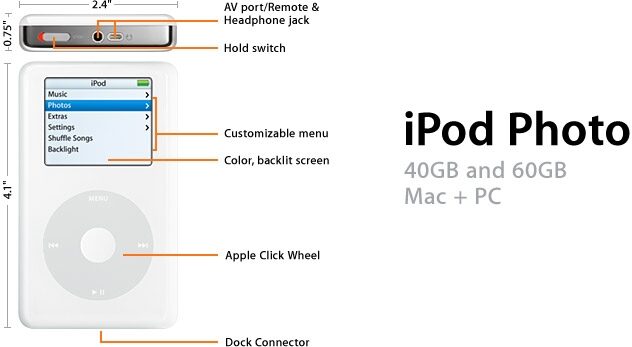
Height: 4.1 inches
Width: 2.4 inches
Depth: 0.75 inches
Weight: 6.4 oz (158 g)
20GB or 40GB hard disk drive (1)
Holds 5,000 or 10,000 songs in 128-Kbps AAC format (2)
Stores data via FireWire or USB 2.0 (3) hard drive
Display
2-inch (diagonal) liquid crystal display with blue-white LED backlight
160 x 128 pixel resolution, 0.24-mm dot pitch
Support for display of multiple languages and characters simultaneously
Audio
Up to 25 minutes of skip protection
Frequency response: 20Hz to 20,000Hz
Audio formats supported: AAC (16 to 320 Kbps), MP3 (32 to 320 Kbps), MP3 VBR, Audible, AIFF, Apple Lossless and WAV
Upgradable firmware enables support for future audio formats
Photo
iPod Photo supports syncing and displaying iPod-viewable photos from the most popular formats:
BMP, GIF, JPEG, PNG, PSD, TIFF, and SGI on a Mac
BMP, GIF, JPEG, PNG, and TIFF for Windows customers
Headphones
Earbud-style headphones with 18-mm drivers using Neodymium transducer magnets
Frequency response: 20Hz to 20,000Hz
Impedance: 32 ohms
Mac System Requirements
Macintosh computer with FireWire port
Mac OS X v10.1.5 or later (Mac OS X 10.3 or later recommended)
USB 2.0 requires Mac OS X v10.3.4
Windows System Requirements
PC with FireWire or USB 2.0 port, or FireWire or USB 2.0 card
Windows 2000 with Service Pack 4 or Windows XP Home or Professional
Customizable Settings
Customize main menu
Create multiple On-the-Go playlists
Adjust audiobook playback speed
Clicker playback through headphones
Rate songs
Shuffle songs or albums
Repeat one or all
Sound Check on or off
20 Equalizer settings
Backlight timer
Display contrast
Alarms on, off or silent
Sleep timer
Date and time
Display time in menu bar
Contacts sort and display by first or last names
Clicker on or off
Album art display large or small
Photo slideshow settings
Music from iPhoto (Mac) or iTunes playlists
Time per slide manual, 2-, 3-, 5-, 10- or 20-seconds
Repeat on or off
Shuffle photos on or off
Transitions on or off
TV out on, off or ask
TV signal PAL or NTSC
Menu Languages: English, French, German, Japanese, Spanish, Italian, Dutch, Danish, Norwegian, Finnish, Swedish, Korean, Simplified Chinese, Traditional Chinese
Display Song, Artist and Album Info in: Bulgarian, Croatian, Czech, Danish, Dutch, English, Finnish, French, German, Greek, Hungarian, Italian, Japanese, Korean, Norwegian, Polish, Portuguese, Romanian, Russian, Serbian, Slovak, Slovenian, Simplified Chinese, Spanish, Swedish, Traditional Chinese, Turkish and Ukrainian
Environmental Requirements
Operating temperature: 32 degrees to 95 degrees F (0 degrees to 35 degrees C)
Non operating temperature: -4 degrees to 113 degrees F (-20 degrees to 45 degrees C)
Relative humidity: 5% to 95% noncondensing
Maximum operating altitude: 10,000 feet (3000 m)
Input and Output
Dock connector
3.5-mm stereo headphone jack
Wired remote connector
Power and Battery (3)
Built-in rechargeable lithium ion battery
Playtime: Up to 12 hours when fully charged
Standby time: 1 month when fully charged
Charging via FireWire to computer system or power adapter
Fast-charge time: about 2 hours (charges up to 80% of battery capacity)
Full-charge time: about 4 hours
Charging via USB 2.0 to computer system or power adapter
Full-charge time: about 4 hours
Power Adapter
6-pin FireWire connector
AC input: 100V to 240V at 0.4 amp maximum
Frequency: 50Hz to 60Hz
DC output: 12V at 1 amp maximum
Size and Weight
Height: 4.1 inches
Width: 2.4 inches
Depth: 0.75 inches
Weight: 6.4 oz (158 g)
Reviews
Reviewers gave this product an overall rating of 5 out of 5 stars.
(17 ratings)
Submitted August 10, 2005 by a customer from aol.com
"A Thoroughly Amazing Experience"
This review has been selected by our experts as particularly helpful.
I am amazingly thrilled with this product -- within an hour after I received it, I had a slide show about my hairless sphynx cats made, with accompanying musical background as well as voice message, which was done with the accessory I purchased along with the iPod Photo
Sound
I use different earphones because the ones provided by Apple don't fit in my ears right -- maybe I'm not made right? In any case, the sound if fabulous, crisp and clear, way better than listening to a CD on my stereo system
Features
I was amazed at the cables to hook up the iPod Photo to a TV for presentations/slide shows, accompanied by a musical background of my choice! What an idea -- now instead of carrying around a laptop for presentations, it can all be stashed on a toy that I can hold in my hand or have in my pocket!
Quality
From the custom box, to the iPod itself and the included accesssories, there is NO ONE who does this better and with more attention to detail
Value
there is NO other toy comparable to this one, and the price reflects the value of ease of use, and plug and play right out of the box
Manufacturer Support
I got the extended warrenty, as I do for most techy gadgets because one never knows what might pop up -- I have other Apple products, and have always found their tech support way superior compared to any other, easy to reach, always… read more polite and extremely helpful with even dumb sounding questions -- glitches solved in a snap!
The Wow Factor
Sexy is in the eye of the beholder -- it's what's inside a person that really matters, not the exterior -- in this case, both the exterior and internal qualities are out of this world, which makes for a really hot / sexy experience -- ahhhhhhhhhhhhh
Musical Background:
just luv music of any kind -- have a massive CD collection
Musical Style:
eclectic, much foreign, Spanish, German, Portuguese read less
Sound
I use different earphones because the ones provided by Apple don't fit in my ears right -- maybe I'm not made right? In any case, the sound if fabulous, crisp and clear, way better than listening to a CD on my stereo system
Features
I was amazed at the cables to hook up the iPod Photo to a TV for presentations/slide shows, accompanied by a musical background of my choice! What an idea -- now instead of carrying around a laptop for presentations, it can all be stashed on a toy that I can hold in my hand or have in my pocket!
Quality
From the custom box, to the iPod itself and the included accesssories, there is NO ONE who does this better and with more attention to detail
Value
there is NO other toy comparable to this one, and the price reflects the value of ease of use, and plug and play right out of the box
Manufacturer Support
I got the extended warrenty, as I do for most techy gadgets because one never knows what might pop up -- I have other Apple products, and have always found their tech support way superior compared to any other, easy to reach, always… read more polite and extremely helpful with even dumb sounding questions -- glitches solved in a snap!
The Wow Factor
Sexy is in the eye of the beholder -- it's what's inside a person that really matters, not the exterior -- in this case, both the exterior and internal qualities are out of this world, which makes for a really hot / sexy experience -- ahhhhhhhhhhhhh
Musical Background:
just luv music of any kind -- have a massive CD collection
Musical Style:
eclectic, much foreign, Spanish, German, Portuguese read less
Did you find this review helpful?
Thanks for your opinion!
No longer available at zZounds
In most cases, a product is unavailable because it has been discontinued by the manufacturer