Steinberg WaveLab Essential Mastering Software (Windows)
No longer available at zZounds
zZounds Gear Experts Say...
192 kHz fidelity. Includes Red Book CD audio and DVD audio tools.
Overview
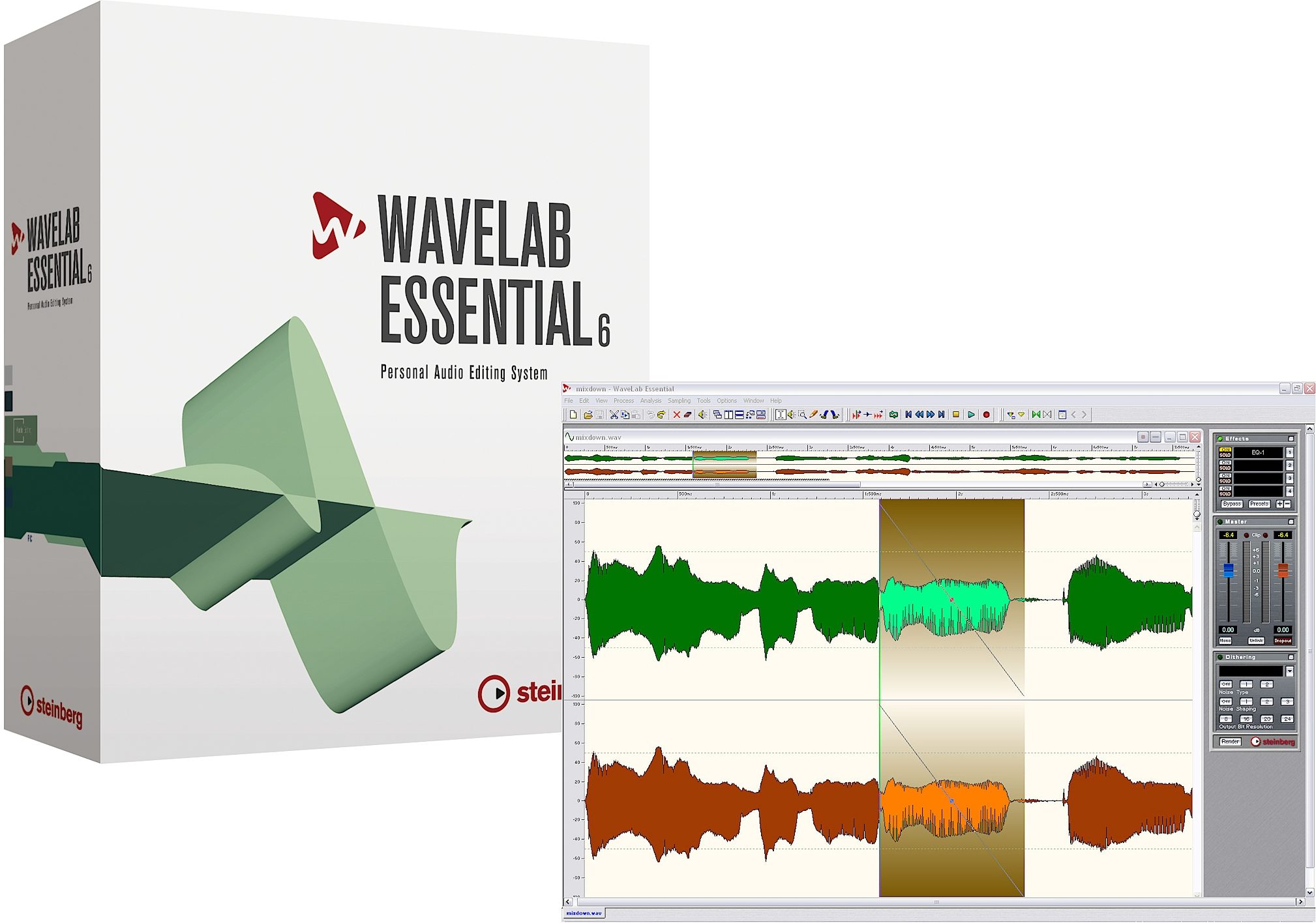
WaveLab Essential 6 offers a high-value suite of audio editing tools tailored to the needs of musicians, smaller recording environments and podcast authors. Introducing a new level of functionality at a very low price point, the completely redesigned WaveLab Essential 6 provides a full complement of streamlined editing and CD/DVD burning capabilities. The integrated podcast tools combine professional editing, restoration and mastering capabilities with full internet audio publishing features, creating a unique one-stop application for recording, editing, CD burning right through to online publication via podcast. WaveLab Essential 6 is also an ideal extension to both Sequel and Cubase.
Features
Podcast creation and publishing
Redbook compatible CD burning with CD-Text
Stereo non-destructive editing with versatile clip grouping over multiple lanes
Powerful real-time engine with integration of clip-based and global effect plug-ins
Superior audio processors
Video track for sample accurate alignment of audio and video
Sample accurate audio editor with crystal clear audio processing at up to 96 kHz and 32 bit floating point resolution
Audio Editing
As part of the WaveLab family, WaveLab Essential 6 is based on award-wining technology from Steinberg's WaveLab editing and mastering application, and combines the features of many other programs into one intuitive and flexible application.
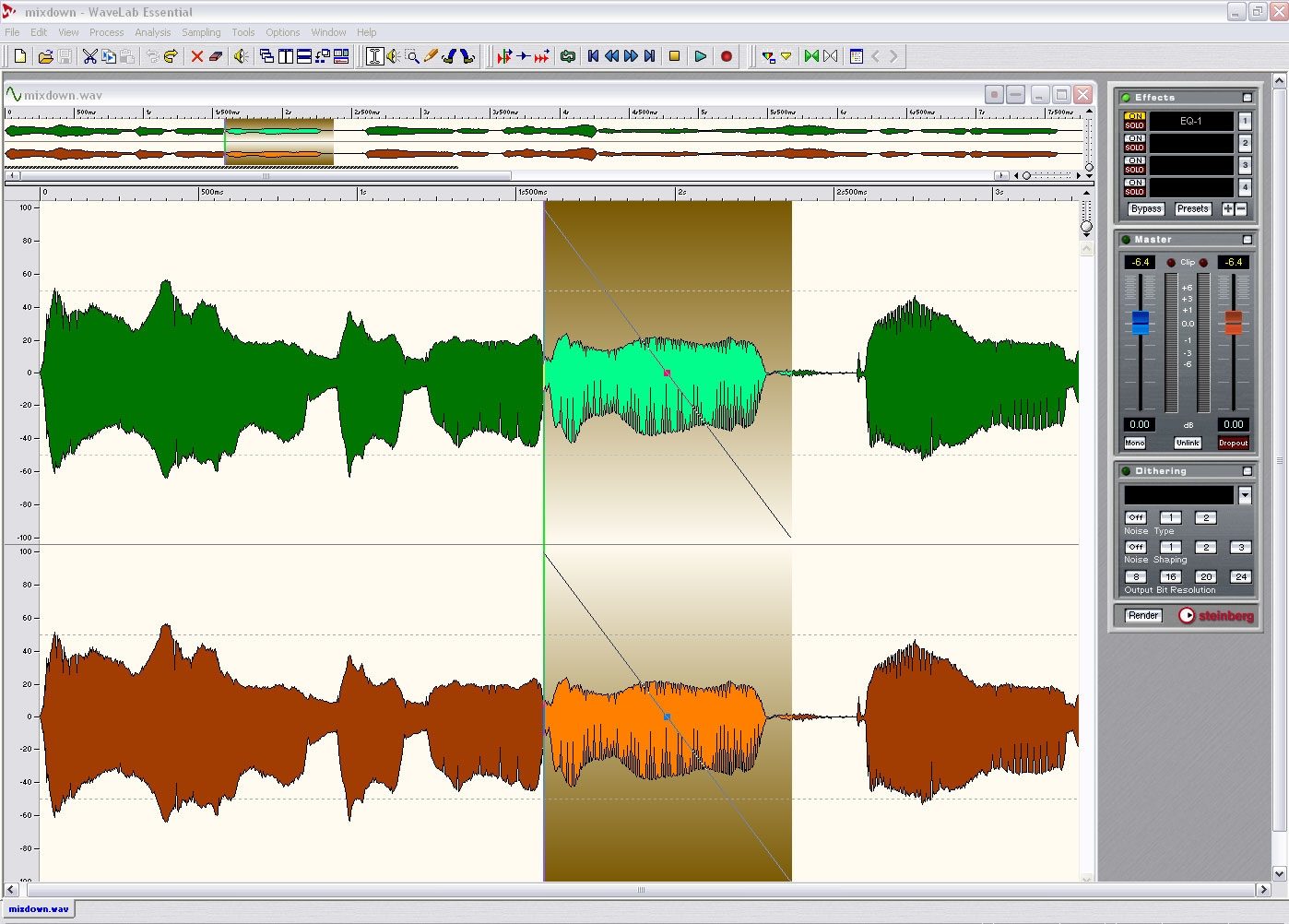
WaveLab Essential 6 features sample-accurate stereo combined with impressive effects for… read more sound design. Depending on the editing task, users may chose between a destructive stereo editor and the powerful non-destructive, clip-based Audio CD Montage.
The Audio CD Montage allows real-time fades and cross fades, clip-based effects and global effects through the Master Section. Every change and edit can be undone with the unlimited undo/redo capability. No other single software tool can match the WaveLab Essential 6 feature set in its price range.
Audio CD Montage
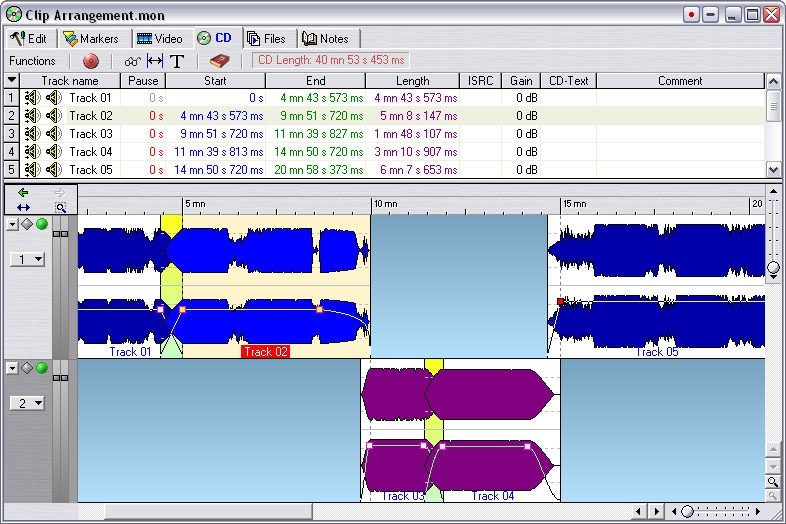
The Audio CD Montage is the heart of the non-destructive, real-time editing processes in WaveLab Essential 6. All editing tasks and actions are either processed in real-time or rendered into the audio material. The powerful Audio CD Montage environment supports not only two audio tracks but also a video track for audio-to-video editing.
Audio files in the Audio CD Montage are shown as so-called clips. Each clip is actually merely a window on either a part or the entire length of an audio file. The selection can be enlarged, reduced or just moved over the audio material (known as sliding). The advanced Crossfade handling in the Audio CD Montage includes freely movable crossfade handles and symmetric resizing to come up with the perfect crossfade. Grouping of clips in a montage provides an easy way to edit fades for multiple clips across tracks. Up to four plug-ins can be used globally on any montage.
CD Mastering
CD Mastering is more than just squeezing maximum loudness out of music tracks and putting these into the right order for creating a CD.
A mastering studio has to match and adjust levels, equalization, spatial integration and many other audio aspects between different audio tracks in order to create a coherent acoustic experience across the entire CD.
WaveLab Essential 6 makes the creation of complex transitions and cross fades between titles very easy. WaveLab Essential 6 provides intuitive track assembly, audio editing, cross fades and effects processing. You can even create full colour CD covers and labels right out of the project. No other audio editing software offers such a complete set of CD mastering features in this price range.
Audio for Video
With its "smart" video thumbnail track, WaveLab Essential 6 is the perfect tool for audio-for-video editing. WaveLab Essential allows for far more accurate and detailed audio editing than the typical video editing software. From trimming and editing audio clips to complex sound design - WaveLab Essential 6 offers the full spectrum of audio editing and processing tools needed to turn a flat-sounding movie soundtrack into a powerful and impressive sonic experience. WaveLab Essential 6 can be used to create sound effects, looped background music beds, impressively clear and "in the face" dialog or even complex multi-track edits using the CD Montage window. Use WaveLab Essential 6 to edit the audio track of a video clip extracted from the video file. Or run WaveLab Essential 6 as the audio editing front-end of your preferred video editor. With XSend and XReceive, WaveLab Essential 6 can be integrated seamlessly into any AV workstation, e.g. Pinnacles Liquid Edition.
Podcasting
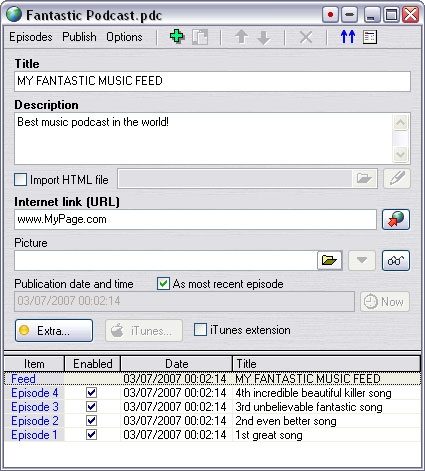
This growing internet standard is now fully supported by WaveLab. Simple and intuitive user interface allows to create basic or complex Podcasts from A to Z, without ever quitting WaveLab. The perfect integration in the WaveLab audio recording and editing environment makes it a unique solution on the market.
WaveLab Essential 6 supports the complete podcast standard RSS 2.0 specification. Not only audio files but also video and PDF files can be integrated. Pictures are automatically scaled to the right size. The integrated FTP client transfers the podcast quickly and efficiently over to the server without stopping work on audio files in WaveLab Essential 6. Podcast descriptions can be imported as an HTML file, locally saved picture files are automatically saved with the audio onto the server when a podcast is published. To help create new episodes of the podcast even faster, WaveLab Essential 6 includes user-definable templates. WaveLab Essential 6 can also create podcasts directly for iTunes.
File formats
WaveLab Essential 6 supports major audio file formats like WAV, AIFF, SD II, AU, MP3, MP2 (M.U.S.I.C.A.M.), OGG, PAF, ALAW, ULAW, VOX, OSQ, WMA etc. In combination with the powerful batch converting function, WaveLab Essential 6 becomes the tool of choice for any file-conversion task.
Master Section
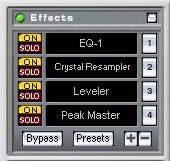
The Master Section offers important monitoring functions like the level meter, global bypass switch, Mono button and Dropout indicator. Four slots for VST and DirectX plug-ins are also available in the Master Section, as are top-grade dithering and noise shaping algorithms. Plug-in presets allow easy recalling of your favourite combinations of plug-ins and settings, while the Render function puts finished master only one click away.
Plug-ins
WaveLab Essential 6 includes a complete suite of sophisticated audio plug-ins such as EQ, Compressor, Dynamics and Reverb. The DeNoiser and DeClicker plug-ins are excellent real-time tools for audio restoration while Crystal Resampler is professional sample rate converter providing exceptional transparency and preservation of the frequency content up to 192 kHz.
Audio Analysis
Detailed information about the audio material and its properties is absolutely essential to almost any audio editing and mastering task. WaveLab Essential 6 offers three analysis tools displaying in crystal clarity important aspects of the audio material: level meter, spectum meter and oscilloscope. These tools help zoom in on glitches and other aberrations, ready to be fixed using the WaveLab Essential 6 editing tools. read less
Features
Podcast creation and publishing
Redbook compatible CD burning with CD-Text
Stereo non-destructive editing with versatile clip grouping over multiple lanes
Powerful real-time engine with integration of clip-based and global effect plug-ins
Superior audio processors
Video track for sample accurate alignment of audio and video
Sample accurate audio editor with crystal clear audio processing at up to 96 kHz and 32 bit floating point resolution
Audio Editing
As part of the WaveLab family, WaveLab Essential 6 is based on award-wining technology from Steinberg's WaveLab editing and mastering application, and combines the features of many other programs into one intuitive and flexible application.
WaveLab Essential 6 features sample-accurate stereo combined with impressive effects for… read more sound design. Depending on the editing task, users may chose between a destructive stereo editor and the powerful non-destructive, clip-based Audio CD Montage.
The Audio CD Montage allows real-time fades and cross fades, clip-based effects and global effects through the Master Section. Every change and edit can be undone with the unlimited undo/redo capability. No other single software tool can match the WaveLab Essential 6 feature set in its price range.
Audio CD Montage
The Audio CD Montage is the heart of the non-destructive, real-time editing processes in WaveLab Essential 6. All editing tasks and actions are either processed in real-time or rendered into the audio material. The powerful Audio CD Montage environment supports not only two audio tracks but also a video track for audio-to-video editing.
Audio files in the Audio CD Montage are shown as so-called clips. Each clip is actually merely a window on either a part or the entire length of an audio file. The selection can be enlarged, reduced or just moved over the audio material (known as sliding). The advanced Crossfade handling in the Audio CD Montage includes freely movable crossfade handles and symmetric resizing to come up with the perfect crossfade. Grouping of clips in a montage provides an easy way to edit fades for multiple clips across tracks. Up to four plug-ins can be used globally on any montage.
CD Mastering
CD Mastering is more than just squeezing maximum loudness out of music tracks and putting these into the right order for creating a CD.
A mastering studio has to match and adjust levels, equalization, spatial integration and many other audio aspects between different audio tracks in order to create a coherent acoustic experience across the entire CD.
WaveLab Essential 6 makes the creation of complex transitions and cross fades between titles very easy. WaveLab Essential 6 provides intuitive track assembly, audio editing, cross fades and effects processing. You can even create full colour CD covers and labels right out of the project. No other audio editing software offers such a complete set of CD mastering features in this price range.
Audio for Video
With its "smart" video thumbnail track, WaveLab Essential 6 is the perfect tool for audio-for-video editing. WaveLab Essential allows for far more accurate and detailed audio editing than the typical video editing software. From trimming and editing audio clips to complex sound design - WaveLab Essential 6 offers the full spectrum of audio editing and processing tools needed to turn a flat-sounding movie soundtrack into a powerful and impressive sonic experience. WaveLab Essential 6 can be used to create sound effects, looped background music beds, impressively clear and "in the face" dialog or even complex multi-track edits using the CD Montage window. Use WaveLab Essential 6 to edit the audio track of a video clip extracted from the video file. Or run WaveLab Essential 6 as the audio editing front-end of your preferred video editor. With XSend and XReceive, WaveLab Essential 6 can be integrated seamlessly into any AV workstation, e.g. Pinnacles Liquid Edition.
Podcasting
This growing internet standard is now fully supported by WaveLab. Simple and intuitive user interface allows to create basic or complex Podcasts from A to Z, without ever quitting WaveLab. The perfect integration in the WaveLab audio recording and editing environment makes it a unique solution on the market.
WaveLab Essential 6 supports the complete podcast standard RSS 2.0 specification. Not only audio files but also video and PDF files can be integrated. Pictures are automatically scaled to the right size. The integrated FTP client transfers the podcast quickly and efficiently over to the server without stopping work on audio files in WaveLab Essential 6. Podcast descriptions can be imported as an HTML file, locally saved picture files are automatically saved with the audio onto the server when a podcast is published. To help create new episodes of the podcast even faster, WaveLab Essential 6 includes user-definable templates. WaveLab Essential 6 can also create podcasts directly for iTunes.
File formats
WaveLab Essential 6 supports major audio file formats like WAV, AIFF, SD II, AU, MP3, MP2 (M.U.S.I.C.A.M.), OGG, PAF, ALAW, ULAW, VOX, OSQ, WMA etc. In combination with the powerful batch converting function, WaveLab Essential 6 becomes the tool of choice for any file-conversion task.
Master Section
The Master Section offers important monitoring functions like the level meter, global bypass switch, Mono button and Dropout indicator. Four slots for VST and DirectX plug-ins are also available in the Master Section, as are top-grade dithering and noise shaping algorithms. Plug-in presets allow easy recalling of your favourite combinations of plug-ins and settings, while the Render function puts finished master only one click away.
Plug-ins
WaveLab Essential 6 includes a complete suite of sophisticated audio plug-ins such as EQ, Compressor, Dynamics and Reverb. The DeNoiser and DeClicker plug-ins are excellent real-time tools for audio restoration while Crystal Resampler is professional sample rate converter providing exceptional transparency and preservation of the frequency content up to 192 kHz.
Audio Analysis
Detailed information about the audio material and its properties is absolutely essential to almost any audio editing and mastering task. WaveLab Essential 6 offers three analysis tools displaying in crystal clarity important aspects of the audio material: level meter, spectum meter and oscilloscope. These tools help zoom in on glitches and other aberrations, ready to be fixed using the WaveLab Essential 6 editing tools. read less
Specs
Intel / AMD Processor 800 MHz minimum
256 MB RAM
80 MB of free disk space
Windows XP or Windows Vista (32-bit only)
Windows MME compatible audio hardware is required (ASIO compatible audio hardware recommended)
Internet connection required for license activation
*NOTE: Windows-only program, will not work with Mac OS or Linux OS systems.
Where is the "protection device"?
After the installation of Sequel, a wizard pops up asking you to download and activate the Sequel license. Now do not get confused, if the wizard wants you to download the license to a copy protection device (also called Steinberg Key or just a "dongle"). You do not have such a thing and you do not need it for Sequel! The license for Sequel is stored in a container file (they call it "soft-eLicenser") on your harddisk. So, just follow the wizard and ignore the word "protection device".
256 MB RAM
80 MB of free disk space
Windows XP or Windows Vista (32-bit only)
Windows MME compatible audio hardware is required (ASIO compatible audio hardware recommended)
Internet connection required for license activation
*NOTE: Windows-only program, will not work with Mac OS or Linux OS systems.
Where is the "protection device"?
After the installation of Sequel, a wizard pops up asking you to download and activate the Sequel license. Now do not get confused, if the wizard wants you to download the license to a copy protection device (also called Steinberg Key or just a "dongle"). You do not have such a thing and you do not need it for Sequel! The license for Sequel is stored in a container file (they call it "soft-eLicenser") on your harddisk. So, just follow the wizard and ignore the word "protection device".
Documents and Manuals
For support or warranty questions, please contact the manufacturer:
Phone: 844-358-4022
Email: steinbergussupport@yamaha.com
Web: https://helpcenter.steinberg.de
Phone: 844-358-4022
Email: steinbergussupport@yamaha.com
Web: https://helpcenter.steinberg.de
Reviews
Reviewers gave this product an overall rating of 0.5 out of 5 stars.
(54 ratings)
Submitted February 15, 2008 by a customer from aol.com
"Read the fine print very carefully"
An internet connection is required for activation. Why would anyone connect their studio system to the internet? I'm certainly not going to risk anything on my studio system to an internet virus. Steinberg needs to think ahead more and provide much better technical support (like being able to contact them), and other product activation options.
Manufacturer Support
There is no support. No technical support phone numbers are available. They don't want to be bothered by you.
Musical Background:
recording artist and recording engineer
Musical Style:
Rock
41 of 66 people (62%) people found this review helpful. Did you?
Thanks for your opinion!
No longer available at zZounds
In most cases, a product is unavailable because it has been discontinued by the manufacturer