Sonic Foundry Sound Forge Studio 6.0
No longer available at zZounds

zZounds Gear Experts Say...
Record audio straight through your computer's soundcard. Edit audio using standard windows commands.
Overview
Sound Forge Studio includes much of the same award-winning technology found in Sound Forge, the professional digital audio editor. This streamlined version makes it easy to record, edit, and process audio using your PC. Record from a CD, microphone, LP, cassette, or musical instrument, and then edit your recording using a wide range of tools and effects. Liven up presentations, recordings, and music using over 30 digital audio effects and processes, including 1001 Sound Effects. Create your own "Best Of" audio CDs using track-at-once CD burning.
Why Sound Forge Studio
Powerful editing tools Ö Edit files in real-time and hear the changes immediately. Sound Forge Studio includes dozens of editing tools including: cut, paste, move, delete, mute, reverse, crossfade, trim, normalize, fade, pan, resample, enhance, insert silence, and more.
Amazing audio effects Ö Sound Forge Studio includes a 10-band EQ, reverb, delay, distortion, mute, reverse, fades, crossfade, pan, volume, normalize, and more.
Multiple file format support Ö Sound Forge Studio supports many popular audio and web formats, including WAV, Windows Media Audio and Video, QuickTime, RealAudio¬, and MP3. It is perfect for creating streaming media for the web.
Free sound effects library Ö Enhance your audio with over 1,000 professional-quality sound clips - from explosions and flying saucers to animals and spooky noises. This royalty-free library is perfect for presentations, PowerPoint¬ productions, and web… read more sites.
Audio Recording and Editing
Record and edit audio using your PC! Record instruments, vocals, CDs, records, cassettes, keyboards, and microphones - just about anything you can plug into your PC.
Perform fast, real-time edits.
Edit audio files in over 10 popular formats, including MP3, WAV, and WMA.
Cross-fade audio tracks, balance sound levels, and perform smooth fade-ins and fade-outs.
Work on one file while another is processing in the background using multitask background rendering.
Synchronize audio and video frame by frame.
Create music loops and samples for use in Sonic Foundry's ACID¬.
Effects Processing
Add effects including reverb, distortion, delay/echo, equalization, and more.
Fix uneven sound levels, trim unwanted sections, and enhance dull recordings.
Energize your presentations with vocal narrations and amazing sound effects.
Time stretch your audio by changing the length of an audio recording without altering its pitch.
CD Ripping and Burning
Rip audio tracks from a CD directly into Sound Forge Studio for immediate editing and mixing.
Create your own audio CDs using track-at-once CD burning. Produce "Best Of" mixes of your favorite songs and record them to CD.
Audio Encoding
Quickly convert audio files into MP3 format for the web, or a portable MP3 player.
Put your audio files on the web. Sound Forge Studio supports over 10 import and 15 export formats, including Windows Media, RealAudio¬, and MP3.
Import QuickTime, WMV, and MPEG-1&2 formats for immediate editing.
Features:
Real-time nondestructive editing
Multitask background rendering
QuickTime, WMV, and MPEG-1&2 import*
Tabbed docking windows
Fully customizable toolbars
Enhanced Preset Manager
Full support for 4 GB and larger files
New video rendering options
User interface enhancements
General Editing Features
Simple editing and navigation
Drag-and-Drop operations
Real-time nondestructive editing
Multitask background rendering
Automatic left and right mono to stereo merge
Fully customizable toolbars
Mix, paste, and crossfade
Overview window
Unlimited Undo/Redo
Over 30 built-in effects & processes
System and user-defined function presets
Enhanced Preset Manager
10-band EQ
Effects previewing
Crash recovery
Time Compression
Mark-in, mark-out, drop markers in real time
Embed URL flips within audio and video stream
Sample rates from 2 kHz to 48 kHz
8-bit, 16-bit file support
Video and AVI file support with frame-accurate editing
Embed summary information in files
Mono and stereo sound files
Real-time play and record meters
Tabbed, docking windows
Save files to popular multimedia and Internet file formats
Full support for 4 GB and larger files
Standard keyboard commands, mouse shortcuts, and toolbars
Compress sound files for 8-bit distribution
Processes
Bit Depth Converter (to 8-bit, 16-bit)
DC Offset
10-band EQ
Fade In/Out
Graphic Fade
Insert Silence
Invert/Flip
Mute
Normalize
Pan
Resample
Reverse
Smooth/Enhance
Swap channels
Time Compress
Volume
Effects
Amplitude Modulation
Chorus
Delay
Distortion
Dynamics
Envelopes
Flange/Wah-Wah
Noise Gate
Pitch Bend/Shift
Reverb
Stutter
Tools
Track at once CD burning
CD Ripping
Statistics Tool
Simple Synthesis
DTMF/MF Synthesis
Tools for ACID¬
Create ACIDized loops
Loop-editing toolbar
Assign root notes, number of beats, and tempo
Regions and Playlists
Name markers, loops, and regions
Sample Editing
Real-time loop tuning window
Sustaining Loop, Release Loop
Recording
Real-time record meters
Remote record function
Timing Basis
Absolute Frames
Measures and Beats
Samples, Time, Seconds
SMPTE Drop/Non-Drop
SMPTE EBU/Film Sync
Time and Frames
Video Support
QuickTime, WMV, and MPEG-1&2 import*
Adjustable video frame rate and frame size
Video frame display above waveform
Edit AVI files with multiple audio streams
Maintain perfect sync while working with full NTSC and PAL video
Audio and video synchronization with sub-frame accuracy
Various video and audio compression options
Video preview window
* MPEG-1&2 support requires the purchase of the MainConcept MPEG plug-in from Sonic Foundry. read less
Why Sound Forge Studio
Powerful editing tools Ö Edit files in real-time and hear the changes immediately. Sound Forge Studio includes dozens of editing tools including: cut, paste, move, delete, mute, reverse, crossfade, trim, normalize, fade, pan, resample, enhance, insert silence, and more.
Amazing audio effects Ö Sound Forge Studio includes a 10-band EQ, reverb, delay, distortion, mute, reverse, fades, crossfade, pan, volume, normalize, and more.
Multiple file format support Ö Sound Forge Studio supports many popular audio and web formats, including WAV, Windows Media Audio and Video, QuickTime, RealAudio¬, and MP3. It is perfect for creating streaming media for the web.
Free sound effects library Ö Enhance your audio with over 1,000 professional-quality sound clips - from explosions and flying saucers to animals and spooky noises. This royalty-free library is perfect for presentations, PowerPoint¬ productions, and web… read more sites.
Audio Recording and Editing
Record and edit audio using your PC! Record instruments, vocals, CDs, records, cassettes, keyboards, and microphones - just about anything you can plug into your PC.
Perform fast, real-time edits.
Edit audio files in over 10 popular formats, including MP3, WAV, and WMA.
Cross-fade audio tracks, balance sound levels, and perform smooth fade-ins and fade-outs.
Work on one file while another is processing in the background using multitask background rendering.
Synchronize audio and video frame by frame.
Create music loops and samples for use in Sonic Foundry's ACID¬.
Effects Processing
Add effects including reverb, distortion, delay/echo, equalization, and more.
Fix uneven sound levels, trim unwanted sections, and enhance dull recordings.
Energize your presentations with vocal narrations and amazing sound effects.
Time stretch your audio by changing the length of an audio recording without altering its pitch.
CD Ripping and Burning
Rip audio tracks from a CD directly into Sound Forge Studio for immediate editing and mixing.
Create your own audio CDs using track-at-once CD burning. Produce "Best Of" mixes of your favorite songs and record them to CD.
Audio Encoding
Quickly convert audio files into MP3 format for the web, or a portable MP3 player.
Put your audio files on the web. Sound Forge Studio supports over 10 import and 15 export formats, including Windows Media, RealAudio¬, and MP3.
Import QuickTime, WMV, and MPEG-1&2 formats for immediate editing.
Features:
Real-time nondestructive editing
Multitask background rendering
QuickTime, WMV, and MPEG-1&2 import*
Tabbed docking windows
Fully customizable toolbars
Enhanced Preset Manager
Full support for 4 GB and larger files
New video rendering options
User interface enhancements
General Editing Features
Simple editing and navigation
Drag-and-Drop operations
Real-time nondestructive editing
Multitask background rendering
Automatic left and right mono to stereo merge
Fully customizable toolbars
Mix, paste, and crossfade
Overview window
Unlimited Undo/Redo
Over 30 built-in effects & processes
System and user-defined function presets
Enhanced Preset Manager
10-band EQ
Effects previewing
Crash recovery
Time Compression
Mark-in, mark-out, drop markers in real time
Embed URL flips within audio and video stream
Sample rates from 2 kHz to 48 kHz
8-bit, 16-bit file support
Video and AVI file support with frame-accurate editing
Embed summary information in files
Mono and stereo sound files
Real-time play and record meters
Tabbed, docking windows
Save files to popular multimedia and Internet file formats
Full support for 4 GB and larger files
Standard keyboard commands, mouse shortcuts, and toolbars
Compress sound files for 8-bit distribution
Processes
Bit Depth Converter (to 8-bit, 16-bit)
DC Offset
10-band EQ
Fade In/Out
Graphic Fade
Insert Silence
Invert/Flip
Mute
Normalize
Pan
Resample
Reverse
Smooth/Enhance
Swap channels
Time Compress
Volume
Effects
Amplitude Modulation
Chorus
Delay
Distortion
Dynamics
Envelopes
Flange/Wah-Wah
Noise Gate
Pitch Bend/Shift
Reverb
Stutter
Tools
Track at once CD burning
CD Ripping
Statistics Tool
Simple Synthesis
DTMF/MF Synthesis
Tools for ACID¬
Create ACIDized loops
Loop-editing toolbar
Assign root notes, number of beats, and tempo
Regions and Playlists
Name markers, loops, and regions
Sample Editing
Real-time loop tuning window
Sustaining Loop, Release Loop
Recording
Real-time record meters
Remote record function
Timing Basis
Absolute Frames
Measures and Beats
Samples, Time, Seconds
SMPTE Drop/Non-Drop
SMPTE EBU/Film Sync
Time and Frames
Video Support
QuickTime, WMV, and MPEG-1&2 import*
Adjustable video frame rate and frame size
Video frame display above waveform
Edit AVI files with multiple audio streams
Maintain perfect sync while working with full NTSC and PAL video
Audio and video synchronization with sub-frame accuracy
Various video and audio compression options
Video preview window
* MPEG-1&2 support requires the purchase of the MainConcept MPEG plug-in from Sonic Foundry. read less
Specs
System Requirements:
200 MHz processor
Windows-compatible sound card
CD-ROM drive (for installation from a CD only)
Supported CD-Recordable drive (for CD burning only)
24-bit color display recommended
32 MB RAM
25 MB hard-disk space for program installation
Microsoft¬ Windows¬ 98SE, Me, 2000, or XP
Microsoft DirectX¬ 8 or later
Internet Explorer 4.0 or later
200 MHz processor
Windows-compatible sound card
CD-ROM drive (for installation from a CD only)
Supported CD-Recordable drive (for CD burning only)
24-bit color display recommended
32 MB RAM
25 MB hard-disk space for program installation
Microsoft¬ Windows¬ 98SE, Me, 2000, or XP
Microsoft DirectX¬ 8 or later
Internet Explorer 4.0 or later
Documents and Manuals
For support or warranty questions, please contact the manufacturer:
No longer available at zZounds
In most cases, a product is unavailable because it has been discontinued by the manufacturer
This is a carousel with product cards. Use the previous and next buttons to navigate.
People who bought this item also bought


Universal Audio Apollo Twin X Duo Gen 2 Thunderbolt Audio Interface, Essentials+ Edition
$999.00
- 12 payments of$83.25/mo
- No Credit Check6 payments of$166.50/mo
-

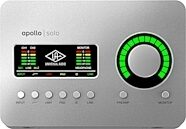
Universal Audio Apollo Solo Thunderbolt 3 Audio Interface
$699.00
- 12 payments of$58.25/mo
- No Credit Check6 payments of$116.50/mo
-